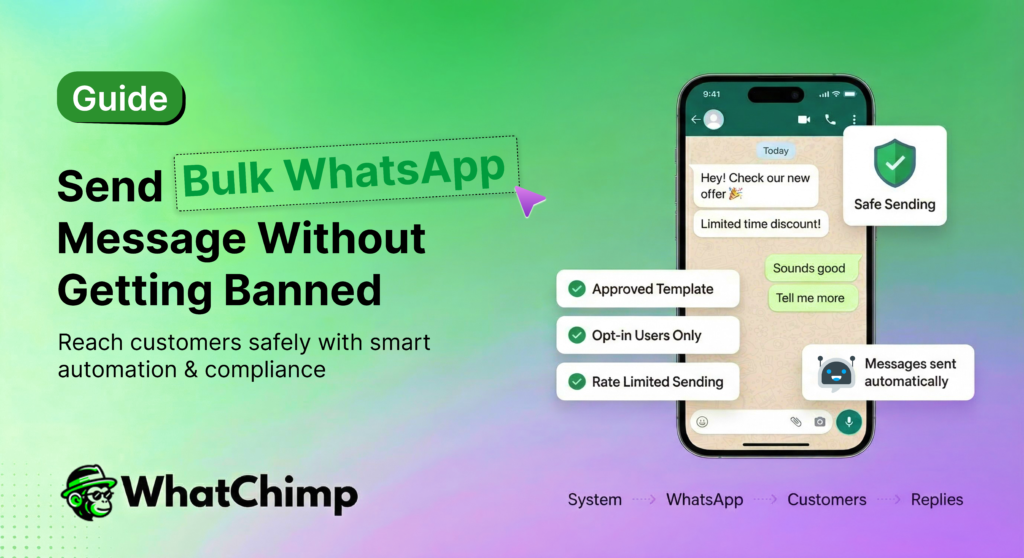
WhatsApp isn’t just another messaging app anymore.
It’s where your customers actually are. With over 2.7 billion active users and a staggering 98% open rate (compared to email’s measly 20%),
WhatsApp has become the most powerful direct communication channel for businesses in 2026.
But one wrong move, and your account gets permanently banned, taking your entire customer base with it.
The difference between businesses crushing it with WhatsApp marketing and those getting shut down? They understand the rules of the game.
Whether you’re a solopreneur looking to reach your first 100 customers or a marketing team managing campaigns for thousands, this guide will show you exactly how to send mass WhatsApp messages the right way, legally, effectively, and without risking your account.
Let’s turn WhatsApp into your highest-converting marketing channel.
Understanding WhatsApp’s Policies and Restrictions
Before you send your first bulk message, you need to understand one critical truth: WhatsApp wasn’t built for mass marketing; it was built for personal conversations.
WhatsApp fiercely protects its platform from spam to maintain user trust.
That’s why the rules for bulk messaging are strict, non-negotiable, and enforced with zero tolerance.
Is It Legal to Send Bulk WhatsApp Messages?
Yes, but only under specific conditions. Sending bulk WhatsApp messages is completely legal when done through the official WhatsApp Business API with proper user consent. What’s illegal and will get you banned is:
- Sending unsolicited messages to people who haven’t opted in
- Using unofficial third-party tools that violate WhatsApp’s Terms of Service
- Scraping phone numbers from online sources
- Purchasing contact lists and messaging them without permission
As one industry expert puts it:
WhatsApp’s strict enforcement isn’t just about platform rules; it’s backed by international data protection laws. The platform’s €225 million GDPR fine in relation to transparency violations remains one of the largest privacy enforcement actions, setting compliance standards that every business must follow when using WhatsApp for marketing.
WhatsApp’s Core Policy: Opt-In is Mandatory
The foundation of WhatsApp’s bulk messaging policy is simple: explicit user consent.
Meta’s November 2024 WhatsApp Business Messaging Policy update reinforced that businesses must obtain explicit user opt-in before sending marketing messages. This isn’t a suggestion – it’s a requirement.
Globally, WhatsApp’s opt-in rate for business promotional messages stands at 60%, which shows that when you ask permission properly, people are willing to engage.
The key is making your opt-in process:
- Clear: Users must understand they’re signing up for WhatsApp messages
- Voluntary: No pre-checked boxes or deceptive practices
- Specific: Explain what type of messages they’ll receive and how often
- Easy to revoke: Provide a simple way to opt out at any time
Is WhatsApp Bulk Messaging Spam?
Not if you do it right. The key differentiator is consent and value.
54% of consumers prefer receiving marketing communications and order updates via WhatsApp compared to other channels. WhatsApp campaigns achieve up to 40% conversion rates for time-sensitive offers, and 45% of WhatsApp users engage with business broadcasts at least once a week.
These numbers prove that bulk WhatsApp messaging isn’t spam when it’s:
- Permission-based (proper opt-ins)
- Personalized and segmented
- Valuable and relevant to the recipient
- Sent at appropriate frequencies
- Easy to unsubscribe from
The businesses winning on WhatsApp aren’t the ones trying to game the system. They’re the ones who respect the rules, prioritize user consent, and focus on delivering genuine value in every message.
WhatsApp Business App vs. WhatsApp Business API: Choosing the Right Path
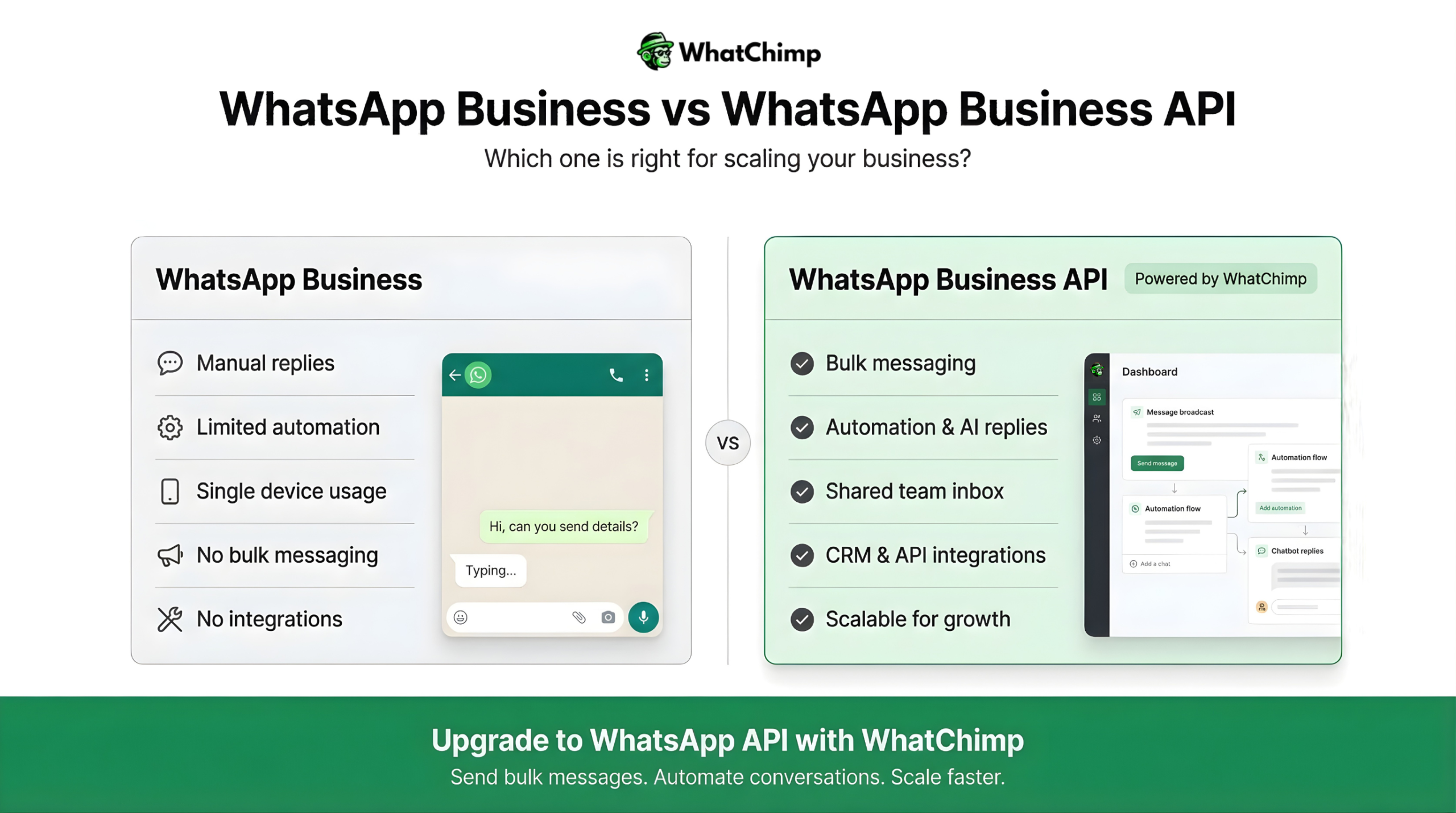
Not all WhatsApp business solutions are created equal.
The confusion starts here: WhatsApp offers two distinct business solutions, and choosing the wrong one can either limit your growth or get you banned. Let’s break down exactly which path is right for you.
WhatsApp Business App: Features, Limitations, and When to Use It
The WhatsApp Business app is the free, standalone application that small businesses can download directly from app stores.
With a 4.5+ average star rating on Google Play as of 2024 and 764 million monthly active users worldwide by the end of 2024, it’s the go-to choice for solopreneurs and small teams just getting started with business messaging.
Key Features:
✅ Business Profile: Display your business name, description, address, hours, and website
✅ Quick Replies: Save and reuse frequent messages
✅ Labels: Organize contacts and chats with color-coded tags
✅ Away Messages: Automatic replies when you’re offline
✅ Greeting Messages: Automated welcome messages for new contacts
✅ Broadcast Lists: Send messages to up to 256 contacts at once
✅ Catalog: Showcase your products or services directly in the app
✅ WhatsApp Web Integration: Access from desktop
Critical Limitations:
❌ Broadcast cap of 256 contacts — You can’t scale beyond this
❌ Saved contact requirement — Recipients only receive broadcast messages if they’ve saved your number
❌ Single device/user access — Only one person can use the account at a time (though multi-device support has improved)
❌ No automation or integration — Can’t connect to CRMs, marketing platforms, or custom systems
❌ Manual sending only — No scheduling, no bulk imports from Excel
❌ Limited analytics — Basic read receipts, but no campaign metrics
❌ Not designed for bulk messaging — Excessive use can trigger bans
When to Use WhatsApp Business App:
The free WhatsApp Business app works perfectly if you:
- Have fewer than 250 active customers you communicate with regularly
- Run a local business with personal customer relationships (salons, restaurants, consultants)
- Need basic business messaging features without automation
- Want to test WhatsApp marketing before investing in API access
- Primarily respond to customer inquiries rather than send proactive campaigns
80% of small businesses in India and Brazil have reported WhatsApp as critical for customer communication, and most of them start with the free Business app. It’s an excellent entry point but it’s not a bulk messaging solution.
WhatsApp Business API: Benefits for Scaling Bulk Messaging
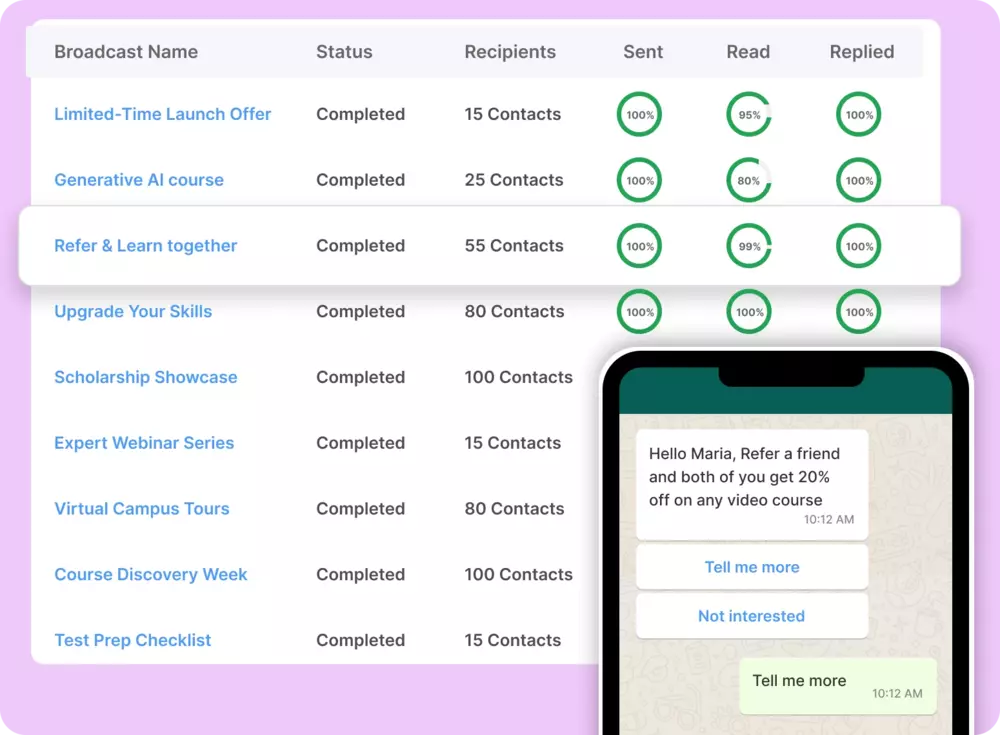
When businesses outgrow the 256-contact limit or need to send thousands of messages daily, they graduate to the WhatsApp Business API (also called WhatsApp Business Platform or WhatsApp Cloud API). This is the enterprise-grade solution designed specifically for medium to large businesses doing bulk messaging at scale.
How Do Businesses Send Bulk WhatsApp Messages?
The answer is simple: through the official WhatsApp Business API.
This is a programmable interface that connects your business systems directly to WhatsApp’s infrastructure.
Key Benefits:
1. Unlimited Messaging Capacity
No 256-contact limit. Send messages to thousands, hundreds of thousands, or millions of opt-in subscribers. The platform is built to handle enterprise-scale messaging without restrictions.
2. No Saved Contact Requirement
Recipients don’t need to save your number to receive messages. Your business can message any customer who has opted in, making it perfect for e-commerce, newsletters, and promotional campaigns.
3. Advanced Automation & Integration
- Connect to CRMs (Salesforce, HubSpot, Zoho)
- Integrate with e-commerce platforms (Shopify, WooCommerce, Magento)
- Automate workflows based on customer behavior
- Schedule campaigns in advance
- Set up chatbots and AI-powered responses
4. Pre-Approved Message Templates
Create reusable message templates for marketing, transactional updates, and customer service. Once approved by WhatsApp, you can send these at scale while staying compliant.
5. Multi-User/Team Access
Multiple team members can access the same WhatsApp Business number simultaneously using a shared inbox through API integrations, perfect for customer support teams and sales departments.
6. Comprehensive Analytics
Track delivery rates, read rates, response rates, conversion metrics, and campaign ROI with detailed reporting that the regular Business app can’t provide.
7. Media & Rich Messaging
Send images, videos, PDFs, location pins, and interactive buttons; all at scale through automated campaigns.
8. Official Verification
Get the green verified checkmark next to your business name, building instant trust with customers. Verified accounts see significantly higher engagement rates.
9. Two-Way Conversations
Unlike broadcast-only tools, the API supports full conversational messaging. Customers can reply, ask questions, and engage naturally while you maintain organized, scalable communication.
WhatsApp Business API vs. Bulk Sender Tools: Which Should You Use?
This isn’t even a fair comparison. Let’s make it crystal clear:
| Factor | Official WhatsApp Business API | Unofficial Bulk Sender Tools |
| Compliance | ✅ Fully compliant, approved by WhatsApp | ❌ Violates Terms of Service |
| Ban Risk | ✅ Minimal (if you follow rules) | ❌ High to guaranteed |
| Scale | ✅ Unlimited capacity | ⚠️ Limited before detection |
| Features | ✅ Full automation, integrations, analytics | ⚠️ Basic sending only |
| Support | ✅ Official Meta support + BSP support | ❌ No official support |
| Verification | ✅ Green checkmark available | ❌ Not possible |
| Legal Protection | ✅ GDPR compliant, proper contracts | ❌ Legal liability risk |
| Cost | 💰 Pay per conversation (transparent pricing) | 💰 Cheaper upfront, but… |
| Long-term Viability | ✅ Stable, maintained, future-proof | ❌ Can break anytime |
The Bottom Line:
If you’re serious about bulk WhatsApp messaging for your business, there’s only one legitimate path: the official WhatsApp Business API through an authorized Business Solution Provider.
Yes, it costs money. Yes, there’s a setup process. But businesses using the compliant API achieve 98% open rates, 35% click-through rates, and drive 89% higher purchases per user compared to other marketing platforms.
Those results don’t come from sketchy workarounds, they come from respecting the platform, following the rules, and providing value to opted-in customers.
Comparison Table: WhatsApp Business App vs. WhatsApp Business API
| Feature | WhatsApp Business App | WhatsApp Business API |
| Best For | Small businesses, solopreneurs, local shops | Medium to large businesses, enterprises, high-volume senders |
| Cost | ✅ Completely free | 💰 Pay per conversation (pricing varies by country, starts ~$0.005-0.10 per conversation) |
| Setup Complexity | ✅ Download app and register (5 minutes) | ⚠️ Requires BSP approval, verification process (1-7 days) |
| Contact Limit | ❌ 256 contacts per broadcast list | ✅ Unlimited |
| Saved Contact Requirement | ❌ Yes—recipients must save your number to receive broadcasts | ✅ No—can message any opted-in user |
| Number of Users | ❌ 1 primary device + up to 4 linked devices | ✅ Unlimited team members via API integration |
| Bulk Messaging Capability | ❌ Manual broadcasts only, not designed for bulk | ✅ Designed for automated bulk messaging at scale |
| Message Templates | ⚠️ Quick replies only (not pre-approved) | ✅ Pre-approved templates required for outbound marketing |
| Automation | ❌ Basic auto-replies only (greeting, away messages) | ✅ Full automation: chatbots, workflows, triggers, AI integration |
| CRM Integration | ❌ None | ✅ Integrates with Salesforce, HubSpot, Zoho, custom systems |
| E-commerce Integration | ❌ None (catalog feature only) | ✅ Shopify, WooCommerce, Magento, custom APIs |
| Analytics & Reporting | ❌ Basic read receipts only | ✅ Comprehensive: delivery rates, engagement metrics, conversion tracking, ROI analysis |
| Scheduling | ❌ Not available | ✅ Schedule messages and campaigns in advance |
| Personalization | ⚠️ Manual only | ✅ Dynamic variables, merge fields, AI-powered personalization |
| Media Support | ✅ Images, videos, documents, voice notes | ✅ Images, videos, PDFs, location pins, interactive buttons, carousels |
| Import Contacts | ⚠️ Manual or from phone contacts | ✅ CSV/Excel import, API sync from databases |
| Segmentation | ❌ Label-based only (manual) | ✅ Advanced: behavior-based, demographic, custom attributes |
| Green Verified Badge | ❌ Not available | ✅ Available after verification process |
| Official Meta Support | ⚠️ Limited (community forums) | ✅ Enterprise support via Meta and BSP |
| Compliance Tools | ❌ Manual opt-in management | ✅ Built-in: opt-in tracking, opt-out automation, compliance reporting |
| 24-Hour Window | ✅ Free-form messaging within 24 hours | ✅ Free-form within 24 hours, templates required after |
| Two-Way Conversations | ✅ Yes | ✅ Yes, with better management tools |
| API Access | ❌ None | ✅ Full REST API for custom integrations |
| Webhooks | ❌ Not supported | ✅ Real-time event notifications |
| Multi-Language Support | ✅ Device language | ✅ Programmatic multi-language template management |
| Message Volume Capacity | ❌ Low (risk of ban if overused) | ✅ High (1,000 to 100,000+ per day based on quality rating) |
| Quality Rating System | ⚠️ Yes, but no visibility | ✅ Visible quality rating with actionable insights |
| Account Suspension Risk | ⚠️ High if used for bulk messaging | ✅ Low when following API guidelines |
| Customer Database | ❌ Limited to phone contacts and labels | ✅ Unlimited, integrated with external databases |
| Payment Integration | ❌ Not available (varies by region) | ✅ WhatsApp Pay integration in supported countries |
| Click-to-WhatsApp Ads | ⚠️ Limited | ✅ Full integration with Facebook/Instagram ads |
| Chatbot Capabilities | ❌ None | ✅ Advanced AI chatbots, NLP, sentiment analysis |
| A/B Testing | ❌ Not possible | ✅ Test templates, timing, segmentation |
| Ideal Monthly Volume | 📊 Up to ~1,000 messages | 📊 10,000 to 1,000,000+ messages |
| Typical Users | Freelancers, consultants, local retailers, service providers | E-commerce, SaaS, banks, healthcare, education, large retailers |
| Use Cases | Customer inquiries, appointment confirmations, order updates for small shops | Marketing campaigns, transactional notifications, customer support at scale, lead generation |
Quick Decision Guide
Choose WhatsApp Business App if:
- You have fewer than 250 regular customers
- Budget is tight and you need a free solution
- Your messaging needs are primarily reactive (customers reach out to you)
- You’re testing WhatsApp for business before scaling
- You run a local/small business with personal customer relationships
Choose WhatsApp Business API if:
- You need to message 500+ customers regularly
- You want to run marketing campaigns and promotions
- You need automation, scheduling, and CRM integration
- You’re an e-commerce business with high order volumes
- You want detailed analytics and ROI tracking
- You need multiple team members handling conversations
- You’re serious about scaling your WhatsApp marketing
- Compliance and account safety are priorities
Using WhatChimp for Compliant Bulk WhatsApp Messaging
Now that you understand why the official WhatsApp Business API is the only safe path for bulk messaging, the next question becomes: Which Business Solution Provider (BSP) should you choose?
With over 200 million businesses using WhatsApp and the API adoption increasing by 3x between 2022 and 2024, countless platforms claim to offer WhatsApp Business API access. But not all BSPs are created equal.
WhatChimp—a Meta-verified Business Solution Provider that’s built specifically for businesses serious about compliant, scalable bulk WhatsApp messaging.
What Is WhatChimp?
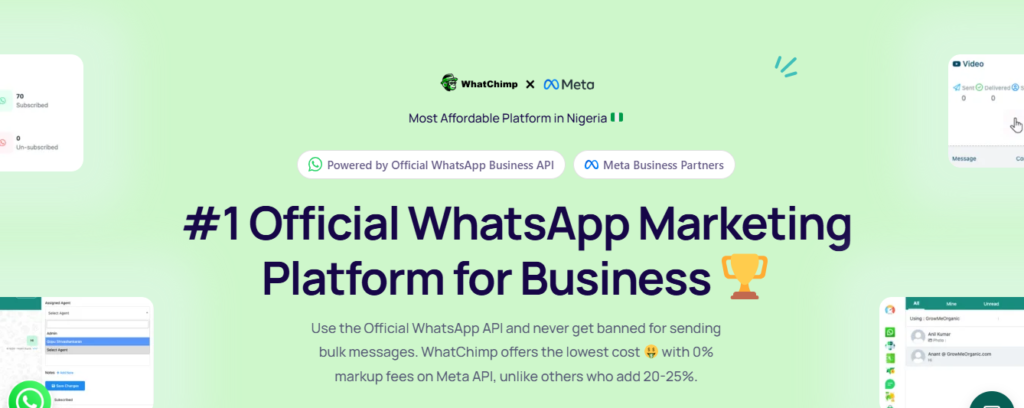
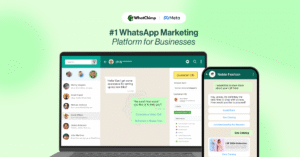
WhatChimp is the #1 Official WhatsApp Marketing Platform powered by the Official WhatsApp Business API. As a verified Meta Business Partner (ID: 9414567625222420), WhatChimp provides direct access to Meta’s infrastructure, priority support, and most importantly with a guarantee that your bulk messaging operations stay fully compliant with WhatsApp’s evolving policies.
Here’s what sets WhatChimp apart:
🏆 Official Meta Business Partner Status
Unlike grey-market tools or unofficial bulk senders, WhatChimp has formal partnership status with Meta. This means direct priority access to Meta’s support team for immediate resolution of account blocks or technical issues in a lifeline when your business depends on WhatsApp messaging.
💰 0% Markup Fees on Meta API
This is huge. While most BSPs add 20-25% markup on top of Meta’s conversation pricing, WhatChimp charges 0% markup. You pay Meta directly, allowing businesses to save up to 35% per conversation compared to competitors. With WhatsApp transitioning to per-template message pricing as of July 1, 2025, this cost savings becomes even more significant at scale.
✅ Built for Compliance
Using the official WhatsApp Business API, WhatChimp eliminates the risk of getting banned for sending bulk messages. The platform has built-in safeguards that align with Meta’s November 2024 policy updates requiring explicit opt-in, and it supports the March 2025 stricter character and emoji limits for templates.
⚡ Lightning-Fast Setup
Most businesses are up and running in under 15 minutes with no technical knowledge required. Template approvals happen in just 10 seconds (compared to hours or days with some providers), and you get a 7-day free trial without requiring a credit card.
📊 99% Message Delivery Rate
With WhatsApp’s 98% open rate and 90% read rate, the last thing you want is delivery failures. WhatChimp’s infrastructure ensures 99% delivery, so your campaigns actually reach your opted-in audience.
Key Compliance Features
When it comes to bulk WhatsApp messaging, compliance is the foundation. WhatChimp provides the tools and infrastructure to keep your business on the right side of WhatsApp’s policies.
1. Official WhatsApp Business API Integration
WhatChimp is built exclusively on Meta’s official API, meaning every message you send goes through approved, monitored channels. There are no modified apps, no workarounds, no grey areas, just legitimate, policy-compliant messaging.
2. Pre-Approved Template System
All outbound marketing messages require WhatsApp-approved templates as per Meta’s Business Messaging Policy (updated November 2024). WhatChimp’s template approval process is incredibly fast – 10 seconds on average – while ensuring your templates meet WhatsApp’s guidelines for:
- Proper categorization (Marketing, Utility, Authentication)
- Character and emoji limits (enforced March 27, 2025)
- Honest, non-misleading messaging
- Correct use of variables and personalization
This prevents you from accidentally sending policy-violating messages that could tank your quality rating.
3. Opt-In Management & Subscriber Database
WhatChimp helps you build and manage compliant opt-in databases with:
- Custom fields to store subscriber information and consent records
- Automated opt-out management via keywords or buttons
- Segmentation capabilities to ensure relevant messaging
- Data collection forms that gather opt-ins directly within WhatsApp
- Webhook integration to sync consent data with your CRM
With 60% global opt-in rates for business promotional messages on WhatsApp, proper consent management isn’t just about compliance – it’s about building trust.
4. Quality Rating Monitoring
Your WhatsApp quality rating (High, Medium, Low) determines your sending limits and account health. WhatChimp provides visibility into your quality metrics and sending capacity, helping you:
- Monitor delivery and engagement rates in real-time
- Identify campaigns causing opt-outs or blocks
- Adjust strategy before your rating drops
- Maintain high sender reputation
5. 24-Hour Window Management
The WhatsApp Business Platform allows free-form messaging within 24 hours of a customer-initiated conversation, after which you must use approved templates. WhatChimp’s Smart Campaign Manager handles this automatically, ensuring you’re always using the right message type at the right time.
6. GDPR & Data Protection Compliance
With the €225 million WhatsApp GDPR fine as a reminder, data protection is critical. WhatChimp provides:
- End-to-end encrypted messaging infrastructure
- Proper data processing agreements
- Audit trails for compliance reporting
- Secure storage of customer information
- Privacy-compliant webhook integrations
How to Get Started with WhatChimp
How Can I Send Bulk WhatsApp Messages? Through WhatChimp’s official API platform, it’s surprisingly simple. Here’s the step-by-step process:
Step 1: Start Your Free 7-Day Trial
Visit whatchimp.com and sign up for the free trial. No credit card required, just your business information and contact details.
Time required: 2 minutes
Step 2: Complete WhatsApp Business Account Setup
WhatChimp guides you through the WhatsApp Business API verification process:
- Provide business information: Legal business name, website, business type
- Choose your display name: This appears to customers when you message them
- Verify your phone number: The number you’ll use for WhatsApp Business API
- Submit business verification documents: Business registration, tax ID, or similar (required by Meta)
Time required: 5-10 minutes (verification can take 1-24 hours depending on Meta’s review)
Pro tip: WhatChimp provides step-by-step video tutorials and comprehensive documentation with screenshots, making it straightforward enough for anyone – including interns or VAs – to set up without technical knowledge.
Step 3: Get Your Account Approved
Meta reviews your business information to ensure legitimacy. As a Meta Business Partner, WhatChimp has priority channels that often expedite this process. Most businesses receive approval within hours, though it can take up to 24 hours in some cases.
Time required: Typically a few hours (waiting for Meta approval)
Step 4: Create Your First Message Template
While waiting for account approval, create your first WhatsApp message template:
- Choose template category: Marketing, Utility, or Authentication
- Write your message: Include personalization variables like {{1}} for name, {{2}} for custom data
- Add media (optional): Header image, video, or document
- Include call-to-action buttons (optional): Quick reply buttons, URL buttons, or phone call buttons
- Submit for approval
Template approval time: 10 seconds with WhatChimp (seriously – it’s that fast)
Example Marketing Template:
Hi {{1}}! 🎉
We’re offering an exclusive 25% discount on all products this weekend.
Your personalized code: {{2}}
Valid until: {{3}}
Shop now and save big!
Step 5: Upload Your Contact List
How to Send Bulk WhatsApp Messages from Excel?
WhatChimp makes this incredibly easy:
- Prepare your Excel/CSV file with columns for:
- Phone number (with country code)
- Name
- Any custom variables you’re using in templates
- Upload to WhatChimp’s Smart Campaign Manager
- Map your columns to match template variables
- Select segments if you want to target specific groups
Remember: These must be contacts who have opted in to receive WhatsApp messages from you. WhatChimp helps you track opt-in status, but you’re responsible for only messaging consented contacts.
Step 6: Create Your First Bulk Campaign
- Select your approved template
- Choose your target audience (uploaded contacts or segments)
- Personalize with dynamic variables (automatically pulls from your contact data)
- Preview messages to ensure personalization works correctly
- Schedule or send immediately
How to Send Personalized Bulk WhatsApp Messages?
WhatChimp automatically merges your contact data with template variables, so “Hi {{1}}” becomes “Hi Sarah” for each recipient. This personalization is crucial as generic mass blasts get ignored, while personalized messages achieve those impressive open rates.
Step 7: Monitor Campaign Performance
Once your campaign launches, WhatChimp’s analytics dashboard shows real-time metrics:
- Messages sent vs. delivered
- Read rates and response rates
- Click-through rates on buttons/links
- Opt-out requests
- Revenue attribution (if integrated with e-commerce)
Use these insights to optimize future campaigns.
Total time to first campaign: Under 15 minutes after account approval
Additional Features: Beyond Bulk Messaging
WhatChimp is a complete WhatsApp marketing and customer engagement platform. Here are the advanced features that maximize your WhatsApp investment:
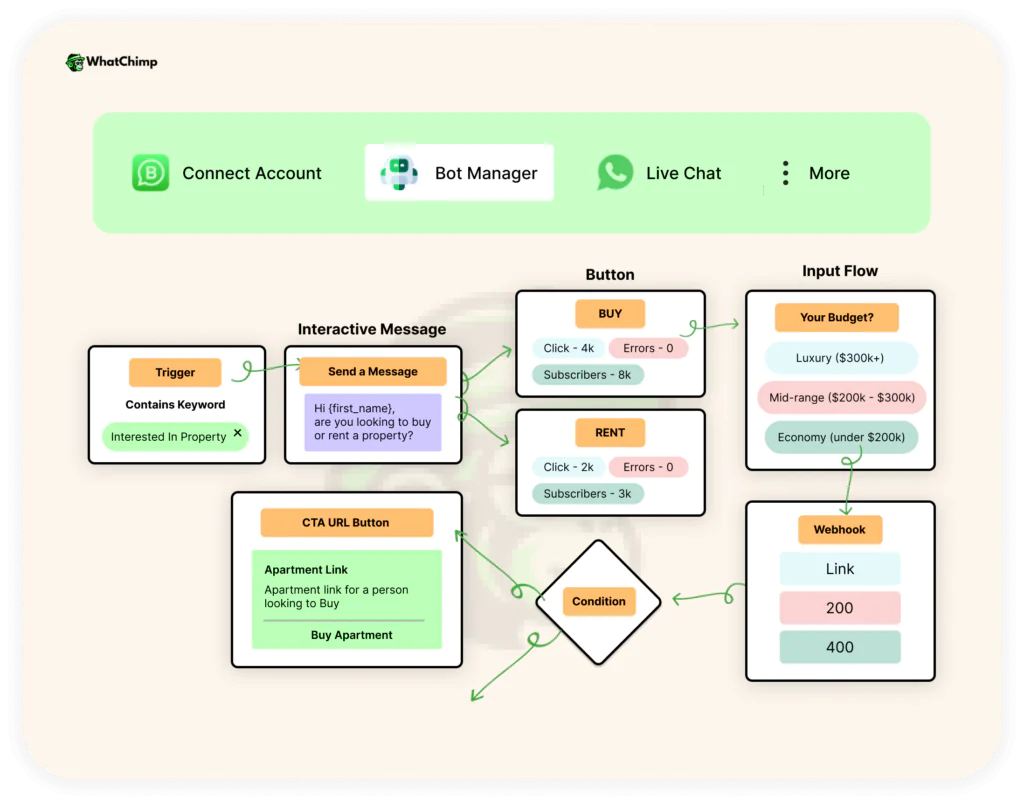
1. AI Chatbot for 24/7 Automation
Can I Automate Bulk WhatsApp Messages? Absolutely, and WhatChimp’s AI Agent takes it further.
Key capabilities:
- Train on your content: Upload your website, PDFs, FAQs, and product information to create a custom-trained AI chatbot
- Human-like conversations: Powered by OpenAI integration for natural, contextual responses
- No-code bot builder: Create complex conversation flows without programming skills
- Lead qualification: AI asks qualifying questions and routes high-value leads to human agents
- Sales automation: Handles product inquiries, provides recommendations, and processes orders
With 70% of WhatsApp users checking the app daily and messages opened within 5 minutes on average, having an AI chatbot ensures you capture opportunities instantly – even when your team is offline.
The chatbot handles routine inquiries while your team focuses on high-value conversations, directly supporting the 89% higher purchase rate that WhatsApp drives compared to other platforms.
2. Multi-Human Live Chat Support
When conversations need a human touch, WhatChimp’s shared team inbox ensures professional, organized support:
Features:
- Unlimited team members: Add your entire sales and support staff
- Smart agent routing: Automatically assigns incoming chats based on availability, expertise, or round-robin
- Phone number masking: Hide customer WhatsApp numbers from agents to protect privacy
- Internal notes: Team members can leave context without customers seeing it
- Conversation history: Full context of past interactions for personalized service
- Number coexistence: Use the same WhatsApp number on your phone AND WhatChimp simultaneously
This is critical because WhatsApp’s 60% average response rate for bulk messaging means thousands of replies when you run campaigns. Proper team management prevents overwhelm and maintains the high engagement that protects your quality rating.
3. Advanced Analytics & Reporting
Is WhatsApp Bulk Messaging Effective for Marketing?
The data says yes but only if you’re tracking the right metrics. WhatChimp’s analytics provide:
Campaign-level metrics:
- Delivery rates by segment
- Open/read rates over time
- Click-through rates on CTAs
- Conversion rates (when integrated with sales data)
- Revenue per message sent
Account health metrics:
- Quality rating status
- Sending limit capacity
- Opt-out rate trends
- Response time averages
Comparative analysis:
- Campaign A/B testing results
- Channel comparison (WhatsApp vs. email vs. SMS)
- ROI calculations
With WhatsApp campaigns achieving up to 40% conversion rates for time-sensitive offers and 35% average click-through rates, having granular analytics ensures you can replicate what works and eliminate what doesn’t.
4. E-commerce Integrations
For online retailers, WhatChimp transforms WhatsApp into a complete sales channel with shopify and woocommerce integrations:
Shopify & WooCommerce Integration:
- Automated abandoned cart recovery messages
- Order confirmation notifications
- Shipping updates with tracking links
- Delivery confirmations
- Review request sequences
- Showcase products with images, descriptions, and prices
- Shareable catalog links
- Browse and shop entirely within WhatsApp
- Inquiry-to-purchase flows
Payment Integration:
- Support for WhatsApp Pay in eligible countries
- Payment links in messages
- Invoice delivery and reminders
Given that WhatsApp messages drive 89% higher purchases per user compared to other marketing platforms, e-commerce integration directly impacts your bottom line.
5. Data Collection & Form Builder
WhatChimp’s data collection features make opt-in management seamless:
Native WhatsApp Forms:
- Collect information directly within WhatsApp
- No external website redirects
- Ask one question at a time (conversational UX)
- Store responses in custom fields
Automated Data Sync:
- Export to Google Sheets automatically
- Send to CRM via webhook
- Trigger Zapier workflows (connect with 3000+ apps)
- Custom API integrations
Use cases:
- Event registration with opt-in confirmation
- Lead capture with consent checkbox
- Survey and feedback collection
- Quiz funnels that segment subscribers
This infrastructure ensures you’re building compliant, high-quality subscriber lists rather than buying risky contact databases.
6. Smart Automation & Drip Campaigns
WhatChimp’s automation features let you set up sophisticated campaigns once, then let them run:
Drip sequences:
- Welcome series for new subscribers
- Educational content over days/weeks
- Re-engagement campaigns for inactive subscribers
- Post-purchase follow-up sequences
Trigger-based automation:
- Send message when someone submits a form
- Trigger campaign when Google Sheets updates
- Webhook-triggered messages from external systems
- Behavior-based messaging (e.g., when someone clicks a link)
Scheduled campaigns:
- Plan promotional campaigns in advance
- Launch at optimal send times for your audience
- Coordinate with other marketing channels
Segmentation automation:
- Automatically tag subscribers based on responses
- Move contacts between segments based on behavior
- Create dynamic lists that update in real-time
These automation capabilities ensure you’re maximizing the 98% open rate and 60% response rate that WhatsApp offers, without overwhelming your team with manual work.
7. CRM & Integration Ecosystem
How Do Companies Send Thousands of WhatsApp Messages at Once?
Through sophisticated integrations that connect WhatsApp with their entire business infrastructure. WhatChimp provides:
Native integrations:
- Shopify, WooCommerce (e-commerce)
- Zapier (3000+ apps)
- Google Sheets (data sync)
- Payment gateways
Custom integrations via API:
- Salesforce, HubSpot, Zoho CRM
- Customer support platforms
- Marketing automation tools
- Custom business systems
Webhook capabilities:
- Capture JSON data from any external system
- Trigger WhatsApp messages based on external events
- Sync bidirectional data in real-time
This ecosystem approach means WhatsApp becomes a connected hub in your business, not an isolated channel, enabling the sophisticated, personalized campaigns that drive results.
Why WhatChimp for Bulk WhatsApp Messaging?
Let’s bring it back to the core question: With so many BSPs offering WhatsApp Business API access, why choose WhatChimp?
The compliance advantage: As a Meta Business Partner with direct priority support, you get immediate help if issues arise with no waiting days for support tickets. The 0% markup fees save substantial money at scale, and the 10-second template approvals mean you can move fast on time-sensitive campaigns.
The results speak for themselves:
- ✅ 99% message delivery rate
- ✅ 98% open rate (industry standard on WhatsApp)
- ✅ 35% average click-through rate
- ✅ 25%+ engagement increase with segmentation
- ✅ 40% conversion rates on time-sensitive offers
Whether you’re sending 1,000 messages monthly or 1,000,000, WhatChimp’s infrastructure handles it with the same reliability and performance.
WhatChimp gives you a compliant, powerful platform to capture it.
Visit Whatchimp and begin your 7-day free trial. No credit card required, 15-minute setup, and you could be sending your first compliant bulk WhatsApp campaign today.
Best Practices for Sending Bulk Messages Without Getting Flagged
You’ve set up your WhatsApp Business API, you’ve got your templates approved, and you’re ready to send. But here’s where most businesses make critical mistakes that tank their quality ratings and risk their accounts.
The difference between sustainable WhatsApp marketing and getting banned comes down to execution. These best practices will help you maximize the open rate and click-through rate potential of WhatsApp while protecting your account health.
Timing and Frequency: How Often Is Too Often?
How Many Bulk WhatsApp Messages Can You Send Per Day?
The technical limit depends on your quality rating:
- High quality rating: 1,000 to unlimited messages per day (scales with your account age and performance)
- Medium quality rating: Reduced limits, typically capped at 1,000-10,000 depending on history
- Low quality rating: Severely restricted, sometimes as low as 50-100 messages per day
But here’s the critical insight: just because you CAN send thousands of messages doesn’t mean you SHOULD.
Your daily sending limit is a ceiling, not a target.
What Is the Safe Limit for Sending Bulk WhatsApp Messages?
The safe limit is determined by your audience’s tolerance and engagement patterns. Here’s the framework top-performing businesses follow:
Frequency Guidelines by Message Type:
Marketing/Promotional Messages:
- ✅ 2-4 times per month: Sweet spot for most businesses
- ⚠️ Weekly (4+ times per month): Only if you have high-value, segmented content
- ❌ Daily promotional messages: Fast track to opt-outs and low quality ratings
Transactional/Utility Messages:
- ✅ As needed: Order confirmations, shipping updates, appointment reminders can be sent whenever triggered by customer actions
- ✅ Time-sensitive: Payment reminders, OTPs, delivery notifications should be sent immediately when relevant
Conversational Messages (within 24-hour window):
- ✅ As appropriate: When replying to customer-initiated conversations, respond naturally without artificial delays
Optimal Sending Times:
With 80% of WhatsApp messages seen within 15 minutes of delivery and messages opened within 5 minutes on average, timing matters:
Best times by business type:
B2C Retail/E-commerce:
- ✅ 7-9 AM: Morning commute (people check phones)
- ✅ 12-1 PM: Lunch break browsing
- ✅ 7-9 PM: Evening relaxation time
- ❌ Late night (11 PM – 6 AM): Intrusive and annoying
B2B Services:
- ✅ 9-11 AM: After morning startup, before lunch
- ✅ 2-4 PM: Post-lunch productivity window
- ❌ Weekends: Lower engagement unless your industry works weekends
With 45% of WhatsApp users engaging with business broadcasts at least once a week, spacing your messages appropriately maintains that engagement without causing fatigue.
Pro tip: Test frequency by starting conservative (2x monthly), monitor engagement metrics, then gradually increase only if metrics remain strong.
Personalization Techniques That Boost Engagement
How to Send Personalized Bulk WhatsApp Messages?
Generic mass blasts are dead. With 90 billion messages delivered instantly on WhatsApp every day, your message competes with conversations from friends, family, and other businesses. Personalization is what makes recipients actually care.
The data proves it: segmented, personalized campaigns see 25%+ higher engagement rates compared to generic broadcasts. Here’s how to personalize at scale:
1. Name Personalization (Baseline)
The absolute minimum: use the recipient’s name.
Bad:
Hi there! Check out our sale…
Good:
Hi Sarah! We picked these items just for you…
Every WhatsApp Business API template supports variable fields like {{1}} for name, {{2}} for custom data. Use them.
2. Behavioral Personalization
Segment based on past behavior:
Purchase history segmentation:
- Recent buyers (last 30 days): Cross-sell complementary products
- Lapsed customers (90+ days): Re-engagement offers
- High-value customers: VIP early access
- Never purchased: First-order discount
Example:
Hey Rajesh! 👋
Since you loved the blue running shoes you bought last month, we thought you’d be interested in our new performance socks – they’re designed specifically for runners.
Use code RUNNER15 for 15% off.
3. Geographic Personalization
With India having 596.6 million WhatsApp users (the highest globally) and WhatsApp being the most-used chat app in 69 countries, location-specific messaging resonates:
Hi Maria!
It’s raining in Mumbai today ☔ – perfect weather for hot soup delivery!
Order now and get it delivered in 30 minutes: [link]
4. Purchase Stage Personalization
Different messages for different customer journey stages:
New subscribers (0-7 days):
- Welcome series with brand story
- Educational content about products
- First-purchase incentive
Engaged prospects (7-30 days):
- Product recommendations based on browsing
- Social proof and reviews
- Limited-time offers to encourage conversion
Active customers:
- New arrivals matching their interests
- Loyalty rewards and exclusive access
- Referral program invitations
At-risk customers (no engagement 60+ days):
- “We miss you” re-engagement campaigns
- Feedback requests
- Special comeback offers
5. Dynamic Content Based on Real-Time Data
What Is the Best Way to Send Personalized Bulk WhatsApp Messages to Customers?
Integrate your WhatsApp platform with your business data to enable:
Abandoned cart recovery:
Hi Jennifer!
You left these items in your cart:
🛍️ Blue Yoga Mat – ₹1,499
🛍️ Resistance Bands Set – ₹899
Complete your order in the next 2 hours and get FREE shipping!
[Complete Purchase Button]
Order updates with personalization:
Great news, David! 📦
Your order #12847 (Nike Air Max – Size 10) just shipped and will arrive tomorrow by 6 PM.
Track here: [tracking link]
Need to change delivery address? Reply and we’ll help immediately!
Birthday/Anniversary messages:
Happy Birthday, Priya! 🎉🎂
Here’s a special gift from us: 25% off anything you love.
Code: BDAY25
Valid for 7 days – treat yourself!
6. Response-Based Personalization
When recipients engage with previous messages, acknowledge it:
Hi Alex!
Thanks for clicking on our summer collection yesterday! We noticed you were checking out dresses.
Here are 3 new arrivals that just came in – they’re exactly your style 👗
[Product images with links]
7. Language & Cultural Personalization
With WhatsApp supporting multiple languages and serving 3 billion global users, language matters:
- Send messages in the recipient’s preferred language
- Use culturally relevant references and holidays
- Adjust tone for different markets (formal vs. casual)
Handling User Responses and Conversations
One of the biggest mistakes in bulk WhatsApp messaging: treating it like email where you broadcast and ignore responses. That strategy kills your quality rating.
Why Response Handling Matters:
When you send bulk messages via WhatsApp Business API, you’re not just broadcasting—you’re opening conversations. And WhatsApp’s algorithms monitor whether you actually respond.
With messages opened within 5 minutes on average and 70% of WhatsApp users checking the app daily, recipients expect quick responses. Ignoring them signals to WhatsApp that you’re spamming, not engaging.
Best Practices for Response Management:
1. Set Response Time Expectations
If you can’t reply instantly, tell recipients when to expect a response:
Thanks for your message! Our team will reply within 2 hours during business hours (9 AM – 6 PM IST).
For urgent issues, call: [phone number]
2. Use AI Chatbots for Instant First Responses
With WhatsApp handling over 150 billion messages per day in 2025, automation is essential. AI chatbots can:
- Answer common questions immediately
- Qualify leads before routing to humans
- Handle simple transactions (order status, FAQs)
- Provide 24/7 availability
This maintains high response rates even when your team is offline, directly supporting account health.
3. Route Complex Queries to Human Agents
Not everything should be automated. Smart routing ensures:
- Purchase-ready customers reach sales team immediately
- Complex issues go to support specialists
- VIP customers get priority handling
Platforms like WhatChimp offer smart agent routing and shared team inboxes specifically for this.
4. Respond Within the 24-Hour Window
After a customer messages you first, you have 24 hours to respond freely. After that, you can only send pre-approved templates.
Best practice: Respond within 15 minutes whenever possible. With 80% of WhatsApp messages seen within 15 minutes, recipients are already in the app—capitalize on that timing.
5. Personalize Responses Even at Scale
Use conversation history and customer data to provide contextual responses:
Bad:
Hello, how can I help you?
Good:
Hi Sarah! I see you messaged about your order #12847. It’s currently out for delivery and should arrive today by 6 PM. Anything else I can help with?
6. Convert Conversations to Value
Every response is an opportunity:
- Collect feedback for product improvements
- Offer relevant upsells based on inquiry
- Request opt-in for future messages if they came from ads
- Ask for reviews if they had positive experience
“Investing in existing customers is highly effective, as the chance of upselling or cross-selling to them is 60% to 70%, compared to a 10% chance with new customers.” Conversations are where that upselling happens.
7. Never Leave Conversations Unresolved
Even if you can’t solve an issue immediately, acknowledge and set expectations:
“Thanks for bringing this to our attention, Raj. I’ve escalated this to our technical team and you’ll hear back within 24 hours with a solution. We appreciate your patience!“
Response Handling Stats:
Remember: WhatsApp’s average response rate for bulk messaging is 60%. If you’re sending 10,000 messages, expect 6,000+ responses. Plan accordingly with:
- Adequate team staffing
- AI chatbot for first-line filtering
- Clear internal processes for escalation
- Response templates for common inquiries
Providing Value in Every Message
But why does WhatsApp perform better? Because it’s personal, immediate, and direct, and that means recipients hold messages to a higher standard than email.
What “Value” Actually Means:
With WhatsApp messages driving 89% higher purchases per user compared to other marketing platforms, value isn’t just about discounts. It’s about relevance, timing, and utility.
Value Categories That Drive Engagement:
1. Transactional Value
Information recipients actively want and need:
- Order confirmations and shipping updates
- Appointment reminders (reducing no-shows by 30-40%)
- Payment receipts and invoice delivery
- Booking confirmations
- Delivery arrival notifications
These achieve near-100% engagement because they’re expected and useful.
2. Educational Value
Teaching recipients something useful:
- How-to guides for your products
- Industry tips and best practices
- Problem-solving content
- Exclusive insights or data
Example:
Quick tip, Maya! 👋
Did you know you can extend your laptop battery life by 30% with these 3 settings changes?
1. Lower screen brightness to 70%
2. Enable battery saver mode
3. Close background apps
[Detailed guide link]
3. Exclusive Access Value
Making recipients feel special:
- Early access to sales for WhatsApp subscribers
- Exclusive products or services
- Insider information
- VIP customer benefits
Example:
VIP Early Access 🌟
Hi Rahul! As one of our best customers, you get 24-hour early access to our Black Friday sale before it goes public.
Shop now with code: VIPEARLY
With WhatsApp campaigns achieving up to 40% conversion rates for time-sensitive offers, exclusivity drives urgency.
4. Personalized Recommendation Value
Curated suggestions based on recipient’s interests:
- Products matching purchase history
- Content based on browsing behavior
- Services relevant to their needs
5. Entertainment Value
Content that’s enjoyable or interesting:
- Behind-the-scenes stories
- User-generated content features
- Contests and interactive games
- Humorous or inspiring content
Example:
Meet the maker! 👨🍳
This week we’re featuring Chef Arjun who creates our signature biryani. Watch his story here:
Fun fact: He’s been perfecting this recipe for 15 years!
6. Problem-Solving Value
Proactively addressing recipient pain points:
Example:
Hi Priya!
We noticed monsoon season started in your area. Here’s a quick reminder to waterproof your new leather bag:
[Care instructions video]
Need our waterproofing spray? Get 20% off: [link]
The “No Value” Red Flags:
❌ Generic “Happy Monday” messages with no purpose
❌ Repeated messages about products they already bought
❌ Irrelevant offers for wrong demographic/interest
❌ Pure advertising with no benefit to recipient
❌ Information they could easily find themselves
Pro tip: Before sending any bulk message, ask: “Would I want to receive this? Does it solve a problem, save time, or provide exclusive benefit?” If the answer is no, rewrite or don’t send.
Do it right, and WhatsApp becomes your highest-performing marketing channel. Cut corners, and you lose access entirely.
The choice is yours but now you have the complete best practices framework to succeed without getting flagged.
What to Do If Your Account Gets Flagged or Banned
Despite your best efforts, account flags or bans can happen especially as WhatsApp processes over 150 billion messages daily and constantly refines its spam detection algorithms. Whether it’s a quality rating drop, sending restriction, or full account ban, quick action can sometimes save your account.
Here’s exactly what to do.
If Your Quality Rating Drops to Medium (Yellow)
⏱️ Within 1 Hour:
- Stop all marketing campaigns immediately. Pause every scheduled broadcast and promotional message. With WhatsApp’s average response rate at 60% for bulk messaging, continuing to send while flagged will only make things worse.
- Review your last 7 days of campaigns. Identify which messages triggered the quality drop:
- Check opt-out rates (anything above 2% is problematic)
- Look for spike in blocks or spam reports
- Review delivery and engagement rates
- Send only essential transactional messages. Order confirmations, shipping updates, and customer service responses only, no promotions.
📊 Within 24 Hours:
- Audit your contact list. Remove:
- Contacts who haven’t engaged in 90+ days
- Anyone who hasn’t explicitly opted in
- Invalid or disconnected numbers
- Contacts who’ve complained previously
- Focus on your most engaged segment. Send high-value, highly personalized messages only to subscribers who regularly respond. Rebuild engagement to improve your rating.
- Increase response rates. Proactively reach out to recent customers with valuable content that encourages replies (surveys, exclusive offers, helpful tips).
Recovery timeline: Quality ratings can improve within 24-48 hours if you significantly boost engagement and eliminate problem behaviors.
If Your Account Is Banned
A complete ban means you’ve lost access to your WhatsApp Business number and cannot send messages.
Within 24 Hours:
- Don’t create a new account immediately. Meta tracks business information, phone numbers, and even device IDs. Creating a new account with the same business details will likely result in another instant ban.
- Document everything:
- When the ban occurred
- What messages were sent in the 48 hours prior
- Your contact list sources and opt-in records
- Any Meta notifications or error messages
- Check if it’s temporary or permanent. Some violations result in 24-72 hour suspensions rather than permanent bans. Meta’s notification usually specifies.
Account bans are serious, but they’re also preventable. With over 3 billion monthly active users on WhatsApp and the platform processing 150 billion messages daily, Meta has zero tolerance for spam that degrades user experience.
If you get flagged or banned:
- Act immediately to stop the damage
- Appeal if you have legitimate grounds
- Learn specifically what went wrong
- Rebuild with obsessive focus on compliance
But the best strategy? Never get banned in the first place. Use official API, get proper opt-ins, provide value, monitor metrics, and respect your audience.
The businesses succeeding with WhatsApp’s 98% open rates and 35% click-through rates are the ones following the rules from day one.
Conclusion
Let’s bring this full circle. You came here with one critical question: How do you send bulk WhatsApp messages without getting banned? Now you have the complete answer.
The opportunity is massive.
Results only come to businesses that play by the rules.
Every shortcut you’re tempted to take like purchasing contact lists, using unofficial bulk sender tools, skipping opt-in consent, sending generic mass blasts leads to the same destination: a banned account, lost customers, and wasted opportunity.
Two paths lie ahead of you:
Path 1: The Shortcut
Use grey-market bulk senders, blast purchased lists, ignore opt-ins, treat WhatsApp like email. Save money upfront, skip the “hassle” of compliance. Within weeks or months, lose your account, your customer access, and your investment. Start over from zero.
Path 2: The Sustainable Path
Invest in official API access like WhatChimp, build proper opt-in lists, segment intelligently, personalize at scale, and provide value in every message. It takes more time upfront, costs more initially, but delivers 98% open rates, 35% CTR, and 89% higher purchase rates sustainably, scalably, and permanently.
The businesses that will dominate WhatsApp marketing in 2026 and beyond aren’t the ones looking for loopholes. They’re the ones who respect the platform, honor their audience, and build their strategy on the foundation of compliance and value.
You now have everything you need to build a bulk WhatsApp messaging strategy that scales without getting banned.
The opportunity is enormous. The rules are clear. The tools are available.
Start today. Start right. Start with compliance.
Your audience is waiting on WhatsApp. It’s time to reach them the right way.
Frequently Asked Questions (FAQs)
How many WhatsApp messages can you send per day?
Your daily sending limit on WhatsApp Business API is determined by:
Quality Rating Tiers:
🟢 High Quality (Green):
- New accounts: Start at 1,000 messages per day
- Established accounts: Scale to 10,000, then 100,000, then unlimited based on sustained high performance
- Scaling speed: Can double every 7 days if maintaining excellent metrics
🟡 Medium Quality (Yellow):
- Reduced to 1,000-10,000 messages per day depending on account history
- Warning state—need to improve engagement to restore full capacity
🔴 Low Quality (Red):
- Severely restricted to 50-250 messages per day
- High risk of permanent ban
- Must improve quality rating before limits increase
Important distinction: Just because you can send thousands of messages doesn’t mean you should. The safe limit is based on your audience’s tolerance.
Is WhatsApp broadcast better than bulk messaging tools?
No. WhatsApp broadcast through the Business App is only suitable for very small lists (under 256 contacts). For any serious marketing effort, bulk messaging through the official WhatsApp Business API is significantly better offering unlimited scale, automation, analytics, and better compliance infrastructure.
Is WhatsApp bulk messaging spam?
No, WhatsApp bulk messaging is not spam when done correctly with explicit opt-in consent, personalized content, and genuine value. It becomes spam only when you message people without permission, send irrelevant content, or ignore opt-out requests.
The difference between legitimate bulk messaging and spam comes down to consent, relevance, and value.
What is the safe limit for sending bulk WhatsApp messages?
The technical limit is 1,000 to unlimited messages per day based on quality rating, but the safe limit is determined by your audience’s engagement. Send 2-4 marketing campaigns per month to any individual contact, maintain response rates above 40%, and keep opt-out rates below 2% per campaign.
Can I send bulk messages on WhatsApp without saving numbers?
Yes, but only through the official WhatsApp Business API. The free WhatsApp Business App requires recipients to save your number to receive broadcasts, but the API allows you to message any opted-in contact without them saving your number first.