WhatsApp Chatbots Explained: Features, Benefits, and Real-World Use Cases
Most whatsapp chatbots are annoying. We've all been there. In this guide, I'm breaking down how WhatsApp chatbots work, what they're actually good for.

Key takeaways
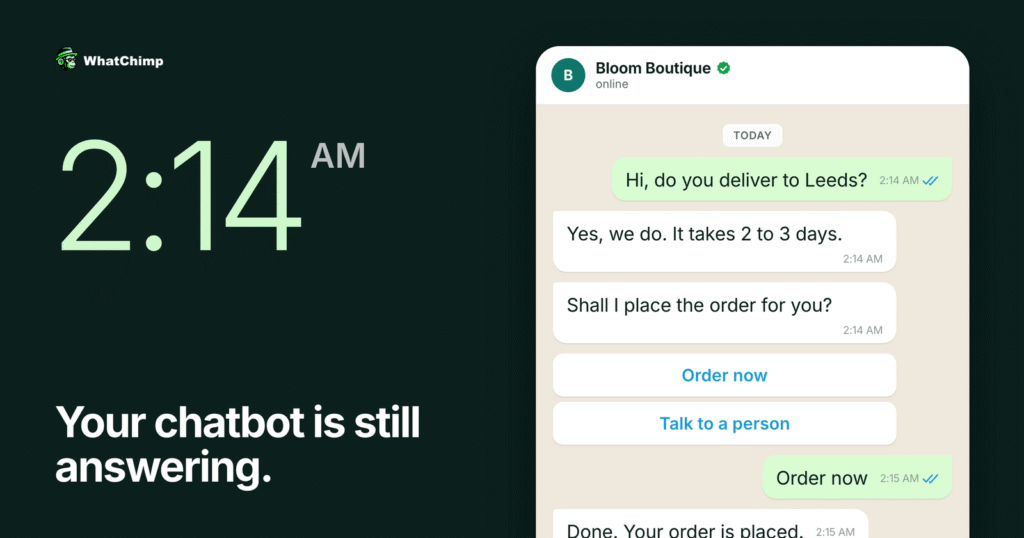
- A WhatsApp chatbot is automated software that talks to your customers through WhatsApp on your behalf and answers their messages instantly at any time of day.
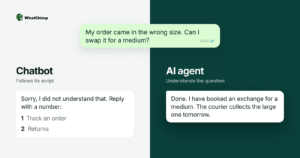
- Rule-based chatbots follow pre-written scripts, AI-powered chatbots understand what people mean, and the best setups combine both and hand complicated cases to humans.
- Chatbots handle repetitive questions, orders, updates and lead qualification well, but angry customers and sensitive situations should go to a human.
- Building one requires the WhatsApp Business API, which comes through an official WhatsApp Business Solution Provider and cannot be downloaded from an app store.
- You can build a chatbot without coding on a visual drag-and-drop builder, and the advice is to start with a simple bot and expand gradually.
On this page
Most whatsapp chatbots are annoying. We’ve all been there.
Stuck in a loop with a bot that doesn’t understand what you’re asking, can’t help with your actual problem, and won’t let you talk to a real person.
So why am I writing about WhatsApp chatbots? Because when done right, they’re actually useful.
The difference is simple: good chatbots stick to what they’re good at.
✅Answering common questions.
✅Taking orders.
✅Sending updates.
✅Collecting information.
They don’t pretend to be human, they don’t try to handle complex problems, and they make it easy to reach a real person when needed.
WhatsApp is the perfect place for this kind of automation because people already use it every day. They’re not downloading a new app or learning a new system as they’re just sending a message like they normally would.
And on your end, you’re automating the repetitive stuff so your team can focus on the conversations that actually need a human touch.
I’ve set up WhatsApp chatbots for businesses in e-commerce, customer service, real estate, and more. Some save hours of manual work every day. Others generate leads while the sales team sleeps.
The best ones do both.
In this guide, I’m breaking down how WhatsApp chatbots work, what they’re actually good for, and how to build one without wasting time or money. No hype, no technical overwhelm—just practical advice from someone who’s done this many times before.
Let’s get into it.
What Is a WhatsApp Chatbot?
A WhatsApp chatbot is automated software that talks to your customers through WhatsApp on your behalf. Think of it as a digital assistant that lives inside the messaging app your customers already use every day.
Instead of having a human manually respond to every “What are your hours?” or “Where’s my order?” message, the chatbot handles it automatically. It reads incoming messages, understands what the person is asking, and sends back relevant answers instantly, any time of day.
How It’s Different from Regular WhatsApp
You might be familiar with the regular WhatsApp Business app—the free one you download on your phone. That’s great for small businesses with a handful of daily messages. But it has limits.
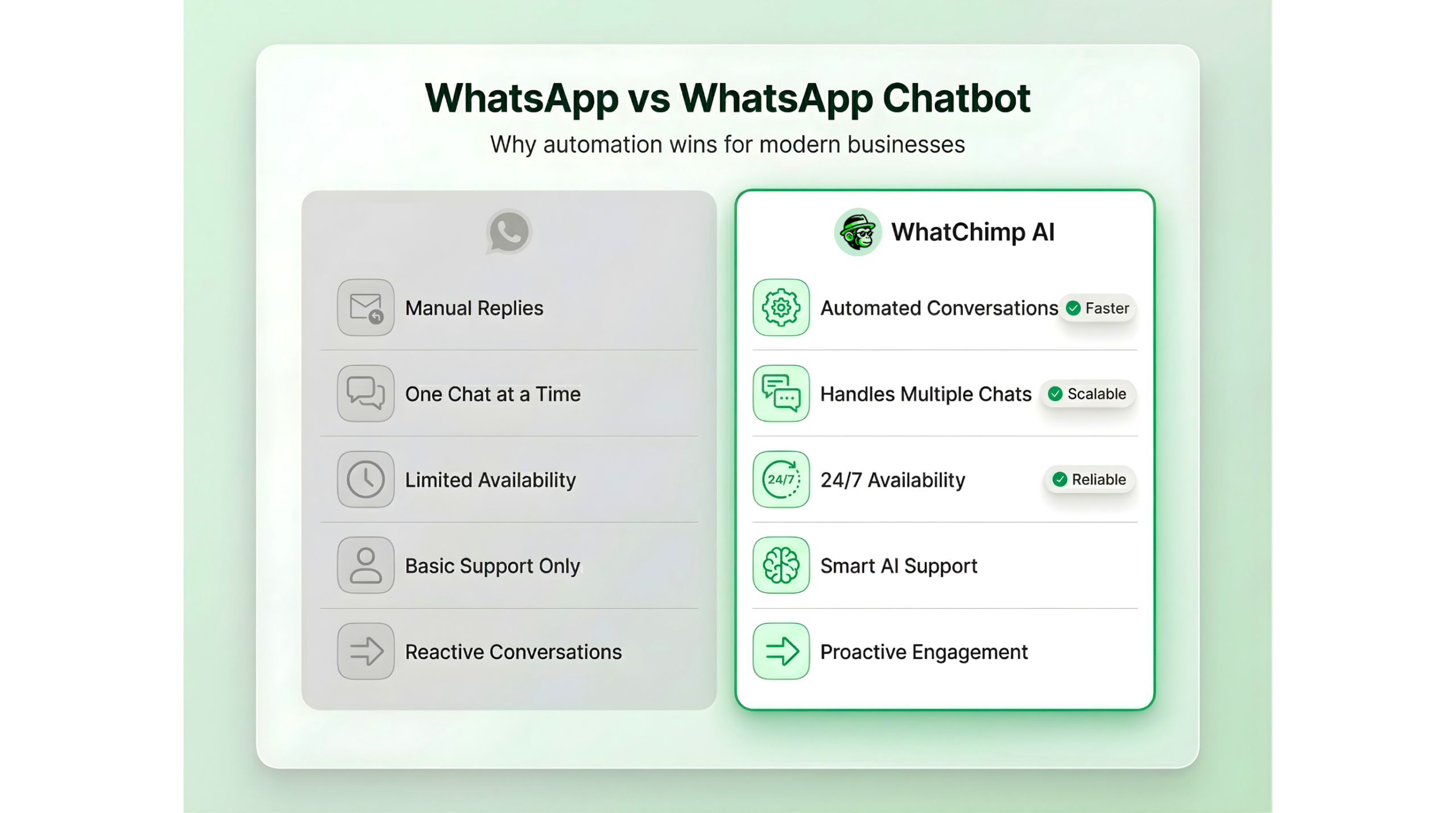
WhatsApp chatbots work through the WhatsApp Business API, which is the professional version designed for automation and scale. Here’s what that means:
🎯Multiple people can manage conversations from different devices
🎯Unlimited messages can be handled simultaneously
🎯Automation runs 24/7 without any human involvement
🎯Integrations connect to your CRM, website, or e-commerce platform
🎯Broadcasting lets you send updates to thousands of customers at once
The catch? You can’t just download the API version from an app store. You need to work with an official WhatsApp Business Solution Provider (like WhatChimp) to get access.
Two Types of WhatsApp Chatbots
Not all chatbots work the same way. There are two main types:
📌Rule-Based Chatbots
These follow pre-written scripts. You set up a conversation flow: “If someone says X, respond with Y”
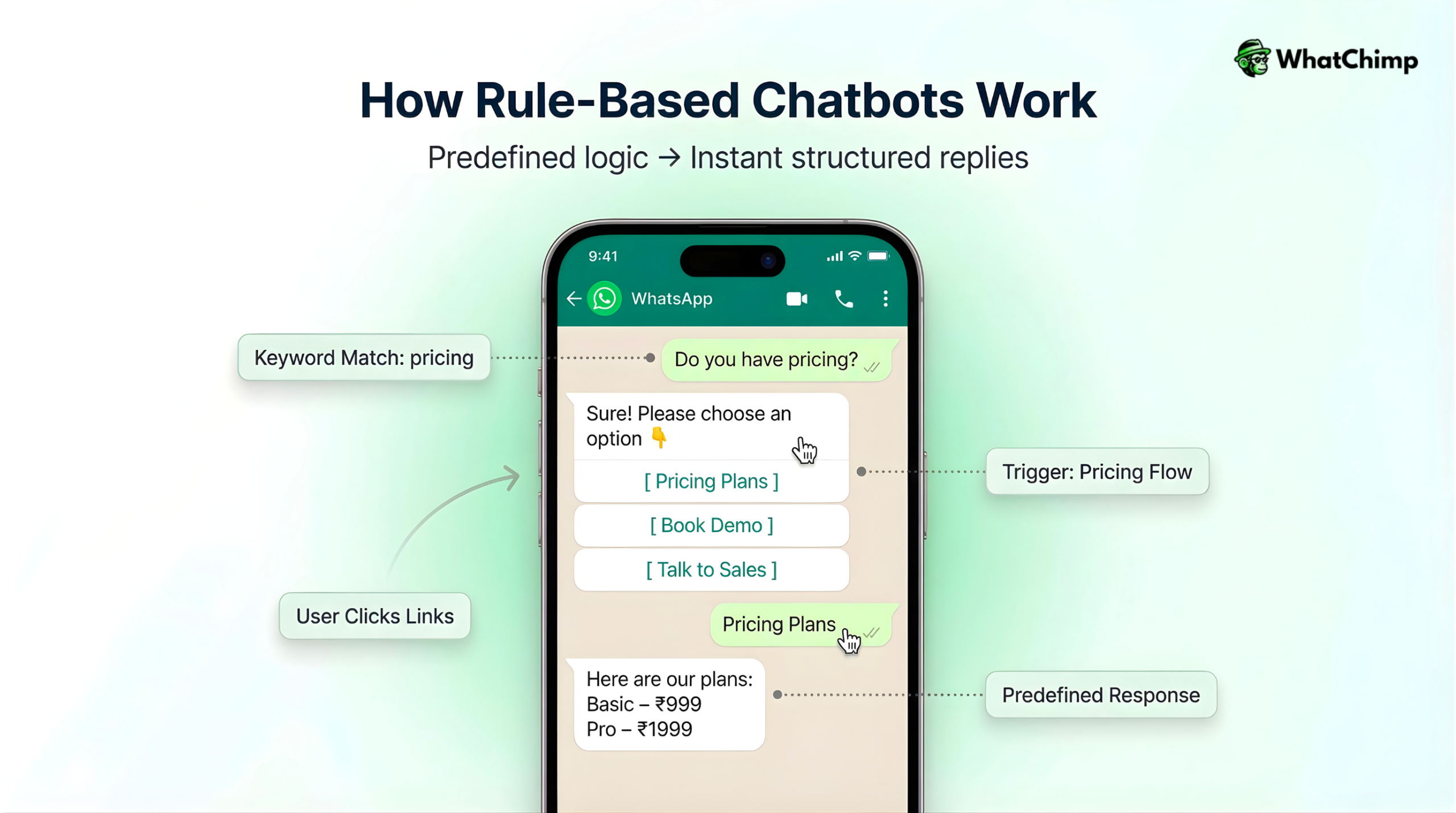
They’re simple, predictable, and work well for straightforward tasks like:
✅Answering FAQs
✅Taking orders from a menu
✅Booking appointments
✅Collecting customer information
The limitation? They only understand specific keywords or button clicks. If a customer asks something in an unexpected way, the bot gets confused.
📌AI-Powered Chatbots
These use artificial intelligence and natural language processing (NLP) to understand what people mean, not just what they type. You can train them on your website content, product catalogs, support documents, or FAQs, and they’ll generate human-like responses.
AI bots can:
✅Understand questions phrased in different ways
✅Learn from conversations over time
✅Handle more complex requests
✅Feel more natural to talk to
The best setups combine both: AI handles the understanding, rules handle the structure, and humans take over when things get complicated.
How WhatsApp Chatbots Actually Work
Here’s the simplified version of what happens behind the scenes:
👉Customer sends a message on WhatsApp to your business number
👉WhatsApp’s API receives it and forwards it to your chatbot platform
👉The chatbot processes the message—either matching it to a rule or using AI to understand intent
👉A response is generated based on your pre-built flows or AI training
👉The reply is sent back through WhatsApp to the customer
All of this happens in seconds.
If the bot can’t handle the request—maybe it’s too complex or the customer is frustrated—it can automatically hand off to a human agent with the full conversation history, so your team doesn’t have to ask the customer to repeat themselves.
Why WhatsApp Specifically?
You might be wondering: why not just use a chatbot on your website or Facebook Messenger?
WhatsApp has unique advantages:
🎯People actually use it: Over 2 billion users worldwide, and in many countries, it’s the primary way people communicate
🎯Insanely high open rates: 98% of WhatsApp messages get read, usually within minutes
🎯Trust factor: People are more comfortable messaging a business on WhatsApp than filling out website forms
🎯Rich features: You can send images, videos, PDFs, product catalogs, location pins, and even payment links
🎯Persistent conversations: Chat history stays in the customer’s phone, so they can refer back anytime
The combination of massive reach, high engagement, and built-in trust makes WhatsApp one of the most effective channels for automated customer communication.
What WhatsApp Chatbots Can (and Can’t) Do
Let me be clear about this, because there’s a lot of hype out there.
WhatsApp chatbots are excellent at:
✅Answering repetitive questions quickly
✅Guiding customers through simple processes
✅Collecting information (names, emails, preferences)
✅Sending automated updates (order confirmations, appointment reminders)
✅Qualifying leads before a salesperson gets involved
✅Handling high volumes without breaking a sweat
WhatsApp chatbots are NOT good at:
❌Understanding complex, emotional, or highly nuanced situations
❌Replacing human judgment in sensitive scenarios
❌Handling angry customers (they should be routed to humans immediately)
❌Selling high-ticket items that need real relationship building
The best WhatsApp chatbot strategy is about handling the routine stuff automatically so your team can focus on conversations that actually need a personal touch.
Benefits of WhatsApp Chatbots
Let me walk you through the real advantages I’ve seen businesses gain from implementing WhatsApp chatbots. They’re what actually happens when you set things up properly.
⚡24/7 Availability & Instant Responses
Your customers don’t work 9-to-5, and they don’t care about your business hours.
I’ve had clients lose deals simply because a prospect asked a question at 10 PM and got a response at 10 AM the next day by which time they’d already signed with a competitor.
WhatsApp chatbots eliminate that problem entirely.
They respond instantly, every single time.
🔸Midnight question about product specifications? Answered immediately.
🔸Sunday inquiry about pricing? Handled.
🔸Holiday weekend support request? Done.
It’s what customers expect now.
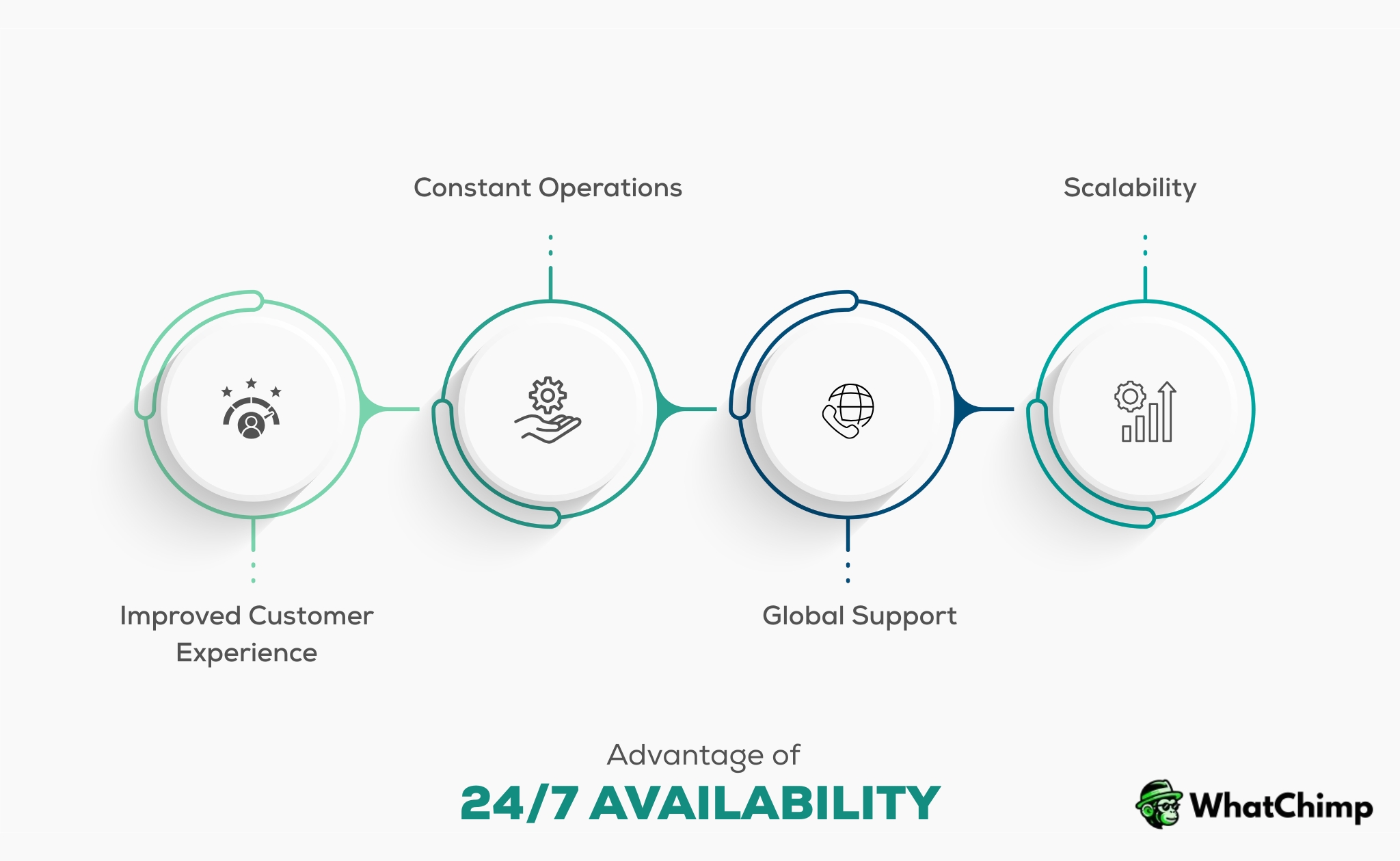
Studies show that 90% of customers rate an immediate response as important or very important when they have a service question. A chatbot delivers on that expectation without requiring your team to work around the clock.
⚡Massive Cost Savings
Here’s the math that gets finance teams excited: one customer support agent can handle maybe 3-4 chat conversations at once before quality drops.
A WhatsApp chatbot can handle hundreds or thousands simultaneously, 24 hours a day, for a fraction of the cost.
And the pricing model makes sense: WhatsApp charges per 24-hour conversation window, not per message. So whether a customer sends 1 message or 20 within that window, the cost stays the same.
When you work with providers like WhatChimp that offer 0% markup on Meta’s API fees, you’re paying the absolute lowest possible rate up to 35% less than platforms that add their own markup.
⚡Handle Unlimited Conversations Simultaneously
This is where chatbots genuinely shine.
During a flash sale or product launch, your message volume can spike 10x or more in a matter of hours. With human agents, that means long wait times, overwhelmed staff, and frustrated customers. With a chatbot, there’s no difference between handling 10 conversations and 10,000.
I’ve seen this play out during Black Friday campaigns. One retail client’s WhatsApp chatbot fielded over 15,000 inquiries in a single weekend—answering product questions, sharing discount codes, tracking orders—without a single bottleneck.
Their human team just monitored the dashboard and stepped in for the handful of complex cases that needed intervention.
⚡Global Reach with Local Touch
WhatsApp is used in over 180 countries, but your customers aren’t all speaking the same language. If you’re operating in multiple markets—or even just one multilingual region—language barriers can kill conversions.
Here’s where smart chatbots make a real difference: they can communicate in multiple languages and switch automatically based on what the customer types.
WhatChimp’s AI chatbot, for example, detects the language from the user’s input and responds accordingly.
A customer types in Spanish, they get Spanish responses.
Switch to English mid-conversation? The bot adapts instantly.
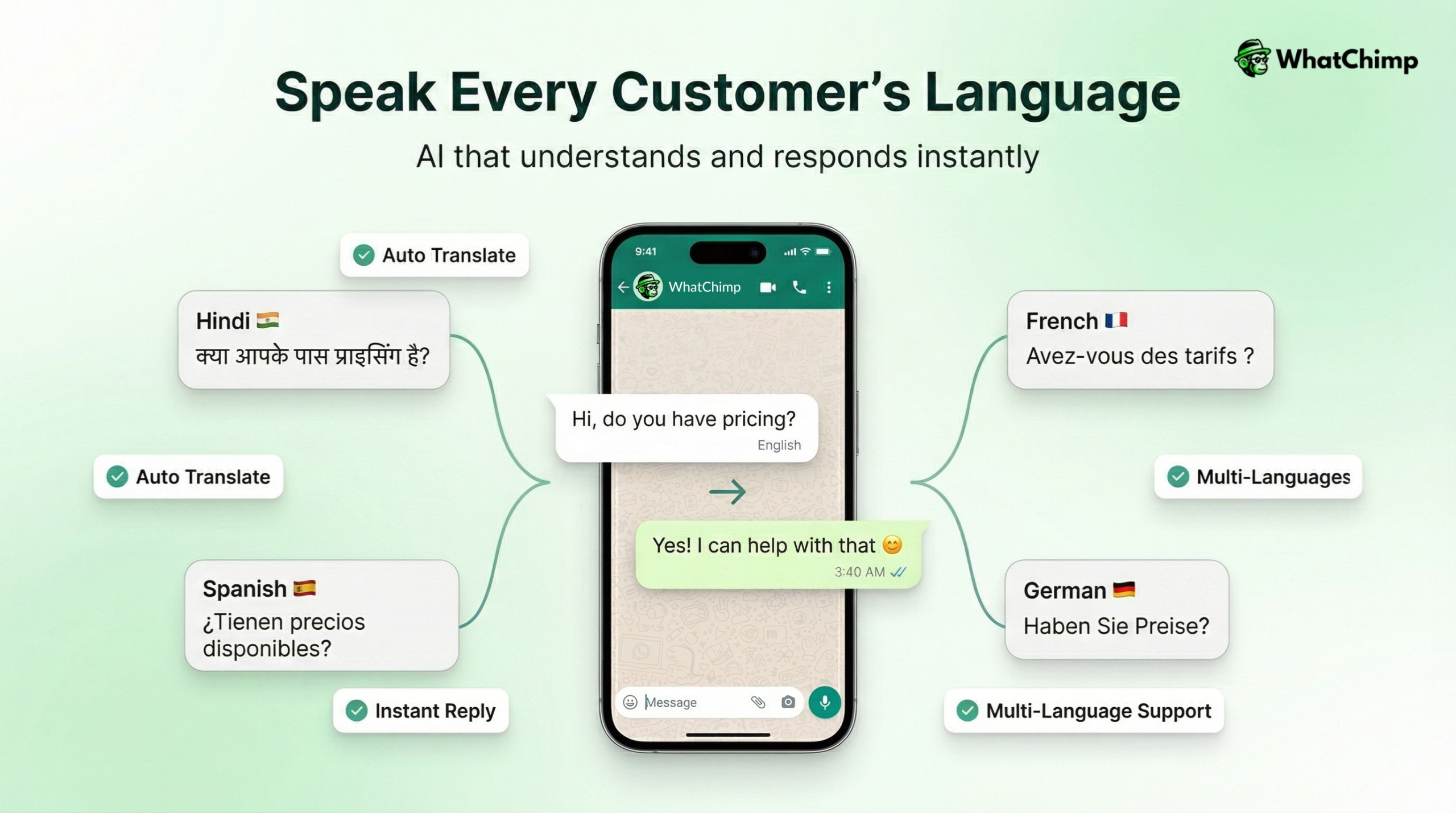
I’ve worked with clients in India serving customers across Hindi, English, Tamil, and Bengali-speaking regions. One chatbot handles all four languages seamlessly. Something that would’ve required hiring multilingual support staff or running separate regional operations.
This isn’t just about translation. It’s about meeting customers in their preferred language, which builds trust and dramatically improves conversion rates, especially in markets where English isn’t the default.
⚡Exceptional Engagement Rates
Let’s compare channels for a second:
🎯Email open rate: 15-25% on average
🎯SMS open rate: 90-98%, but it feels invasive and has strict regulations
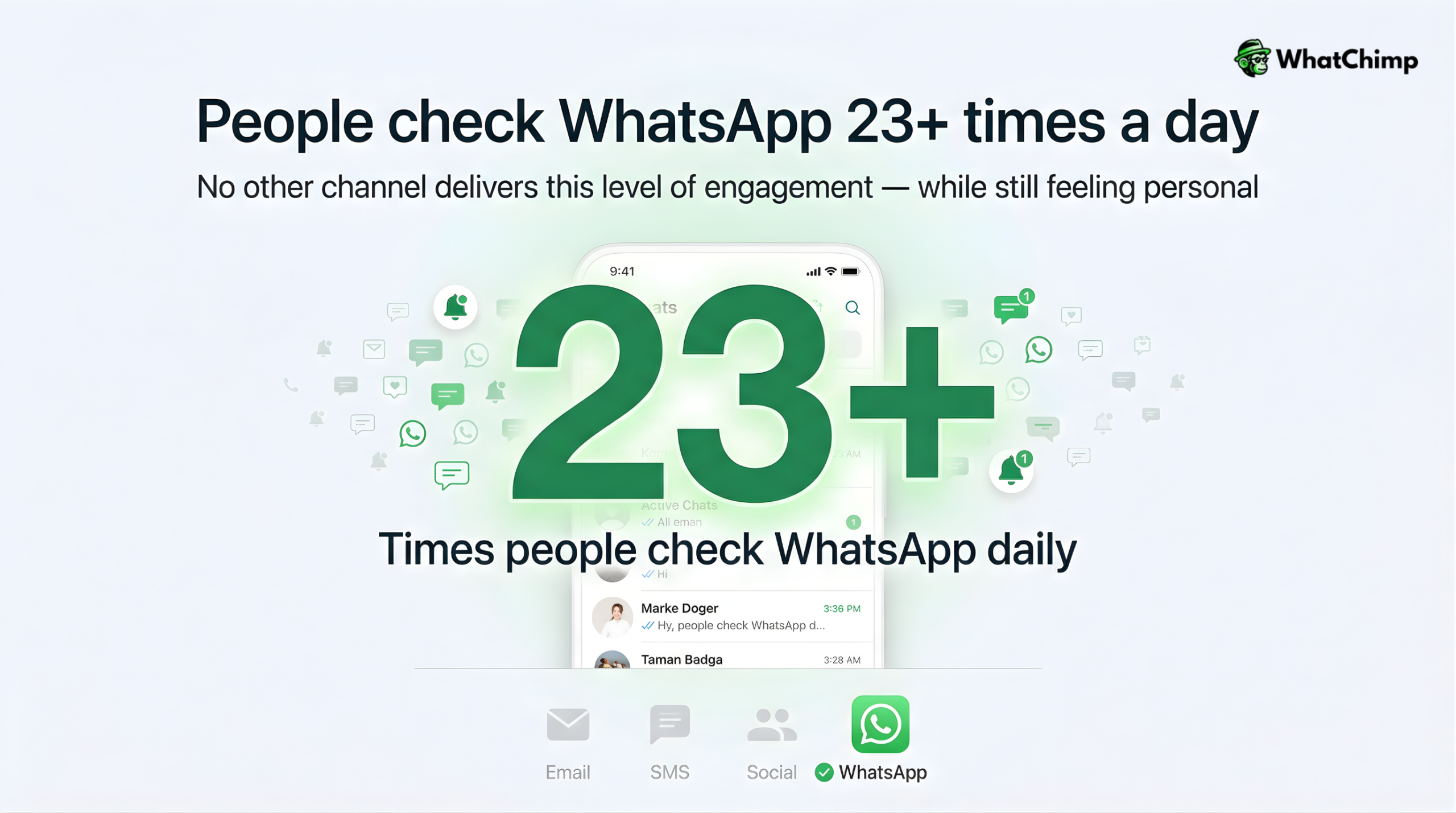
🎯WhatsApp open rate: 98%, and customers actually want to get messages there
I don’t know another marketing or support channel that delivers these kinds of engagement numbers while still feeling personal and non-intrusive.
When you send a WhatsApp message—whether it’s an order update, a promotional offer, or a support response—it shows up right next to conversations with friends and family. That context matters. People check WhatsApp 23+times per day on average. Your message isn’t buried in a spam folder or ignored in an overflowing inbox.
Click-through rates follow the same pattern. I’ve seen WhatsApp broadcast campaigns generate 45-60% click-through rates compared to 2-5% for email.
The difference is staggering.
⚡Data Collection & Analytics
Here’s something most businesses overlook: chatbots aren’t just answering questions—they’re collecting incredibly valuable data about your customers and your business.
Every conversation generates insights:
👉What are customers actually asking about? If 40% of inquiries are about shipping times, maybe your product pages need clearer delivery information.
👉When are customers reaching out? Peak hours tell you when to staff human agents and when automation carries the load.
👉What pain points keep coming up? Repeated questions about returns or refunds might signal a product quality issue or unclear policies.
👉Where do conversations drop off? If customers abandon chats at a specific point in your funnel, you’ve found a friction point to fix.
It’s about improving your actual business. I’ve helped clients identify product issues, refine their pricing messaging, and even discover new product opportunities just by analyzing chatbot conversation data.
Good platforms give you dashboards showing conversation volumes, response times, resolution rates, customer satisfaction scores, and conversation paths. Use that data, and you’ll make smarter decisions across marketing, product, and operations.
⚡Personalized Customer Experiences at Scale
Here’s the paradox: people want personalization, but businesses can’t afford to personalize every interaction manually.
WhatsApp chatbots solve this by remembering customer data and tailoring responses based on who they’re talking to. If someone’s a returning customer, the bot knows their purchase history.
If they’ve browsed specific products, it can recommend related items. If they’ve had a support issue before, it acknowledges that context.
This works because it feels helpful, not creepy. The customer is reaching out voluntarily, the data is being used to serve them better, and the experience feels tailored to their needs—even though it’s completely automated.
⚡Faster Lead Qualification & Sales
Sales teams waste enormous amounts of time on unqualified leads. Someone fills out a form, gets passed to a rep, and after 20 minutes of discovery, it turns out they’re not a fit. That’s time that could’ve been spent closing actual deals.
WhatsApp chatbots qualify leads automatically by asking the right questions upfront:
📌What’s your budget range?
📌What problem are you trying to solve?
📌What’s your timeline?
📌How many users/locations/units do you need?
Based on the answers, the bot can either:
🔸Route high-quality leads directly to sales with full context
🔸Nurture mid-stage leads with relevant content
🔸Politely disqualify poor fits without wasting anyone’s time
⚡Rich Media & Interactive Capabilities
WhatsApp isn’t just text. You can send:
✅Images and videos (product demos, how-to guides)
✅PDFs (invoices, brochures, user manuals)
✅Product catalogs (browsable directly in WhatsApp)
✅Location pins (store locations, delivery addresses)
✅Interactive buttons (quick replies like “Yes/No” or “Track Order”)
✅List menus (choose from multiple options without typing)
This makes conversations feel richer and more helpful.
- Instead of typing out your entire product list, you send a catalog.
- Instead of describing how to reset a password, you send a 30-second video.
- Instead of making customers type their choice, you give them buttons.
I’ve found that conversations with rich media and interactive elements have significantly higher completion rates. People engage more when the experience feels modern and easy, not like they’re navigating a text-based phone tree from 1995.
⚡Reduced Human Error
Humans make mistakes. We forget details, mistype information, give inconsistent answers, and have bad days.
Chatbots don’t.
They deliver the exact same accurate information every single time. If your return policy is 30 days, the bot will never accidentally say 14 days.
If your pricing changed last week, the bot reflects the update immediately across all conversations. If a customer asks the same question three times, they get the same correct answer three times.
This consistency matters for brand reputation and compliance. In regulated industries like finance, healthcare, or insurance, giving incorrect information can have serious legal consequences.
Chatbots ensure that your official policies and approved messaging are followed to the letter.
Plus, there’s no risk of a frustrated agent sending an inappropriate message or a tired employee forgetting to log important customer information. The bot captures everything, stores it properly, and hands off clean data to your CRM or team.
Next, let’s look at real-world examples of how different industries are actually using these capabilities.
Practical Examples of WhatsApp Chatbots
Let me show you how different types of businesses are actually using WhatsApp chatbots. These aren’t hypothetical scenarios.
They’re real implementations I’ve either built myself or seen work effectively for clients.
E-commerce & Retail
E-commerce is probably the most natural fit for WhatsApp chatbots because the entire customer journey—from browsing to purchase to post-sale support—can happen inside one conversation.
✅Product Discovery & Recommendations
Instead of making customers navigate through hundreds of product pages, a chatbot can guide them through a simple conversation:
“What are you looking for today?”
“Who’s it for?”
“What’s your budget?”
Based on the answers, it shows relevant products with images, prices, and direct purchase links. I set this up for a fashion boutique, and customers loved it because it felt like texting a helpful sales associate, not browsing a sterile website.
✅Abandoned Cart Recovery
This is where e-commerce chatbots pay for themselves quickly. When someone adds items to their cart but doesn’t check out, the bot automatically sends a WhatsApp message a few hours later:
“Hey [Name], you left some items in your cart. Still interested? Here’s a 10% discount to complete your order.”
One client recovered 23% of abandoned carts this way but this revenue would’ve been completely lost otherwise.
✅Order Tracking & Updates
Nobody wants to dig through emails or log into portals to check order status. With WhatsApp, customers just send “Where’s my order?” and the bot instantly replies with real-time tracking info.
You can also proactively send updates: order confirmed, shipped, out for delivery, delivered. Customers feel informed, and your support team stops fielding “where is it?” questions all day.
Customer Support & Service
This is where most businesses start, and for good reason: repetitive support questions eat up massive amounts of time.
📌Automated FAQ Responses
The questions you answer 50 times a day—business hours, shipping costs, payment methods, warranty info—can all be handled instantly by a chatbot.
You build these into the bot’s knowledge base, and customers get accurate answers in seconds.
I worked with a telecom company that had hundreds of daily calls asking “How do I reset my password?”
The chatbot now handles that with a simple step-by-step guide and a password reset link. Support call volume dropped 40%.
📌Ticket Creation & Tracking
For issues the bot can’t solve, it creates a support ticket automatically, like capturing all relevant details (order number, issue description, customer contact info) and assigning it to the right department.
The customer gets a ticket number and can check status anytime by messaging “What’s the status of ticket #12345?”
No need to call, no waiting on hold, no repeating information to multiple agents.
📌Troubleshooting Guides
Technical support is expensive. A chatbot can walk customers through common troubleshooting steps before escalating to a human:
“Is the device powered on?”
“Have you tried restarting it?”
“Can you send a photo of the error message?”
Many issues get resolved without ever involving a support agent, and when escalation is necessary, the agent already has diagnostic information to work with.
Lead Generation & Sales
Sales teams love WhatsApp chatbots because they handle the tedious qualification work and only pass along serious prospects.
🎯Initial Lead Qualification
When someone expresses interest—maybe they clicked an ad or filled out a form—the chatbot immediately engages:
“Hi! I see you’re interested in [product/service]. Let me help you out. What’s your biggest challenge right now?”
Based on responses to a few key questions, the bot determines if they’re a good fit. Quality leads get routed to sales instantly with full conversation context. Others get nurturing content or self-service resources.
🎯Demo & Consultation Booking
Instead of back-and-forth emails trying to find a meeting time, the chatbot presents available slots and books directly into your calendar:
“Great! Would you like to schedule a 30-minute demo? Here are our available times this week.”
I’ve seen this cut the time from initial inquiry to booked meeting from days down to minutes.
🎯Follow-Up Sequences
Most leads aren’t ready to buy immediately. A chatbot can run automated follow-up sequences—checking in after a few days, sharing relevant case studies, offering limited-time incentives—keeping leads warm until they’re ready to talk to sales.
One B2B client runs a 14-day nurture sequence through WhatsApp that converts 18% of leads who weren’t initially ready to buy. That’s revenue that would’ve walked away if they’d only made one attempt.
🎯Product Comparisons & Pricing
Prospects often have questions about different product tiers, feature comparisons, or pricing options. A chatbot can present this information clearly with comparison tables, FAQ responses, and direct purchase or contact options—all without requiring a sales call for basic information.
Appointment Booking & Scheduling
Any business that relies on appointments can benefit massively from WhatsApp automation.
🔸Healthcare Appointments
Patients can book, reschedule, or cancel appointments through simple WhatsApp conversations. The bot checks availability, confirms details, and sends appointment reminders automatically:
“Hi [Name], you have an appointment with Dr. Smith tomorrow at 2 PM. Reply YES to confirm or RESCHEDULE if you need to change it.”
A dental clinic I worked with reduced no-shows by 35% just by implementing automated WhatsApp reminders.
🔸Salon & Spa Bookings
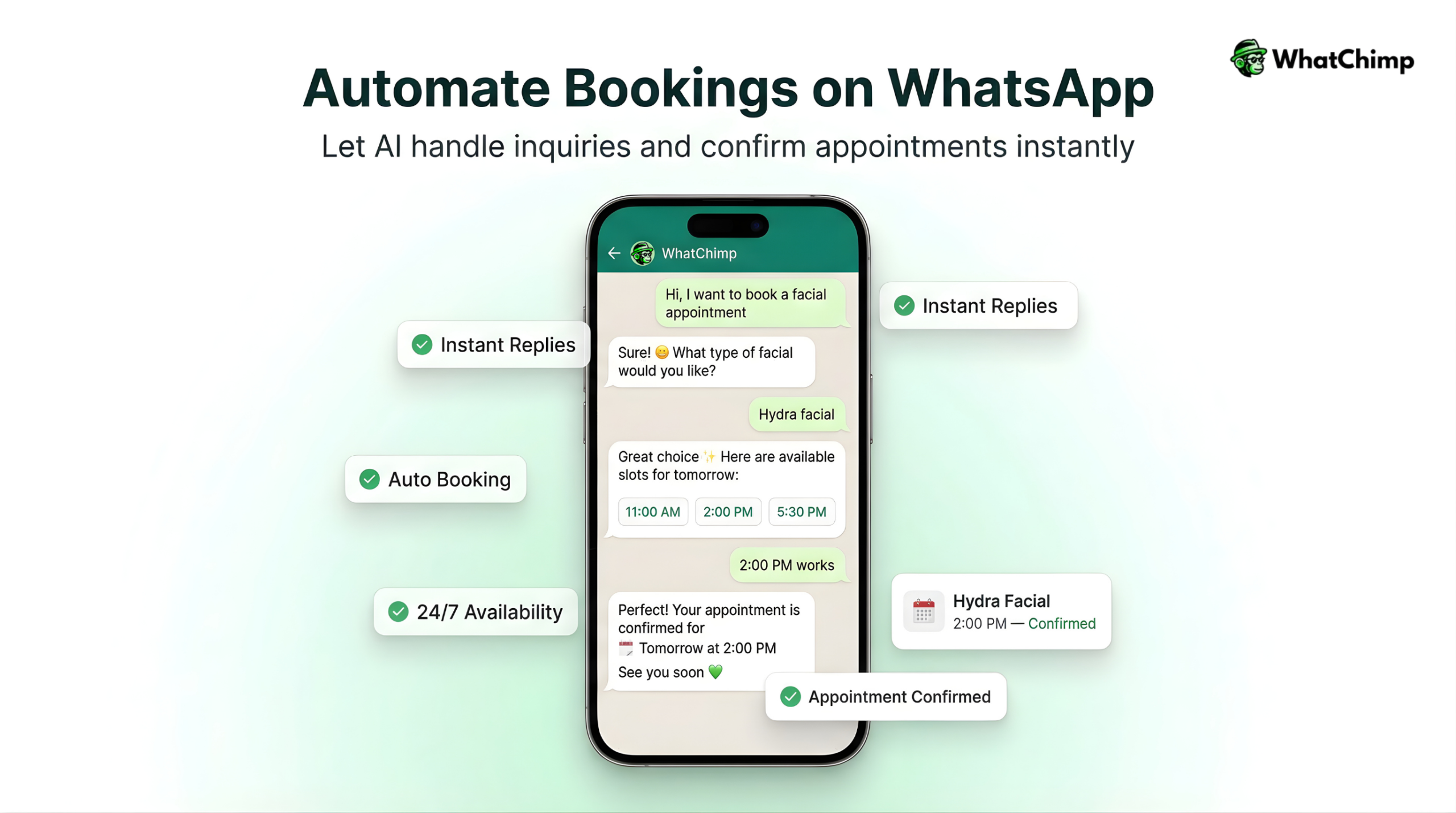
Beauty businesses often juggle multiple service providers with different schedules. A chatbot can handle the complexity:
“Which service would you like?” → Shows menu
“Which stylist do you prefer?” → Lists available providers
“Here are their available times” → Customer picks a slot
→ Booking confirmed with automatic calendar sync
The salon staff focuses on providing great service instead of playing phone tag with customers all day.
🔸Event Registration & Reminders
For conferences, workshops, or webinars, chatbots handle registration, send confirmation details, deliver pre-event materials, and send timely reminders. On the event day, they can share agenda updates, speaker info, or location directions—all through WhatsApp.
Education & E-Learning
Educational institutions and online course providers are finding creative ways to use WhatsApp for student engagement.
⚡Course Enrollment & Information
Prospective students can ask about course details, eligibility requirements, fees, and schedules through WhatsApp. The bot provides instant information and guides them through the enrollment process—even collecting application documents directly through chat.
⚡Assignment & Exam Reminders
Students get automatic reminders about upcoming deadlines, exam schedules, or class timings. This keeps them engaged and reduces missed submissions.
One online learning platform I worked with sends daily study reminders and motivational messages through WhatsApp. Course completion rates increased 28% because students stayed engaged throughout the program.
⚡Instant Query Resolution
Students often have simple questions—“When’s the next class?” “How do I access course materials?” “What’s my attendance percentage?”—that don’t require talking to faculty. A chatbot handles these instantly, freeing up administrative staff for more complex student support.
⚡Fee Payment Reminders
Educational institutions can send automated payment reminders with direct payment links. Students can complete payments through WhatsApp without logging into portals or visiting offices.
Food Delivery & Restaurants
The food industry has embraced WhatsApp ordering because it’s faster and more convenient than apps or phone calls.
📍Menu Browsing & Ordering
Customers can view the full menu with images and prices, customize their orders, and place everything through a simple conversation:
“I’d like to order pizza.”
→ Bot shows pizza options with images
“I’ll take the margherita, large size, extra cheese.”
→ Bot confirms customizations and price
“Deliver to [saved address]?”
→ Order placed and confirmed
A local restaurant chain I worked with now takes 60% of their delivery orders through WhatsApp because customers find it easier than using a third-party app.
📍Order Tracking
Customers get real-time updates: order received, being prepared, out for delivery, arriving in 5 minutes. No need to wonder when their food will arrive or call the restaurant to check.
📍Table Reservations
For dine-in, chatbots handle reservations:
“Table for how many?”
“What date and time?”
“Any special requests?”
→ Reservation confirmed with a reminder sent on the day
📍Loyalty Programs
Restaurants use WhatsApp to notify customers about loyalty points, special offers for regulars, or birthday discounts. Because it’s WhatsApp and not email, customers actually see and use these offers.
Marketing & Engagement
Beyond support and transactions, WhatsApp is a powerful marketing channel when used correctly (and compliantly).
🔊Product Launch Announcements
When you’re releasing a new product, WhatsApp lets you reach customers directly with launch details, exclusive previews, or early-bird offers. Because of those 98% open rates, your announcement actually gets seen.
I helped a cosmetics brand launch a new skincare line through WhatsApp. They sent sneak peeks, ingredient breakdowns, and a limited-time discount code to their subscriber list. The campaign generated 4x the revenue of their email announcement.
🔊Flash Sales & Limited-Time Offers
Time-sensitive promotions work exceptionally well on WhatsApp because customers see messages immediately. A fashion retailer sends flash sale alerts through WhatsApp and consistently sees 40-50% of recipients click through within the first hour.
🔊Customer Feedback & Surveys
After a purchase or service interaction, the chatbot can request feedback through simple rating buttons or quick surveys:
“How was your experience today? 😊”
→ ⭐⭐⭐⭐⭐ (customer taps rating)
“Thanks! Anything we could improve?”
This generates higher response rates than email surveys, and the feedback comes in while the experience is still fresh.
🔊Contests & Giveaways
Running a social media contest? Use WhatsApp for entries and winner notifications. Customers engage more because the barrier is lower—they’re just sending a message, not filling out forms or downloading apps.
🔊Re-engagement Campaigns
For customers who haven’t purchased in a while, chatbots can send personalized re-engagement messages:
“Hey [Name], we haven’t seen you in a while! Here’s 20% off your next order—just for you.”
These campaigns bring back dormant customers who might have forgotten about your business or gotten distracted by competitors.
These examples barely scratch the surface. The pattern you’ll notice: WhatsApp chatbots work best when they simplify something that was previously complicated, time-consuming, or frustrating. Find those friction points in your customer journey, and that’s where automation delivers the most value.
Next, let’s talk about how to actually build one of these chatbots—and what to look for in a platform.
How to Easily Build a WhatsApp Chatbot Using WhatChimp: Step-by-Step Guide
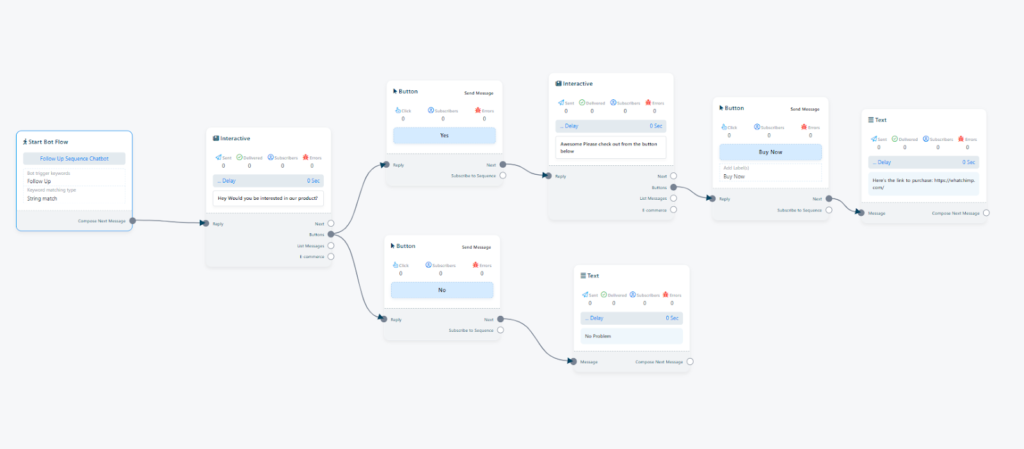
[Image Idea: Flowchart showing a follow-up sequence: Initial message → “Buy Now” button → Wait 30 min → Check if purchased → Send reminder]
One of the most powerful features of WhatsApp chatbots is automatic follow-up sequences. These work 24/7 to re-engage customers who showed interest but didn’t complete an action like making a purchase, booking an appointment, or signing up.
I’ve seen clients recover thousands in revenue just by setting up smart follow-up automation.
Here’s how to build it using WhatChimp.
What Is a Follow-Up Chatbot?
A follow-up chatbot automatically sends reminder messages to users who interacted with your bot but didn’t finish the desired action. Think of it as a persistent sales assistant that never forgets to check back with potential customers.
Why Use Automatic Follow-Ups?
✅Saves time: No manual reminders needed
✅Increases conversions: People forget or get distracted, reminders bring them back
✅Works 24/7: Runs automatically without any human involvement
✅Recovers lost revenue: Especially powerful for abandoned carts and incomplete bookings
Step-by-Step: Building Your Follow-Up Bot
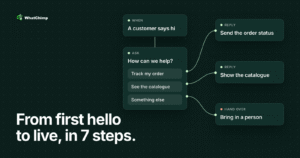
Step 1: Create Your Bot Flow
Navigate to WhatChimp Dashboard > Bot Manager > Bot Reply > Create.
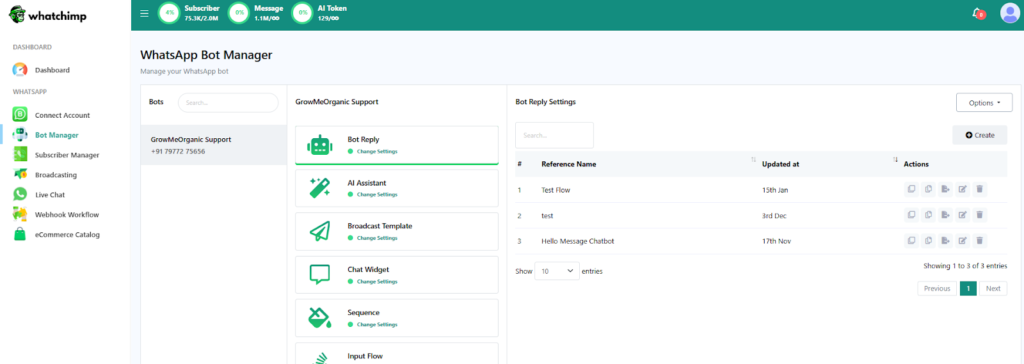
Name your bot something clear like “Follow-Up Bot” or “Abandoned Cart Recovery.” Save it and set the trigger (usually a keyword or welcome message).
Step 2: Set Up the Initial Interaction
Add an interactive message block that presents your offer with buttons:
Message: “Hey! Would you be interested in our product?”
Buttons:
- Yes (leads to product details and purchase link)
- No (ends conversation or offers assistance)
If the user clicks “Yes,” send them product information and a “Buy Now” button with your checkout link.
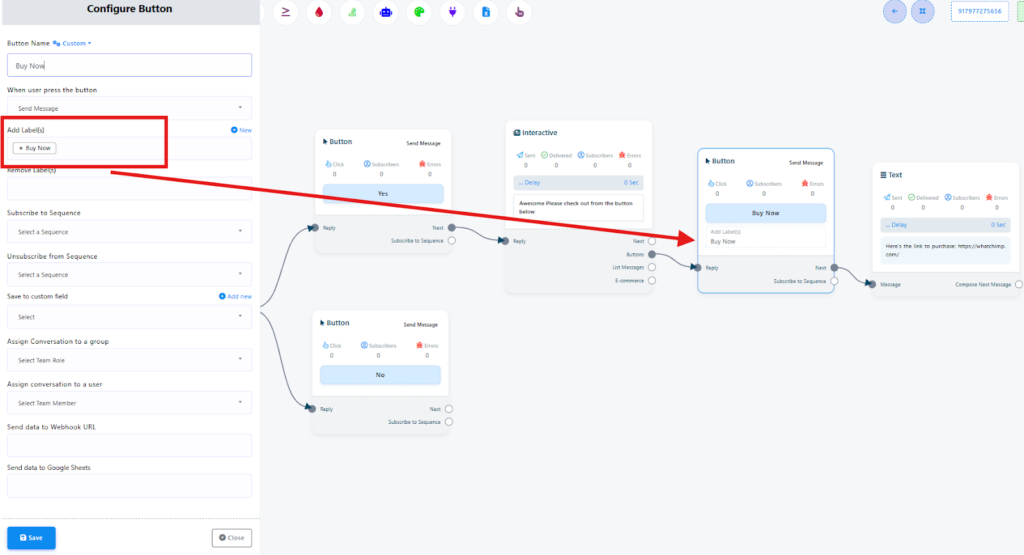
Step 3: Apply Labels to Track Actions
This is crucial. When a user clicks the “Buy Now” button, automatically apply a label called “Buy Now” to that contact.
Why?
This label tells your bot who clicked the purchase button. You’ll use this to determine who needs a follow-up reminder and who actually completed the purchase.
Users who don’t click the button won’t get this label, so they won’t enter your follow-up sequence.
Step 4: Configure the Follow-Up Sequence
Here’s where the automation magic happens.
From the “Buy Now” button, drag a connector to “Subscribe to Sequence.” This creates a follow-up flow:
Set a time delay: Choose how long to wait before sending the first reminder (30 minutes, 1 hour, 2 hours, whatever makes sense for your business).
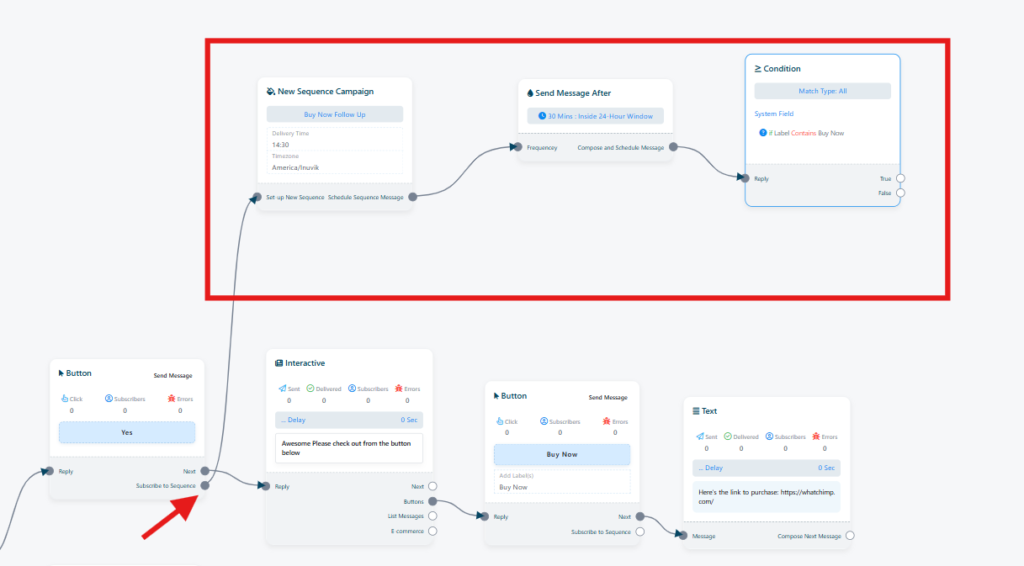
Add a condition: Check if the user has the “Buy Now” label but hasn’t completed the purchase yet.
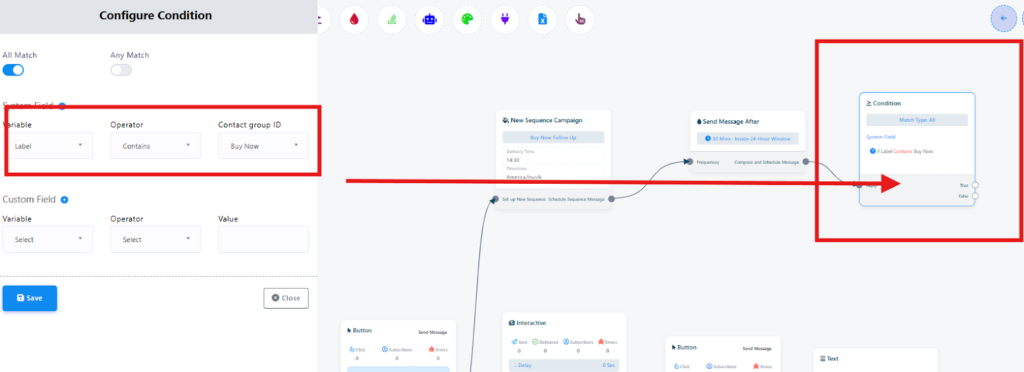
- If False (they clicked but didn’t buy): Send the follow-up reminder
- If True (they already purchased): Stop the sequence (don’t spam paying customers)
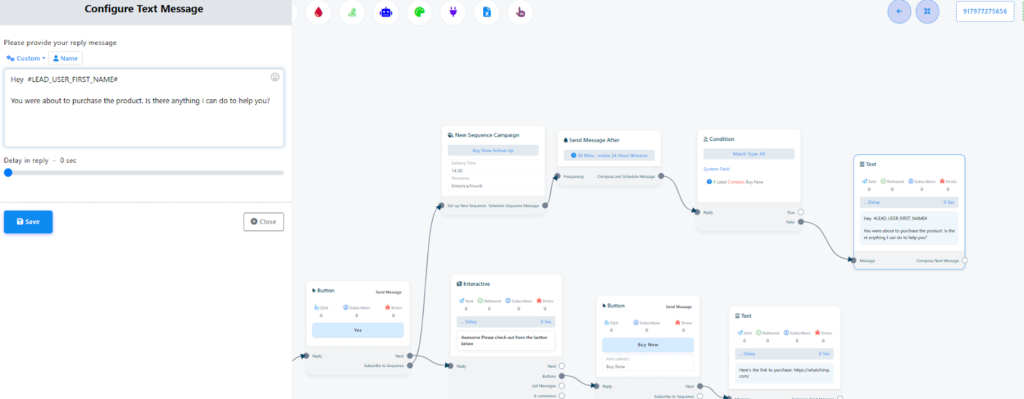
Your first reminder message might say:
“Hey! You left something in your cart. Still interested? Here’s your link again: [checkout URL]”
Include the “Buy Now” button again for easy access.
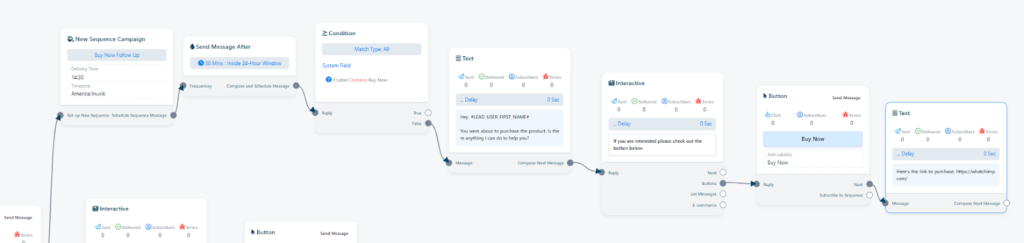
Step 5: Add Multiple Follow-Up Reminders
You can repeat the process for additional reminders:
First reminder (30 minutes): Gentle nudge with the same link
Second reminder (2 hours): Add urgency or a discount code
Final reminder (24 hours): Last chance message with stronger incentive
Each reminder should check the same condition: Has the user purchased? If yes, stop the sequence. If not, send the next message.
Step 6: Understand the 24-Hour Window
This is important: WhatsApp lets you send unlimited free-form messages within 24 hours of the last user interaction. After 24 hours, you can only send pre-approved template messages.
Best practice: Schedule your follow-ups strategically within that 24-hour window to maximize free messaging. If you need to reach users after 24 hours, create and get approval for template messages in advance.
Step 7: Test Your Sequence
Before going live:
- Click through the entire flow yourself
- Verify labels apply correctly
- Test the timing (use shorter delays like 2 minutes for testing)
- Confirm that the sequence stops when someone “purchases”
- Make sure follow-ups only go to users who didn’t complete the action
Step 8: Monitor and Optimize
After deployment, watch your analytics:
- How many people enter the follow-up sequence?
- Which reminder has the highest conversion rate (first, second, or third)?
- What’s your overall recovery rate?
Use this data to refine timing, messaging, and incentives.
Key Features Offered by Chatbots Created Using WhatChimp
[Image Idea
All the points below and their subpoints as well]
AI & Automation Capabilities
⚡24/7 AI Agent Trained on Your Business Data: Upload your website content, product catalogs, FAQs, or PDFs. The AI agent (powered by OpenAI integration) learns to answer questions like a well-trained employee. Dramatically reduces setup time.
⚡No-Code Visual Bot Builder: Drag-and-drop interface for creating conversation flows. Pre-built templates available. Clients with zero technical background build functioning chatbots in under an hour.
⚡Automatic Language Detection: Switching AI detects what language the customer types and responds in that language. No manual selection needed. Works across Hindi, Spanish, French, Arabic, and more.
⚡Smart Follow-Up Sequences & Drip Campaigns: Build automated nurture campaigns (Day 1: welcome, Day 3: educational content, Day 7: case study, Day 10: discount). Set up behavior-triggered sequences like abandoned cart recovery.
Data Collection & Lead Management
📌Native WhatsApp Forms: Collect multiple fields directly in WhatsApp without redirecting to external sites. Higher completion rates.
📌Step-by-Step Interactive Gathering: Guide customers through one question at a time with buttons and open responses. Stores answers with customer profiles.
📌Auto-Sync: Sync easily to Google Sheets, CRMs, and Webhooks Real-time sync to Sheets, HubSpot, Salesforce, Zoho. Webhooks send data in JSON format to any API endpoint for advanced automation.
E-commerce & Sales Features
👉Shopify & WooCommerce: Native Integration Product catalogs sync automatically. Inventory updates in real-time. Order data flows both ways. Checkout links work seamlessly.
👉Abandoned Cart Recovery Automation: Automated reminder sequences that recover 20-25% of abandoned carts.
👉Order Confirmation & Shipping Updates: Automated post-purchase flow: order confirmed, shipped, out for delivery, delivered.
Enterprise-Grade Infrastructure
🔸0% API Markup Pricing Pay: Meta’s actual API rate with zero markup. Saves 30-35% compared to competitors. Official Meta Business Partner status passes cost savings directly to customers.
🔸99% Delivery Rate with Fastest Broadcasting Speed: Messages don’t get flagged as spam or delayed. Process high-volume broadcasts in minutes, not hours.
🔸10-Second Template Approvals Priority: Meta support means template approvals happen in seconds or minutes instead of hours or days. Launch campaigns immediately.
Team Collaboration & Live Chat
🎯Multi-Agent Live Chat with Smart Routing: Shared inbox for multiple agents. Automatic routing based on query type, language, VIP status, or agent expertise. Full conversation history passed to agents.
Integration Ecosystem
🟠Google Sheets Real-Time Sync: Every conversation appears as a new row instantly. Simple and accessible for non-technical users.
🟠Zapier Connection (3,000+ Apps): Connect to Mailchimp, Airtable, Slack, and thousands of other tools through no-code Zaps.
🟠Custom Webhooks for Advanced Automation: Send HTTP POST requests to any URL when specific events occur. Trigger actions in backend systems in real-time.
Conclusion
If you’ve made it this far, you understand that WhatsApp chatbots aren’t just a trendy marketing tool, they’re a fundamental shift in how businesses communicate with customers.
Let me be direct: your customers are already on WhatsApp. They check it constantly, they trust it, and they prefer it over email, phone calls, or filling out website forms.
The question isn’t whether you should be there but whether you’re going to meet them with automation that actually helps or continue handling everything manually while your competitors scale effortlessly.
I’ve spent over a decade helping businesses improve customer communication, and I can tell you with certainty: WhatsApp chatbots are one of the highest-ROI investments you can make right now.
They save time, reduce costs, increase revenue, and improve customer satisfaction—all simultaneously. But only if you implement them thoughtfully.
Don’t overthink it.
Don’t wait for perfect conditions or perfect technology.
Start simple, learn from real conversations, and iterate based on what your customers actually need.
The businesses dominating customer experience in 2026 are the ones who started early, learned fast, and built systems that genuinely help people.
Your customers are already waiting on WhatsApp. Meet them there.
Frequently Asked Questions
Can I build a chatbot without coding?
Yes, absolutely. Modern WhatsApp chatbot platforms like WhatChimp are specifically designed for non-technical users.
You build chatbots using visual, drag-and-drop interfaces—no coding required. You add message blocks, buttons, and logic paths by clicking and connecting elements on screen. It’s more like creating a flowchart than writing software.
Most platforms also offer pre-built templates for common use cases (FAQs, appointment booking, lead qualification) that you can customize to match your business. You can literally have a functioning chatbot running in 15-20 minutes without writing a single line of code.
The only time you’d need technical skills is if you’re doing advanced customizations—like building custom webhook integrations or connecting to proprietary internal systems. But for 90% of business use cases, no-code tools handle everything you need.
Can I send a WhatsApp broadcast with a chatbot?
Yes, and it’s one of the most powerful features for marketing and customer engagement.
WhatsApp broadcasts let you send messages to multiple customers at once like hundreds, thousands, or even hundreds of thousands depending on your list size.
Here’s how it works:
Within the 24-hour conversation window (after a customer has messaged you or interacted with your bot), you can send unlimited free-form messages. This is perfect for personalized follow-ups, order updates, or immediate responses to inquiries.
Outside the 24-hour window, you need to use pre-approved message templates. These are structured messages that Meta reviews and approves before you can send them. Templates are typically used for promotional broadcasts, event reminders, appointment confirmations, or re-engagement campaigns.
How much does a WhatsApp chatbot cost?
WhatsApp chatbot costs have two components: platform fees and Meta’s API conversation fees.
Platform Fees:
This varies widely depending on the provider. Some charge monthly subscriptions ranging from $50 to $500+ based on features and message volume. Others use usage-based pricing.
WhatChimp’s pricing model is transparent and starts at very affordable rates with their 7-day free trial to test everything risk-free.
Meta’s API Conversation Fees:
WhatsApp charges per “conversation,” which is defined as a 24-hour messaging window. Whether you send 1 message or 50 messages within that window, it counts as one conversation.
Example: If you handle 10,000 conversations per month at an average of $0.02 per conversation, that’s $200 in Meta fees. With a 30% markup competitor, you’d pay $260. With WhatChimp, you pay exactly $200.
Do I need technical skills to build a WhatsApp chatbot?
No, you don’t need technical skills for most implementations.
Platforms like WhatChimp are built for marketers, customer service teams, and business owners, not developers. The interface is visual and intuitive. If you can use basic software like Google Docs or PowerPoint, you can build a WhatsApp chatbot.
Most businesses don’t need that level of complexity. Standard integrations (CRM, e-commerce platforms, Google Sheets) are built-in and require no coding. Pre-built templates and AI agents handle sophisticated automation without technical work.
Start simple, and you’ll be surprised how much you can accomplish without touching code. You can always hire technical help later if you need advanced customizations.
Can I use the same WhatsApp number for my personal phone and chatbot?
No, you cannot use the same phone number for both personal WhatsApp and a WhatsApp Business API chatbot.
Because WhatsApp allows one phone number to be registered on one device or one platform at a time. When you set up a WhatsApp Business API account (which is what chatbots use), that number gets registered to the API and can’t simultaneously be active on your personal phone app.
You have three options:
1. Use a dedicated business number
2. Port your existing business number
3. Use WhatsApp Business App (not API)
What’s the difference between WhatsApp Business App and WhatsApp Business API?
This is one of the most common points of confusion, so let me break it down clearly:
WhatsApp Business App (free, consumer-grade):
- Free download from app store
- Runs on one mobile device
- Manual responses only (no automation)
- Limited to one user
- Basic business profile and quick replies
- Suitable for very small businesses with low message volume
WhatsApp Business API (professional, automation-ready):
- Requires a Business Solution Provider like WhatChimp
- Multi-device, multi-user access
- Full automation and chatbot capabilities
- Unlimited message volume
- Broadcasting to thousands of customers
- CRM and e-commerce integrations
- Advanced analytics and reporting
- Suitable for any business serious about scaling customer communication
WhatsApp Business App is like a personal phone for business. WhatsApp Business API is like a complete customer communication platform that happens to use WhatsApp.
How long does it take to set up a WhatsApp chatbot?
This depends on complexity, but here are realistic timeframes:
WhatsApp Business API Access: 10-20 minutes with WhatChimp
Basic Chatbot (FAQ, simple flows): 30-60 minutes
Moderate Complexity (lead qualification, appointment booking): 2-4 hours
Advanced Implementation (AI agent, multi-channel, complex workflows): 1-2 days
The key is starting simple. Get a basic bot working first, learn from real customer interactions, then expand gradually. Don’t try to automate everything on day one.
Are WhatsApp chatbots compliant with data privacy regulations?
Yes, WhatsApp chatbots can be fully compliant with GDPR, CCPA, and other data privacy regulations but compliance is your responsibility as the business owner. All messages on WhatsApp are encrypted end-to-end by default. This means the content of messages is protected during transmission. However, once data reaches your chatbot platform, how it’s stored and used is governed by that platform’s policies and your business practices.
Your Compliance Responsibilities:
- Get explicit consent
- Provide opt-out options
- Handle data properly
- Respect data rights
- Use compliant platforms
Reputable WhatsApp Business API providers undergo security audits and maintain compliance certifications. WhatChimp, as an official Meta Business Partner, adheres to Meta’s strict security and privacy standards.