What is Bulk WhatsApp Marketing
The savvy few who've cracked the code on bulk WhatsApp marketing are enjoying engagement rates that traditional channels can only dream about.

Key takeaways
- Bulk WhatsApp marketing is sending promotional, transactional or informational messages to many customers at once through WhatsApp, with their permission.
- True bulk marketing needs the WhatsApp Business API, which gives unlimited contacts, automation and analytics that regular WhatsApp can't offer.
- Explicit opt-in consent from every contact is the most important rule, and email permission does not count as WhatsApp permission.
- Pricing has two parts, the fee for the platform you use and Meta's conversation charges.
- Keep messages short, personal and well timed, with a clear call to action and an easy way to opt out.
On this page
What if I told you there’s a marketing channel where 98% of your messages get opened, 90% are read within 3 minutes, and your customers actually want to hear from you?
You’d probably think I’m LYING.
But while you’ve been obsessing over email subject lines, A/B testing landing pages, and throwing money at social media ads with diminishing returns, your customers have been literally begging you to message them on WhatsApp. They just didn’t say it out loud.
Think about it.
Where do you check first thing in the morning? Your email inbox or your WhatsApp messages? When you see a notification, which app makes you tap immediately? Exactly.
Your customers are no different.
Every single day, businesses are leaving millions of dollars on the table because they’re marketing where they are comfortable, not where their customers actually are.
Meanwhile, the savvy few who’ve cracked the code on bulk WhatsApp marketing are enjoying engagement rates that traditional channels can only dream about.
But bulk WhatsApp marketing isn’t just downloading an app and blasting messages to everyone. Do it wrong, and you’ll get banned faster than you can say “spam.” Do it right, and you’ll unlock a direct line to your customers that actually converts.
This guide will show you exactly how to do it right—what bulk WhatsApp marketing really is, how it differs from that Business app on your phone, and the step-by-step process to launching campaigns that get opened, read, and acted upon.
Ready to stop being ignored? Let’s dive in.
What is Bulk WhatsApp Marketing?
At its core, bulk WhatsApp marketing is the practice of sending promotional, transactional, or informational messages to multiple customers simultaneously through the WhatsApp platform.
It is like email marketing’s more effective cousin.
But instead of landing in crowded inboxes that rarely get checked, your messages arrive on the world’s most popular messaging app where people spend an average of 38 minutes per day.
But what makes it different from simply adding hundreds of contacts to your phone and spamming them (which, by the way, will get you banned): legitimate bulk WhatsApp marketing is a structured, permission-based, and automated approach to customer communication that respects both WhatsApp’s guidelines and your customers’ preferences.
Let’s see how.
How Bulk WhatsApp Marketing Differs from Regular WhatsApp Usage
You might be thinking, “Can’t I just use my regular WhatsApp account to message my customers?”
Technically, yes—but practically, no.
Here’s why:
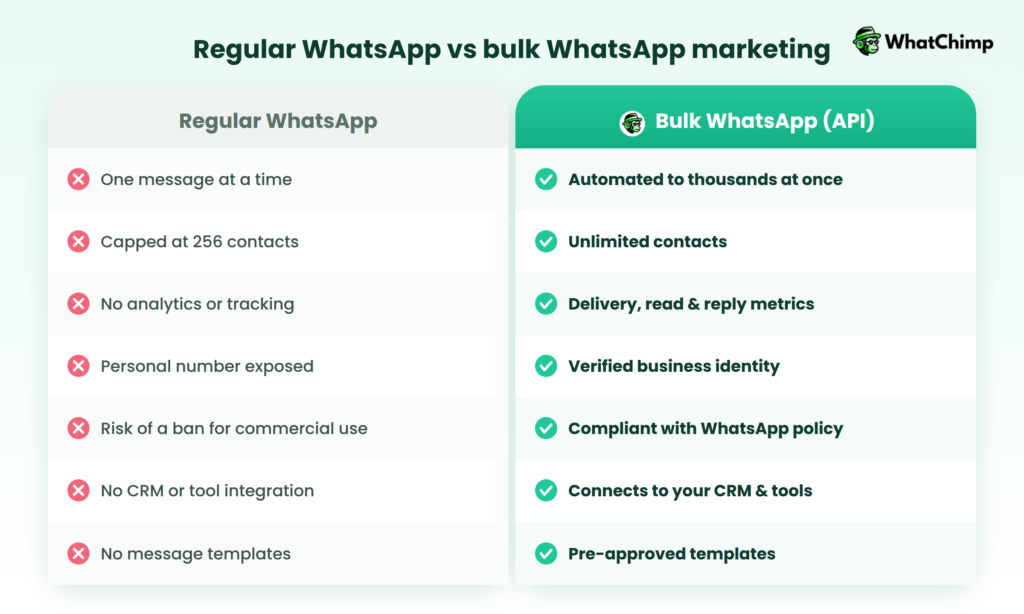
Regular WhatsApp is designed for personal conversations with friends and family.
Bulk WhatsApp marketing is engineered for scalable, compliant, and trackable business communication.
What Bulk WhatsApp Marketing Is NOT
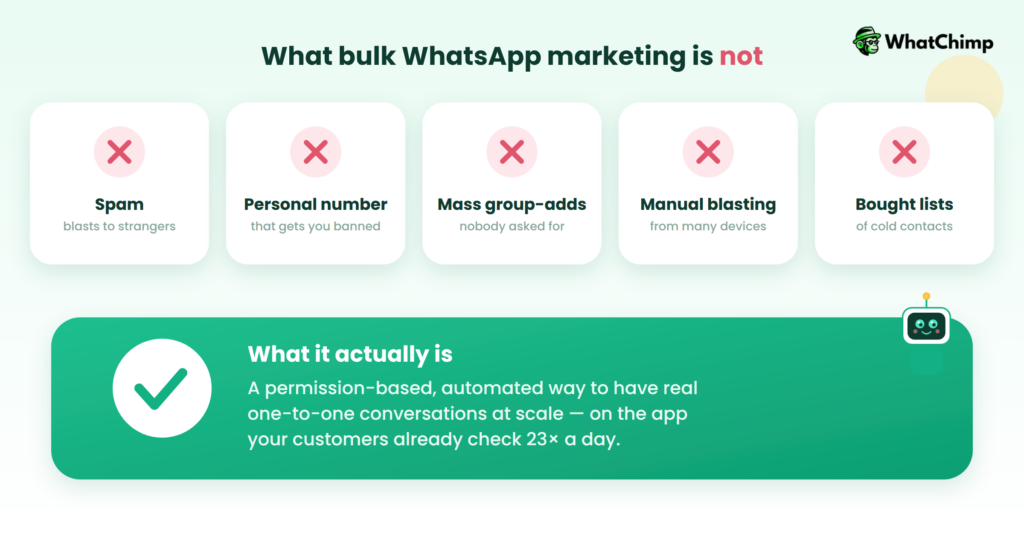
Let’s clear up some misconceptions:
❌ It’s NOT spam: Legitimate bulk WhatsApp marketing is permission-based and value-driven
❌ It’s NOT using your personal WhatsApp: That violates Terms of Service and risks permanent bans
❌ It’s NOT just adding people to groups: Unwanted group adds annoy customers and damage your brand
❌ It’s NOT sending from multiple devices manually: That’s inefficient and unsustainable
❌ It’s NOT buying contact lists and messaging strangers: That’s illegal in many jurisdictions and will get you banned
What it IS: A strategic, automated, and compliant way to have personalized, one-to-one conversations at scale with customers who want to hear from you, on the platform they use most.
Benefits of Bulk WhatsApp Marketing
If you’re still on the fence about whether bulk WhatsApp marketing deserves a spot in your marketing strategy, let’s talk numbers and results.
Here’s why businesses that adopt it early are leaving their competitors in the digital dust.
1. Incredible Open Rates: 98%+ Compared to Email’s 20%
Let’s start with the stat that makes email marketers cry into their coffee: WhatsApp messages have an open rate of 98% or higher. Yes, you read that right. Nearly every single message you send gets opened.
Compare that to email marketing, where:
- Average open rates hover around 21.5% across industries
- B2B emails struggle to break 15-18%
- Your carefully created campaigns compete with 100+ other emails daily
- Spam filters devour your messages before they even have a chance
Why the massive difference?
WhatsApp is intimate and immediate. When your phone buzzes with a WhatsApp notification, you check it often within 90 seconds.
It’s where people chat with friends, family, and increasingly, their favorite brands.
There’s no spam folder, no promotion tab burying your message, and no algorithms deciding who sees what.
2. Direct and Personal Communication
WhatsApp creates a one-to-one conversation feel, even when you’re messaging thousands.
Unlike social media posts that scream into the void or emails that feel like corporate broadcasts, WhatsApp messages land in the same place where customers chat with their closest contacts.
This personal touch translates to:
- Higher trust: Messages feel like they’re coming from a trusted source, not a faceless corporation
- Conversational tone: You can write naturally, as if talking to a friend (while staying professional)
- Two-way dialogue: Customers can reply directly, ask questions, or provide feedback turning monologue marketing into genuine conversations
- Relationship building: Regular, valuable WhatsApp communication strengthens customer relationships in ways email never could
Example in action:
A boutique hotel uses WhatsApp to send pre-arrival messages to guests: “Hi Sarah! We’re so excited to welcome you tomorrow. I’m Maya from the front desk. Quick question: would you like us to arrange a surprise birthday setup in your room? 🎂”
This personal touch has increased their upsell conversion and guest satisfaction.
3. Exceptional Cost-Effectiveness
While your competitors burn through marketing budgets on expensive Facebook ads, Google clicks, and direct mail campaigns, WhatsApp offers astonishing ROI at a fraction of the cost.
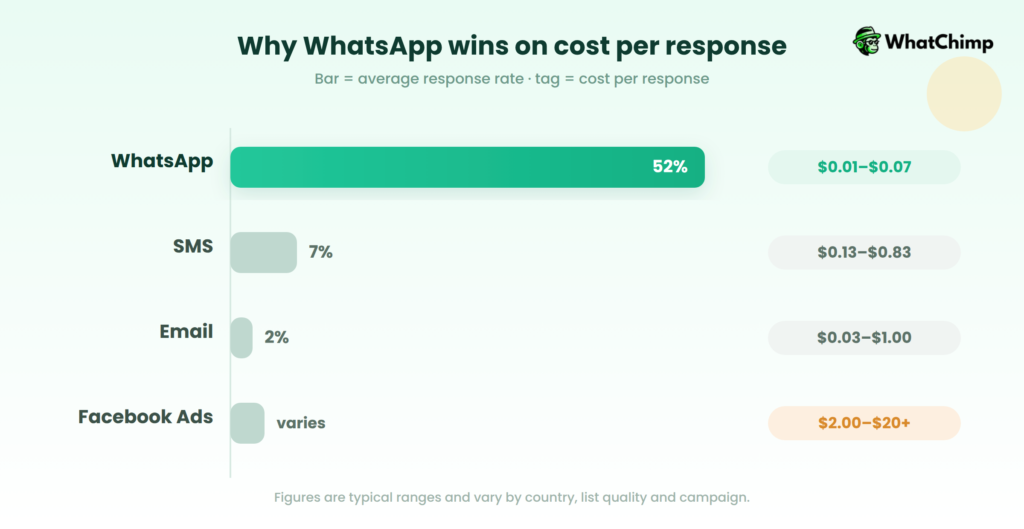
Cost comparison breakdown:
| Channel | Average Cost per Message | Typical Response Rate | Cost per Response |
| $0.005 – $0.03 | 45-60% | $0.01 – $0.07 | |
| SMS | $0.01 – $0.05 | 6-8% | $0.13 – $0.83 |
| $0.001 – $0.01 | 1-3% | $0.03 – $1.00 | |
| Facebook Ads | $0.50 – $2.00 per click | Varies widely | $2.00 – $20.00+ |
The math is simple: WhatsApp costs pennies per message but delivers engagement rates that premium channels can’t match.
Beyond message costs:
- No design costs: Text-based messages work perfectly (though multimedia is available)
- Less content creation: Short, conversational messages perform best
- Lower customer acquisition cost: Existing customers willingly opt-in to your WhatsApp list
- Reduced support costs: Quick WhatsApp responses prevent expensive phone calls and lengthy email threads
4. Instant Delivery and Real-Time Engagement
In today’s world, timing is everything. The difference between a customer buying from you or your competitor can be measured in minutes, not days.
WhatsApp delivers instantly:
- Messages arrive in seconds, not hours
- 90% of messages are read within 3 minutes of delivery
- Customers respond 7x faster on WhatsApp than email
- Perfect for time-sensitive offers, flash sales, and urgent updates
This immediacy creates urgency that drives action. Email that sits unread for 6 hours has lost its power.
WhatsApp strikes while the iron is hot.
5. Rich Multimedia Capabilities
Unlike SMS (limited to 160 characters of plain text), WhatsApp lets you send a full multimedia experience that engages multiple senses and communication styles:
📸 Images
🎥 Videos (up to 16 MB)
📄 Documents (PDF, Word, Excel)
🎵 Audio Messages
📍 Location Sharing
🔗 Clickable Links
Different customers prefer different content formats. Some respond to visuals, others to text, still others to video. WhatsApp lets you cater to all learning and engagement styles in one message.
This multi-format approach increased their consultation bookings by 156% compared to text-only emails.
6. Superior Customer Engagement and Response Rates
Here’s where WhatsApp truly shines: people actually respond.
The engagement numbers:
- Average response rate: 45-60% (vs. 6% for email)
- Average reply time: Under 5 minutes
- Click-through rates: 30-50% on links (vs. 2-5% for email)
- Conversion rates: 3-5x higher than other digital channels
Why engagement is so high:
✅ Conversational format encourages replies
✅ Push notifications ensure visibility
✅ Easy to respond – no forms to fill, just type and send
✅ Mobile-first – perfectly optimized for on-the-go interactions
✅ Two-way communication feels natural and expected
7. Truly Global Reach
WhatsApp is dominant in most of the world. With over 2.78 billion active users across 180+ countries, it’s the communication backbone of entire continents.
🌍 Markets where WhatsApp is #1:
- India: 535+ million users
- Brazil: 147+ million users
- Mexico: 85+ million users
- Indonesia: 84+ million users
- Europe: Dominant in Spain, Italy, Germany, UK
- Africa: Primary communication tool across the continent
- Middle East: Over 90% smartphone penetration
What this means for your business:
- International expansion made easy
- No language barriers (with translation tools)
- No international SMS fees
- Cross-timezone campaigns
These are examples of industries and situations where communication systems like SMS, email, WhatsApp notifications, push notifications, or automated messaging are commonly used.
Best Practices for Bulk WhatsApp Marketing
Bulk WhatsApp marketing means sending promotional, informational, or customer engagement messages to many users through WhatsApp.
Because WhatsApp is a personal messaging platform, businesses must use it carefully and professionally. Poor practices can lead to:
- users blocking the business,
- spam reports,
- account restrictions,
- low engagement.
These best practices help improve:
- customer trust,
- response rates,
- and marketing effectiveness.
1. Obtain Explicit Consent (Opt-In Requirements)
This is the MOST important rule in WhatsApp marketing.
Businesses should send messages only to users who have:
- clearly agreed,
- subscribed,
- or voluntarily shared permission.
This is called Opt-in.
Why It Matters
Without consent:
- messages feel like spam,
- users get irritated,
- WhatsApp may ban the account.
Examples of Opt-In
Customers may:
- tick a checkbox on a website,
- submit a WhatsApp subscription form,
- send a message first,
- agree during registration.
Example
“Would you like to receive updates and offers on WhatsApp?”
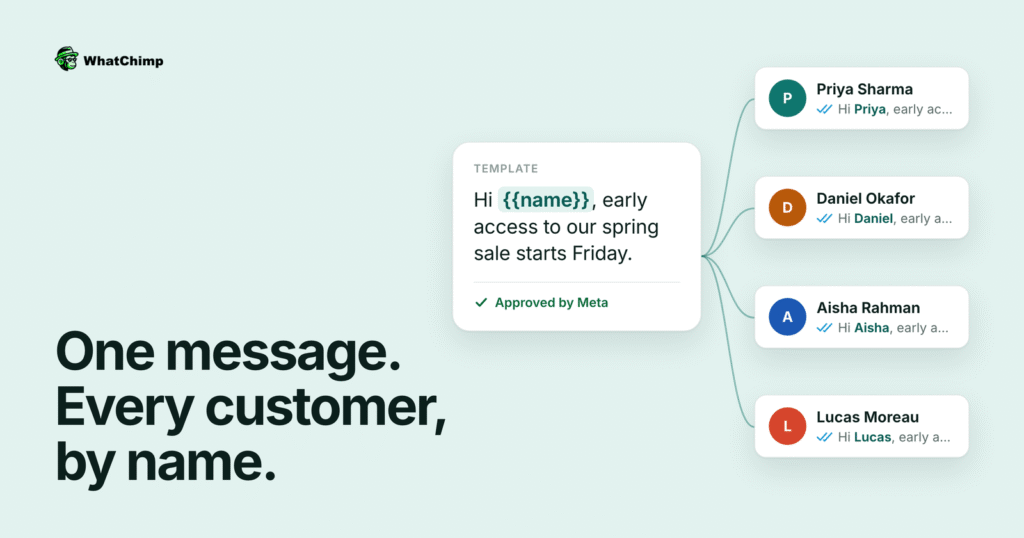
2. Personalize Messages
People respond better when messages feel relevant and human.
Avoid:
- robotic,
- generic,
- mass-produced texts.
Personalization Can Include:
- Customer name
- Purchase history
- Interests
- Location
- Previous interactions
Example
Instead of:
“Big sale today!”
Use:
“Hi Rahul, your favorite sneakers are now 30% off.”
3. Timing and Frequency Considerations
Even useful messages become annoying if sent:
- too often,
- or at inappropriate times.
Best Practices
Avoid:
- late-night messages,
- excessive daily promotions,
- message flooding.
Ideal Timing
Send messages:
- during business hours,
- when users are active,
- at reasonable intervals.
Why This Matters
Too many messages lead to:
- user frustration,
- blocks,
- unsubscribes.
4. Keep Messages Concise and Valuable
WhatsApp users prefer:
- short,
- clear,
- meaningful messages.
Long paragraphs often get ignored.
Good Marketing Message Characteristics
- Brief
- Relevant
- Action-oriented
- Easy to read
Example
“Flash Sale Today! Get 40% off on electronics. Offer ends at midnight.”
Simple and effective.
5. Include Clear CTAs (Call-To-Action)
A CTA tells users:
what they should do next.
Without a CTA, users may read the message but take no action.
Common CTAs
- Shop Now
- Book Today
- Register Here
- Reply YES
- Claim Offer
- Learn More
Example
“Book your free consultation today. Reply ‘BOOK’ to get started.”
6. Provide Easy Opt-Out Options
Users should always have a simple way to stop receiving messages.
This is both:
- ethical,
- and professional.
Examples
“Reply STOP to unsubscribe.”
or
“Type UNSUBSCRIBE anytime.”
Why This Is Important
It:
- respects customer choice,
- reduces complaints,
- improves brand reputation.
How to Get Started with Bulk WhatsApp Marketing Using WhatChimp (Step-by-Step)
Ready to launch your first bulk WhatsApp marketing campaign?
WhatChimp makes it surprisingly simple even if you’ve never used the WhatsApp Business API before.
Most businesses are up and running in under 15 minutes, with some taking just a day to go from setup to first campaign.
This comprehensive guide will walk you through every step, from creating your account to sending your first broadcast message.
Let’s turn WhatsApp into your most profitable marketing channel.
Before You Begin: What You’ll Need
Make sure you have these ready before starting:
✅ A dedicated phone number (not currently on WhatsApp)
✅ Facebook Business Manager account (free to create)
✅ Business verification documents (business registration, website, or official documents)
✅ Payment method (credit/debit card for Meta’s API charges)
✅ Your business logo and description (for WhatsApp profile)
✅ Contact list with permission (customers who’ve opted in)
📌 Important Note
Use a new phone number that has never been registered on the regular WhatsApp Messenger or the WhatsApp Business App. If you’re currently using a number on WhatsApp, you’ll need to migrate it to the WhatsApp Business API or obtain a new dedicated phone number for API use.
Step 1: Create Your Free WhatChimp Account
Time Required: 2-3 minutes
How to Sign Up:
- Visit WhatChimp’s website: Go to whatchimp.com
- Click “Create Free Account” or “Start 7-Days Free Trial”
- Fill in your details:
- First Name
- Last Name
- Email Address
- Phone Number
- Create a password
- Verify your email by clicking the confirmation link sent to your inbox
- Log in to your dashboard.
(Screenshot of Whatchimp Dashboard)
What You Get:
- ✅ 7-day free trial (no credit card required)
- ✅ Access to all features
- ✅ Meta Business Partner benefits
- ✅ 0% markup on API fees
Step 2: Connect Your WhatsApp Number to WhatChimp
Time Required: 10-15 minutes
This is the most critical step. WhatChimp provides a smart setup wizard that adapts to your situation whether you’re brand new, reconnecting, or switching from another provider.
Choose Your Setup Path:
WhatChimp offers three guided setup flows:
🆕 Setting up for the first time
Choose this if you’re brand new to WhatsApp Business API
🔄 Reconnecting my number
Choose this if you previously used WhatChimp and need to reconnect
🔀 Switching from another provider
Choose this if you’re migrating from Interakt, WATI, AiSensy, or other platforms
Connect Your WhatsApp Account:
- Access the Setup Wizard from your WhatChimp dashboard
- Click “Connect WhatsApp” to begin Meta’s embedded signup
- Log in with your Facebook account that’s linked to your Business Manager
- Select or create a Facebook Business Manager:
- If you already have one, select it
- If not, create one (it’s free and takes 2 minutes)
- Choose your WhatsApp Business Account:
- Create a new WhatsApp Business Account
- Give it a name (e.g., “Your Business Name – WhatsApp”)
- Add your phone number:
- Enter the dedicated phone number you’ll use
- Choose verification method: SMS or Voice Call
- Enter the 6-digit code you receive
- Grant permissions to WhatChimp to manage your WhatsApp account
- Complete the connection by clicking “Finish”
✅ Success! Your WhatsApp number is now connected to WhatChimp
(Add relevant screenshots at every step)
Step 3: Set Up Payment Method with Meta
Time Required: 5 minutes
Meta (Facebook) charges for WhatsApp conversations, and you pay them directly (WhatChimp adds 0% markup). You need to add a payment method so your messages keep flowing.
How to Add Payment:
- Go to your Facebook Business Manager at business.facebook.com
- Navigate to Business Settings → Payments
- Click “Add Payment Method”
- Enter your credit or debit card details:
- Card number
- Expiration date
- CVV/Security code
- Billing address
- Set spending limits (optional but recommended):
- Daily limit
- Monthly limit
- Save your payment method
💡 Pro Tip
Meta charges per 24-hour conversation window, not per individual message. Once a conversation starts, you can send unlimited messages within that 24-hour period at no additional cost.
Pricing Reference:
- Marketing conversations: ~$0.0384 per conversation (India)
- Utility conversations: ~$0.0157 per conversation (India)
- Service conversations: FREE when customer messages first
Prices vary by country. Check Meta’s official pricing for your region.
Step 4: Verify Your Facebook Business Manager
Time Required: 1-3 business days (for Meta’s review)
Business verification unlocks higher messaging limits and shows customers your business is legitimate with a verified green checkmark.
Why Verify?
✅ Increased messaging limits (start at 1,000 conversations/day, scale up to unlimited)
✅ Green verified badge on your WhatsApp profile
✅ Better deliverability rates
✅ Access to advanced features
✅ Builds customer trust
How to Verify:
- Go to Facebook Business Manager → Business Settings → Security Center
- Click “Start Verification”
- Choose verification method:
- Business documents (most common): Upload business registration, tax documents, or utility bills
- Phone number verification
- Domain verification (if you have a business website)
- Upload required documents:
- Business registration certificate
- Tax registration (GST, VAT, EIN, etc.)
- Utility bill with business address
- Bank statement with business name
- Submit for review
- Wait for Meta’s approval (usually 1-3 business days)
💡 Pro Tip
Make sure your documents clearly show:
- Your business name (matching your Facebook Business Manager)
- Business address
- Registration or incorporation date
- Official stamps or signatures
Step 5: Set Up Your WhatsApp Business Profile
Time Required: 5 minutes
Make your WhatsApp profile look professional and trustworthy. This is what customers see when they interact with you.
What to Add:
- Log in to WhatChimp Dashboard at app.whatchimp.com
- Go to Settings → WhatsApp Profile (or similar section)
- Upload your business logo as profile picture:
- Recommended size: 640×640 pixels
- Format: JPG or PNG
- Square format works best
- Write a compelling business description:
- Keep it under 139 characters
- Include what you do and your value proposition
- Example: “Premium organic skincare delivered to your door 🌿 | Free shipping on orders over $50 | Shop now!”
- Add your business website URL:
- Your main website
- Or a specific landing page for WhatsApp visitors
- Add business address (if you have a physical location)
- Set business category (e.g., E-commerce, Healthcare, Education)
- Add business hours (when customers can expect responses)
- Save changes
✅ Your WhatsApp business profile is now complete and professional!
Step 6: Build Your Contact List (The Right Way)
Time Required: Varies based on your source
You can’t just import any random contacts and start messaging. You MUST have explicit consent from every person on your list to avoid being banned and comply with regulations.
How to Build a Compliant Contact List:
Option 1: Upload Existing Contacts
If you have customers who’ve already opted in (through your website, forms, or previous communications):
- Prepare your contact list in CSV or Excel format:
- Columns: Name, Phone Number (with country code), Email (optional), Tags (optional)
- Example: John Smith, +91987653210, john@email.com, VIP Customer
- Go to WhatChimp Dashboard → Subscribers or Contacts
- Click “Import Contacts” or “Upload CSV”
- Map your columns to WhatChimp’s fields
- Add tags or segments (optional but recommended)
- Upload and verify
Option 2: Collect New Opt-Ins
Create opt-in mechanisms to grow your list:
🌐 Website Popup/Form:
- Add a WhatsApp opt-in checkbox to your signup forms
- Text: “Yes, I’d like to receive updates on WhatsApp”
📱 Click-to-WhatsApp Ads:
- Run Facebook/Instagram ads that open WhatsApp directly
- When someone messages you, they’re automatically opted in
🛍️ E-commerce Checkout:
- Add WhatsApp notification opt-in at checkout
- Shopify/WooCommerce integration makes this automatic
📄 QR Codes:
- Generate WhatsApp QR codes for offline marketing
- Customers scan to start a conversation (automatic opt-in)
💡 Pro Tip
Keep records of where and when customers opted in. This protects you if anyone reports your messages as spam.
Step 7: Create Your First Message Template
Time Required: 5-10 minutes (+ approval time)
WhatsApp requires businesses to use pre-approved message templates for marketing messages. This ensures quality and prevents spam.
How to Create a Template:
- Go to WhatChimp Dashboard → Templates → Create New Template
- Choose template category:
- Marketing: Promotions, offers, new products
- Utility: Order updates, appointments, account notifications
- Authentication: OTPs, verification codes
- Name your template:
- Use descriptive names: flash_sale_weekend, order_confirmation, cart_reminder
- Only lowercase, numbers, and underscores allowed
- Select language (e.g., English, Hindi, Spanish)
- Write your message:
- Use variables for personalization: {{1}} for first name, {{2}} for custom fields
- Keep it clear, valuable, and compliant
- Include your brand name
- Add clear call-to-action
- Add buttons (optional):
- Call-to-action button: “Shop Now”, “Book Appointment”
- Quick reply buttons: “Yes”, “No”, “Learn More”
- Submit for approval
⏱️ Approval Time: WhatChimp gets templates approved in as little as 10 seconds (yes, really!) thanks to their Meta Business Partner status. Other platforms can take hours or days.
Step 8: Segment Your Audience
Time Required: 10 minutes
Don’t send the same message to everyone. Segmentation increases engagement by 25%+ and reduces opt-outs.
How to Segment:
- Go to WhatChimp Dashboard → Subscribers → Segments or Tags
- Create segments based on:
- Purchase history: VIP customers, first-time buyers, repeat buyers
- Location: City, state, country
- Interests: Product categories they’ve browsed
- Engagement level: Highly engaged, moderately engaged, inactive
- Customer lifecycle: New leads, active customers, churned customers
- Apply tags to contacts:
- Add tags manually during import
- Auto-tag based on chatbot interactions
- Tag via API integration with your CRM
Example Segments:
- high_value_customers: Spent over $500 in last 6 months
- cart_abandoners: Added items but didn’t complete purchase
- new_subscribers: Joined in last 30 days
- mumbai_customers: Location-based targeting
Step 9: Launch Your First Broadcast Campaign
Time Required: 5 minutes
Everything is set up. It’s time to send your first bulk WhatsApp message!
How to Send a Broadcast:
- Go to WhatChimp Dashboard → Broadcast or Campaigns
- Click “Create New Broadcast”
- Name your campaign:
- Example: “Weekend Flash Sale – May 2026”
- Select your approved message template
- Choose your audience:
- Select specific segments or tags
- Or choose “All Subscribers”
- Preview total recipients
- Personalize variables:
- Map {{1}} to “First Name” field
- Map {{2}} to custom data (order number, discount code, etc.)
- Schedule or send immediately:
- Send now: Instant delivery
- Schedule: Choose date and time (consider customer time zones!)
- Preview your message to check personalization
- Click “Send Broadcast” or “Schedule Broadcast”
🎉 Congratulations! Your first bulk WhatsApp campaign is live!
Step 10: Track Performance and Optimize
Time Required: Ongoing
The beauty of WhatChimp is the real-time analytics. You’ll see exactly how your campaign performs.
Go to WhatChimp Dashboard → Analytics or Campaign Reports
Advanced Features to Explore Next
Once you’ve mastered basic broadcasts, unlock WhatChimp’s advanced capabilities:
Chatbot Automation
- Set up auto-responses for FAQs
- Qualify leads automatically
- Guide customers through purchase decisions
- No coding required!
API & Webhook Integration
- Connect with Shopify, WooCommerce, or custom platforms
- Trigger automated messages based on customer actions
- Sync data with Google Sheets or your CRM
Multi-Agent Live Chat
- Add team members to handle customer conversations
- Automatic routing based on department or availability
- Shared inbox for collaboration
WhatsApp Forms
- Collect customer information directly in WhatsApp
- No external landing pages needed
- Seamless user experience
Product Catalog
- Showcase products within WhatsApp
- Let customers browse and inquire
- Perfect for e-commerce brands
Drip Campaigns
- Set up automated message sequences
- Nurture leads over time
- Welcome series, onboarding flows, re-engagement campaigns
The WhatsApp marketing revolution is here.
And with WhatChimp, you’re equipped with the most affordable, powerful, and compliant platform to dominate this channel.
Questions? Stuck on a step? Drop a message to WhatChimp support and we’re incredibly responsive and genuinely want you to succeed.
Now go send that first campaign and watch those engagement rates soar! 🚀
Conclusion
You now have everything you need to harness the power of bulk WhatsApp marketing.
We’ve covered the fundamentals: what bulk WhatsApp marketing is, how it works through the Business API, why platforms like WhatChimp make setup effortless in under 15 minutes, and when to use WhatsApp over email, SMS, or social media.
The data is clear: while your competitors burn budgets on declining email open rates and expensive ads, early WhatsApp adopters are building direct, permission-based relationships that compound in value over time.
This is a strategic asset that touches every part of your customer journey, from first contact to repeat purchase.
The opportunity window won’t stay open forever.
Your customers are already on WhatsApp, checking it 23+ times daily and preferring it over every other communication method.
The platforms are ready, the costs are low (starting at just $12/month with WhatChimp’s 0% markup), and the setup takes less time than your next team meeting.
Don’t let this be another guide you read and forget—your competitors won’t.
Take action today: Sign up for a free trial at whatchimp.com, follow the simple onboarding wizard, and send your first broadcast campaign this week.
A year from now, you’ll either wish you had started today, or you’ll be celebrating the direct line you built to thousands of engaged customers.
The conversation starts now. Which side of that equation will you be on?
FAQs (Frequently Asked Questions)
1. Is bulk WhatsApp marketing legal?
Yes, bulk WhatsApp marketing is completely legal when done correctly. The key is following both WhatsApp’s policies and your country’s data protection regulations.
What Makes It ILLEGAL:
❌ Messaging people without their permission
❌ Buying contact lists and messaging strangers
❌ Using unofficial WhatsApp mods or automation tools
❌ Not providing opt-out options
❌ Sending spam or misleading content
❌ Violating data privacy regulations
If you use the official API, obtain proper consent, respect privacy laws, and provide value, bulk WhatsApp marketing is 100% legal and endorsed by Meta (WhatsApp’s parent company).
2. How much does bulk WhatsApp marketing cost?
Bulk WhatsApp marketing costs depend on two factors: platform fees and Meta’s conversation charges. Total cost typically ranges from $50-$500/month for small to medium businesses.
Cost Breakdown:
| Platform | Starting Price | What’s Included |
| WhatChimp | $12/month | Access to platform, 0% markup on Meta fees, unlimited messages, chatbot, analytics |
| AiSensy | ~$50-100/month | Custom pricing based on conversation volume |
| WATI | ~$30-50/month | Team inbox, automation, basic features |
| Interakt | Custom pricing | Full-stack features, varies by business size |
| Kwik Engage | Custom pricing | Revenue-based pricing for D2C brands |
3. Can I use regular WhatsApp for bulk marketing?
No, you absolutely cannot—and shouldn’t—use regular WhatsApp for bulk marketing. Here’s why:
Why Regular WhatsApp Won’t Work:
❌ Against Terms of Service
❌ Broadcast Limit
❌ No Analytics
❌ Manual & Time-Consuming.
❌ Risk of Ban
❌ Looks Unprofessional
❌ No Automation
❌ No Template Approval
What You SHOULD Use:
✅ WhatsApp Business App (Free): Good for small businesses with under 100 customers, basic features, but still limited to 256 contacts in broadcasts.
✅ WhatsApp Business API (Paid): Required for true bulk marketing—unlimited contacts, automation, analytics, integrations, full compliance. Access it through platforms like WhatChimp.
People have tried using regular WhatsApp with third-party “bulk sender” tools found online.
Here’s what happens:
- Your account gets detected within days or weeks
- WhatsApp permanently bans your phone number
- You lose access to your personal WhatsApp conversations
- Your business number gets blacklisted
- You may face legal consequences for ToS violations
4. What’s the difference between WhatsApp Business and WhatsApp Business API?
WhatsApp offers two distinct business solutions, and understanding the difference is crucial for choosing the right one.
Quick Comparison:
| Feature | WhatsApp Business App | WhatsApp Business API |
| Cost | FREE | Paid (platform fees + Meta conversation charges) |
| Best For | Small businesses, solopreneurs | Medium to large businesses, serious marketers |
| Contact Limit | 256 in broadcast lists | Unlimited (truly scalable) |
| Setup | Download app, 5 minutes | Apply through BSP, 15-30 minutes |
| Messaging | Manual sending | Automated bulk messaging |
| Multi-User Access | No (single device only) | Yes (multiple team members) |
| Analytics | Basic message stats | Detailed delivery, read, response, conversion tracking |
| Integrations | None | CRM, e-commerce, helpdesk, custom APIs |
| Chatbots | No | Yes (advanced automation) |
| Message Templates | Quick replies (basic) | Approved templates for marketing |
| Business Profile | Basic | Enhanced with verification badge |
| Verification | No verification badge | Green verified checkmark available |
5. How do I get customer consent for WhatsApp marketing?
Customer consent is the foundation of legal, effective WhatsApp marketing. Here’s exactly how to collect it properly:
Explicit, documented, opt-in consent means customers actively chose to receive WhatsApp messages from you. It must be:
- Clear (they know what they’re signing up for)
- Specific (permission for WhatsApp, not just general contact)
- Voluntary (not forced or pre-checked boxes)
- Documented (you can prove when and where they consented)
Important: Email opt-in does NOT equal WhatsApp opt-in. You need separate permission.
Keep records of:
- ✅ Date and time of consent
- ✅ Method of consent (website form, in-person, ad click, etc.)
- ✅ Specific language shown to customer
- ✅ IP address (for online opt-ins)
- ✅ Any associated transaction or interaction
Why? If someone reports spam, you need proof they consented.