WhatsApp OTP: how it works, the real message sample, India pricing and setup
WhatsApp OTP explained: the exact message Meta allows, the ₹0.1150 India rate, copy code vs one-tap vs zero-tap, setup steps and fixes for codes that don't


On this page
What this guide covers
- Key takeaways
- What is a WhatsApp OTP?
- How does WhatsApp OTP verification work?
- What does a WhatsApp OTP message sample actually look like?
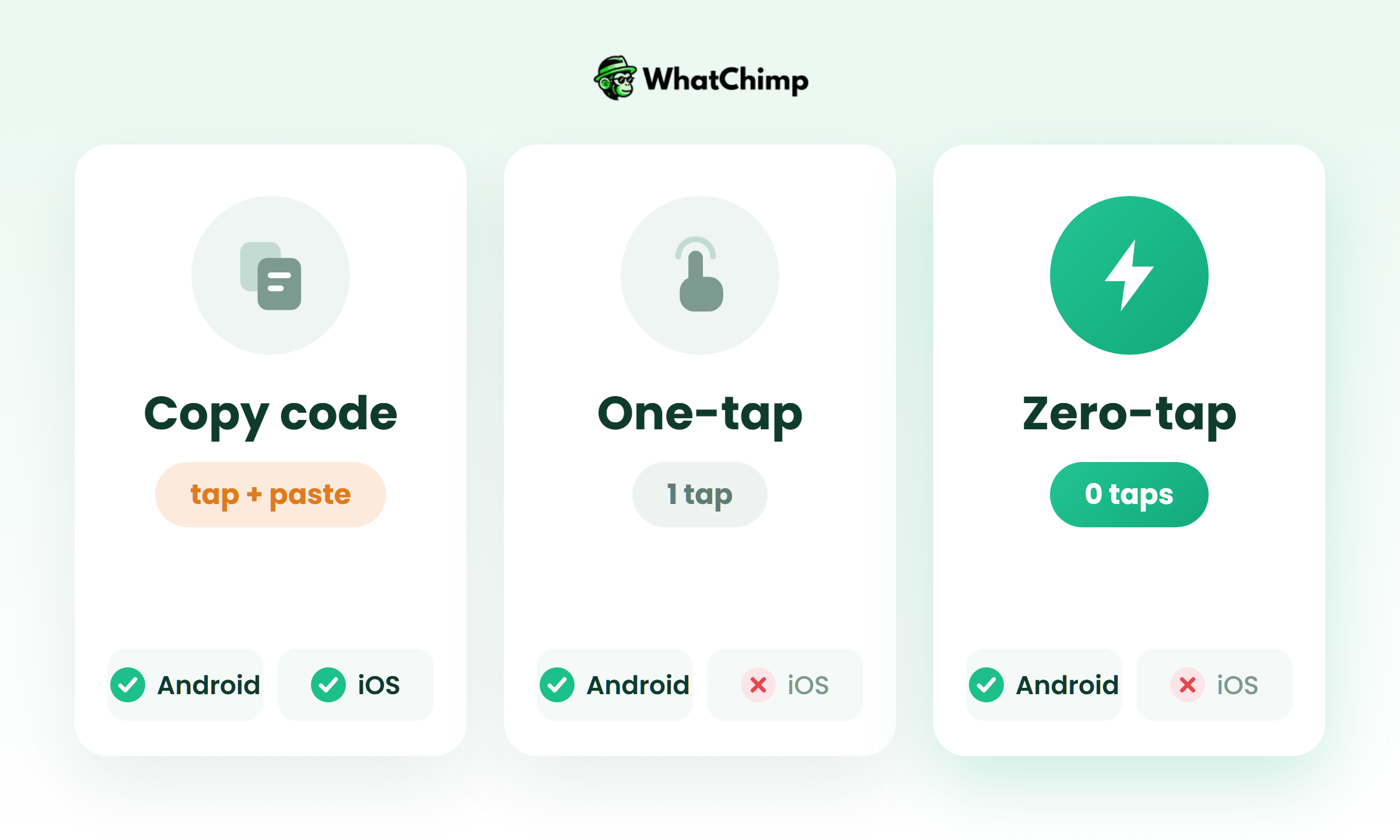
- Copy code, one-tap or zero-tap: which button should you use?
- How much does it cost to send OTP via WhatsApp in India?
- Is WhatsApp better than SMS for OTPs?
- How to send OTP via WhatsApp, step by step
- Why isn’t my OTP arriving on WhatsApp?
- Security rules for your OTP codes
- Sending OTPs with WhatChimp
- Conclusion
- FAQs
Key takeaways
- Meta fixes the wording of every WhatsApp OTP, so the message always reads “123456 is your verification code.” with an optional security line and an optional expiry line.
- In India, Meta charges ₹0.1150 per delivered authentication message from October 1, 2026, which works out to ₹1,150 for 10,000 codes before GST and platform fees.
- You pick one of three buttons: copy code, one-tap autofill or zero-tap, and zero-tap only works on Android.
- Your own backend creates and checks the code; WhatsApp only delivers it, so expiry and attempt limits are your job.
- Keep SMS as a fallback for users who don’t have WhatsApp or whose code doesn’t arrive in time.
What if I told you 10,000 login codes on WhatsApp cost you ₹1,150 in Meta fees?
You’d probably think I’m leaving out a zero.
I’m not. That’s Meta’s own India rate card, and it’s why so many founders I talk to are looking at WhatsApp OTP for sign-ups, logins and checkout.
But here’s what usually happens next. You search for a sample message, copy something like “Hi Priya, your GlowCo code is 482913, happy shopping! 💄”, submit it, and Meta rejects it.
Then you start wondering whether the whole thing is worth the effort.
It is. You just need the real rules, and almost nobody publishes them.
In this guide I’ll show you the exact message Meta allows, what each button type does, what it really costs in rupees, how it compares with SMS, how to set it up and what to check when a code doesn’t show up.
Here’s the whole picture.
What is a WhatsApp OTP?
It’s a one-time password your business sends to a customer’s WhatsApp number so they can prove the number is theirs.
Same job as an SMS code. Different delivery route.
You’ll see it used for:
- Sign-up and phone number verification
- Login and two-step verification
- Password or account recovery
- Confirming a payment or a cash-on-delivery order
One thing to clear up early. When WhatsApp sends YOU a code to register your own WhatsApp account, that’s WhatsApp’s own registration code. This guide is about the codes your business sends to your customers.
Meta is strict here. If your app sends one-time passwords or verification codes on WhatsApp, Meta says it “must use an authentication template” (Meta’s authentication templates docs). That’s a special template category with its own rules and its own price.
How does WhatsApp OTP verification work?
Think of it as a relay between your server and Meta.
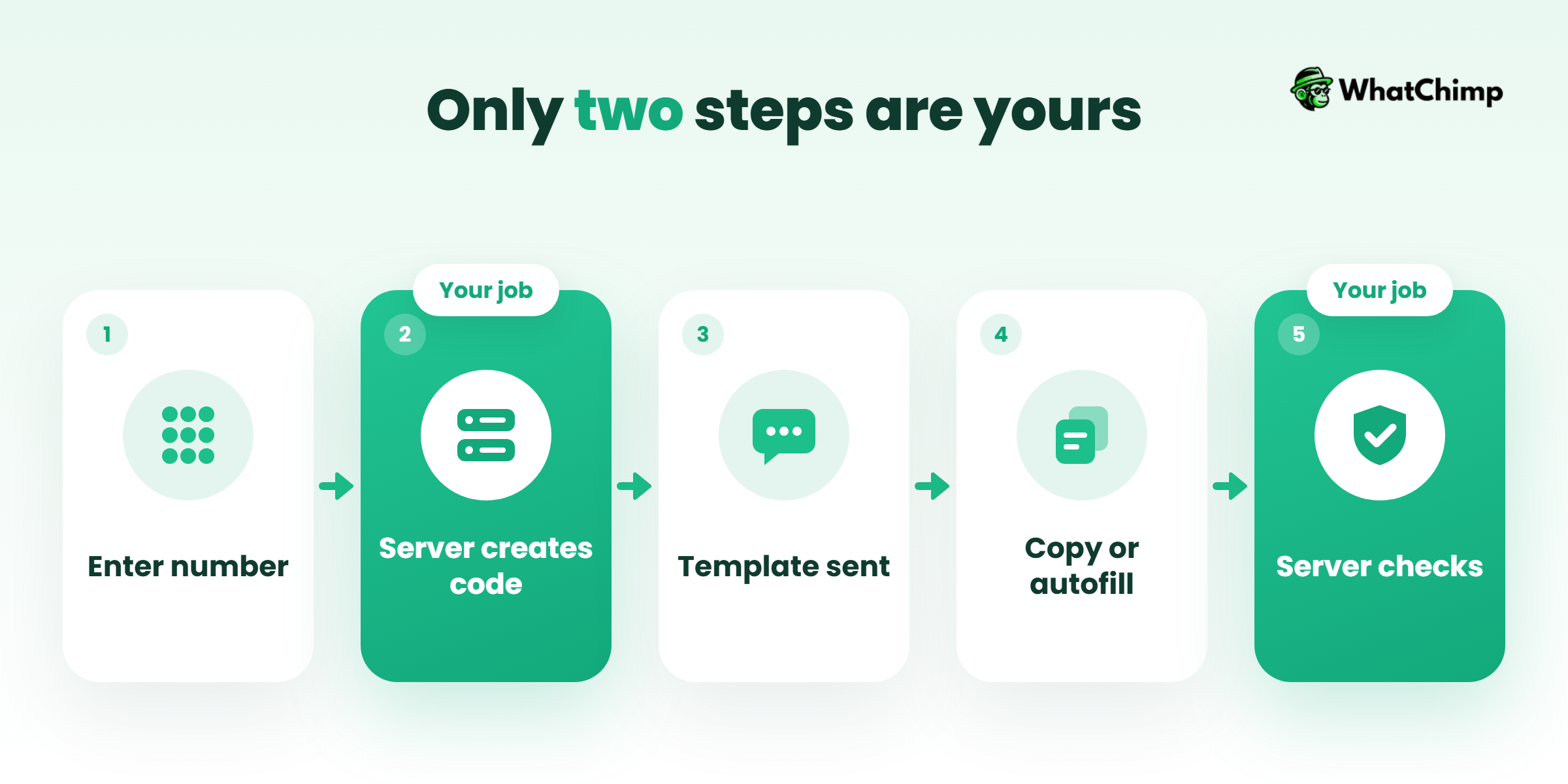
- Your customer types their phone number and taps “Send code”.
- Your backend generates a random code and saves it with an expiry time.
- Your backend calls a WhatsApp Business API provider to send the approved authentication template, with the code as the variable.
- The customer copies the code or it autofills.
- Your backend checks it against the saved code and lets them in.
Who creates and checks the code?
You do. Not Meta, and not your messaging provider.
This is the MOST important thing to get right when you plan the build. WhatsApp is the delivery pipe. Generating the code, storing it, expiring it and limiting wrong attempts all sit in your own system.
Example in action: Rahul runs a small edtech app. A student named Ananya enters her number at sign-up. Rahul’s server creates 739104, stores it for 5 minutes and sends the template. Ananya taps “Copy code”, pastes it, and Rahul’s server matches it. If she pastes it after 6 minutes, the server says no, even though the message is still sitting in her chat.
What does a WhatsApp OTP message sample actually look like?
Here’s the part most “sample” pages get wrong.
There’s basically one message. Meta writes the body text, and you can’t change it.

The fixed text Meta allows
According to Meta’s authentication template docs, every authentication message is built from these pieces:
| Part | Text | Required? |
|---|---|---|
| Body | “<code> is your verification code.” | Yes |
| Security line | “For your security, do not share this code.” | Optional |
| Expiry line (footer) | “This code expires in <N> minutes.” | Optional |
| Button | Copy code, one-tap autofill or zero-tap | One of these |
Meta’s own example reads: “{{1}} is your verification code. For your security, do not share this code.” with the footer “This code expires in 10 minutes.” and a “Copy code” button.
So a real message your customer sees looks like this:
“482913 is your verification code. For your security, do not share this code.”
“This code expires in 10 minutes.”
[Copy code]
Anatomy of the message
- Sender name and profile: this is where your brand shows up. The chat header carries your business name, so you don’t need it in the body.
- The code: up to 15 characters.
- Security line: a short warning, worth switching on.
- Expiry footer: anywhere from 1 to 90 minutes.
- Button: the button text can be up to 25 characters.
Those limits come from Meta’s copy code button page, which also says authentication templates don’t support URLs, media or emojis.
Why your branded sample gets rejected
Instead of:
“Hi Priya! Your GlowCo login code is 482913. Shop our Diwali sale at glowco.in 💄”
Use:
“482913 is your verification code. For your security, do not share this code.”
The first one has a name, a brand, a promo, a link and an emoji. Meta doesn’t allow any of those in the body. The second one is the only shape that gets approved.
Common myths about OTPs on WhatsApp
❌ “I can write my own OTP message like I do for SMS.” You can’t. The body is fixed.
❌ “I’ll add a login link so it’s one tap.” Links aren’t allowed in authentication templates.
❌ “Meta generates the code for me.” Your server generates and checks it.
❌ “Once it’s sent, it’s guaranteed to land.” Users without WhatsApp, expired messages and limits can all block it. More on that below.
✅ What you do control: the expiry, the security line, the button type, the language and your business name.
Copy code, one-tap or zero-tap: which button should you use?
This choice decides how many taps stand between your customer and checkout.
| Copy code | One-tap autofill | Zero-tap | |
|---|---|---|---|
| What the user does | Taps “Copy code”, pastes it in your app | Taps a button and the code fills in | Nothing, the code fills in by itself |
| Android | Yes | Yes | Yes |
| iOS | Yes | Through keyboard suggestions, on by default from iOS 26 | No, falls back to copy code |
| Extra work for you | None | App package name and signature hash | Same setup, plus Meta’s OTP Android SDK |
| Best for | Websites and quick launches | Android apps | Android apps chasing the fastest login |
Meta says “zero-tap is only supported on Android”, and other devices get a copy code button instead (Meta’s zero-tap docs). The older handshake method was deprecated after October 15, 2026, in favour of the SDK.
Pro tip: If you’re selling on a website or a Shopify store, start with copy code. It works everywhere and needs zero app work.
How much does it cost to send OTP via WhatsApp in India?
Since July 1, 2025, Meta charges per delivered message, based on the message category and the recipient’s country code (Meta pricing).
Authentication is one of those categories.
Meta’s India rate, effective October 1, 2026
| Category | Rate per delivered message |
|---|---|
| Authentication | ₹0.1150 |
| Authentication-international | ₹2.4971 |
| Utility | ₹0.1150 |
| Marketing | ₹0.8631 |
Authentication also gets volume tiers. They’re counted per business portfolio and reset every month.
| Messages per month | Rate | Discount |
|---|---|---|
| 0 to 750,000 | ₹0.1150 | List rate |
| 750,001 to 15M | ₹0.1081 | 6% off |
| 15M to 20M | ₹0.1012 | 12% off |
| 20M to 50M | ₹0.0943 | 18% off |
| 50M to 100M | ₹0.0874 | 24% off |
| 100M+ | ₹0.0805 | 30% off |
Source: Meta’s INR rates and volume tiers card, linked from the pricing page.
What that means for your monthly bill
| OTPs per month | Meta fees (before GST and platform fees) |
|---|---|
| 10,000 | ₹1,150 |
| 100,000 | ₹11,500 |
| 1,000,000 | About ₹1,13,275 (750,000 at ₹0.1150 plus 250,000 at ₹0.1081) |
Remember, you only pay for delivered messages.
Authentication-international: the rate global apps miss
If your company is based outside India and you send codes to +91 numbers, you may pay ₹2.4971 instead.
It only applies when all of these are true: your business sends more than 750K messages outside customer service windows in a moving 30-day period, your primary business location is in another country, and the message lands after that country’s start date. India’s start date was July 1, 2024. Meta also says you’re always charged the domestic rate for your own primary business location.
The INR billing deadline
Indian businesses that are eligible must move their messaging accounts to INR billing by December 31, 2026. From January 1, 2027, Meta stops delivering messages from their non-INR accounts.
If that’s you, sort it this month.
For a wider breakdown of categories and fees, see our WhatsApp Business API pricing guide.
Is WhatsApp better than SMS for OTPs?
Can’t you just stick with SMS?
Technically, yes. Practically, most teams end up using both.
| WhatsApp authentication | SMS OTP | |
|---|---|---|
| Billing | Per delivered message, published Meta rate card | Per message, set by your SMS vendor |
| Message wording | Fixed by Meta | Your own approved wording |
| Autofill | Copy code, one-tap or zero-tap | Depends on the phone |
| Brand in the chat | Business name in the chat header | Sender ID |
| Reach | Only users with WhatsApp on their number | Any phone with a SIM |
| Delivery window | You set a time-to-live, after which Meta stops trying | Depends on the carrier |
I’m deliberately not giving you an open-rate or “90% cheaper” figure here. The ones floating around are vendor claims without a country basis, and your savings depend on where your users are and what your SMS vendor charges you.
When to keep SMS as a fallback
Always, at least at the start.
Send on WhatsApp first. If your system doesn’t see a delivered status within a short window, or the user taps “Didn’t get it?”, send the same flow by SMS. The customer just wants to get in, and it doesn’t matter to them which pipe the code came through.
How to send OTP via WhatsApp, step by step
Step 1: Get WhatsApp Business API access
Time required: 15 to 30 minutes
- Sign up with a WhatsApp Business API provider.
- Click Connect WhatsApp and log in with your Meta business account.
- Add and verify the phone number your codes will come from.
- Set your display name and profile so your brand shows in the chat header.
What you get:
✅ A verified sender number on the WhatsApp Business API
✅ Access to template categories, including authentication
Step 2: Create an authentication template
Time required: 5 to 10 minutes
- Open your template manager and choose the Authentication category.
- Switch on the security line (“For your security, do not share this code.”).
- Switch on the expiry footer and set the minutes.
- Pick the button: copy code, one-tap or zero-tap.
- Choose the language and submit for approval.
Step 3: Set code expiry and time-to-live
Time required: 2 to 3 minutes
Two settings, and people mix them up.
Code expiry is what your footer says and what your backend enforces (1 to 90 minutes).
Time-to-live (TTL) is how long Meta keeps trying to deliver the message. The default is 10 minutes, and you can set anything from 30 seconds to 15 minutes. Meta advises setting it “preferably equal to or less than your code expiration time” (Meta’s TTL docs).
My default for logins: 5 minute expiry, 5 minute TTL. A code that arrives after it’s dead is just confusing.
Step 4: Send the template from your server
Time required: an hour or two for a developer
- Your backend generates the code.
- It calls your provider’s send-template API with the template name, the phone number and the code as the variable.
- It stores the code with its expiry and an attempt counter.
Keep the API key on your server, never in the app or the browser.
Step 5: Track delivery and fall back to SMS
Time required: 30 minutes
- Listen for message status updates from your provider.
- If there’s no delivered status in your window, trigger SMS.
- Log which channel worked so you can see your WhatsApp reach over time.
Why isn’t my OTP arriving on WhatsApp?
Here’s the checklist I’d run, in order.
- Template not approved: check its status. A paused or rejected template sends nothing.
- TTL expired: if the phone was offline longer than your TTL, Meta stops trying.
- User not on WhatsApp: the number has no WhatsApp account. Fall back to SMS.
- Wrong number format: send with the full country code, for example 91 followed by the 10 digits.
- Checking the wrong device: linked-device security is on by default on Cloud API, so authentication messages go only to the user’s primary phone. If your customer is looking at WhatsApp Web on their laptop, they won’t see it there.
- Messaging limit reached: new business portfolios start at 250 unique users outside a customer service window. That rises to 2,000 once you verify your business or send 2,000 delivered template messages in 30 days (Meta’s messaging limits).
Example in action: a clinic in Pune launches app logins on a Monday. By lunchtime, new patients stop getting codes. The template was fine. They’d just hit the 250 limit on a brand new portfolio. Verifying the business fixed it.
Security rules for your OTP codes
WhatsApp delivers the code. Keeping it safe is on you.
✅ Keep expiry short, 5 minutes is plenty for most logins
✅ Allow a few wrong attempts, then lock and ask for a new code
✅ Kill the old code the moment a new one is sent
✅ Rate-limit resends per number
❌ Never put the code or your API key in a URL
❌ Never log codes in plain text
Sending OTPs with WhatChimp
WhatChimp is WhatsApp marketing software built on the official WhatsApp Business API, and every plan includes the Developer API.
Our send-template API doc lists “Authentication: OTP and verification codes” as a template type. It’s meant for “notifications, order updates, appointment reminders, OTPs”. You call `https://app.whatchimp.com/api/v1/whatsapp/send` from your server and pass the code as `variable1` (WhatChimp API doc).
Here’s who does what:
| You build | WhatChimp handles |
|---|---|
| Generating and checking the code | Sending your approved template through the API |
| Expiry and attempt limits | Template management and outgoing webhooks |
| Your SMS fallback logic | Billing at Meta’s rates |
We charge 0% markup on Meta’s WhatsApp conversation fees, so ₹0.1150 stays ₹0.1150. You can check that against Meta’s card yourself. Plan prices are on our pricing page, and you don’t need a credit card to start.
Once the customer is in, the same number can carry on the conversation. Think COD confirmations through our Shopify integration or order updates with WhatsApp automations.
If your checkout is losing people at the SMS code step, try one login flow on WhatsApp this week and compare.
Conclusion
You now know the exact message Meta allows, which button suits your app, what each code costs in India and what to check when one goes missing.
Today, write down how many OTPs you sent last month and multiply by ₹0.1150. Then connect your number to WhatChimp and send your first authentication template from your server, with SMS kept as the backup.
So how many of your customers are already sitting in WhatsApp waiting for that code?
FAQs
Is a WhatsApp OTP code secure?
Yes, if your backend is set up properly. Authentication messages go only to the user’s primary phone by default, which stops them from showing up on linked laptops. You still need short expiry, attempt limits and resend limits on your side. And never pass the code through a URL.
Can I customise the WhatsApp OTP message?
No, not the body. Meta fixes it as “<code> is your verification code.” You can switch on the security line and the expiry footer, choose the button and the language, and your brand shows through your business name in the chat header.
How long should the code stay valid?
It should usually be 5 to 10 minutes. Meta lets you set expiry from 1 to 90 minutes and TTL from 30 seconds to 15 minutes. Keep TTL equal to or shorter than your expiry so a late message never carries a dead code.
Can I send OTPs to customers outside India?
Yes. You pay the rate for the recipient’s country code. If your business is based abroad and sends to Indian numbers, you may pay the authentication-international rate of ₹2.4971 once you meet Meta’s eligibility rules.
Can I add a link to the OTP message?
No. Authentication templates don’t allow these:
❌ URLs
❌ Images or other media
❌ Emojis
Does my customer need the WhatsApp app?
Yes. The number has to have a WhatsApp account, and the code goes to their primary phone. For everyone else, keep SMS as a fallback.
What does a WhatsApp OTP service cost in India?
Meta charges ₹0.1150 per delivered authentication message from October 1, 2026, with cheaper rates above 750,000 a month. Your provider may add platform fees or a markup on top, plus GST. With WhatChimp, Meta’s fee passes through at 0% markup.