WhatsApp bulk message sender: free vs official tools compared (2026)
Compare every WhatsApp bulk message sender type: free extensions, Business app lists and official API tools, with real limits, costs and ban risks.

On this page
What this guide covers
- Key takeaways
- What is a WhatsApp bulk message sender?
- The 3 types of bulk message sender for WhatsApp, and how each one sends
- Is there a free WhatsApp bulk message sender?
- Why do unofficial bulk senders get numbers banned?
- How does official-API bulk sending work?
- Best WhatsApp bulk message sender software compared
- How to choose a bulk sender: an 8-point checklist
- How to send bulk WhatsApp messages with WhatChimp
- How to send bulk WhatsApp messages without getting banned
- My number got banned using a bulk sender. What now?
- Conclusion
- FAQs
Key takeaways
- A WhatsApp bulk message sender comes in three kinds: the WhatsApp Business app’s own broadcast feature, unofficial extensions that automate WhatsApp Web, and software built on the official WhatsApp Business API.
- Unofficial extensions go against WhatsApp’s Terms of Service, which forbid “bulk messaging, auto-messaging, auto-dialing”, so an “anti-ban” setting can make a ban less likely but never makes the sending allowed.
- On the official API, a new business portfolio can reach 250 unique contacts a day, and that limit grows on its own up to unlimited as long as your messages stay high quality.
- On the API, Meta charges you for each delivered message, so pick a tool that adds 0% markup to Meta’s fees and charges a flat plan price.
- Get opt-ins and use approved templates before you send to anyone, because that’s what keeps your number healthy whichever tool you use.
What if I told you WhatsApp banned 54,70,958 Indian accounts in one month this year?
You’d probably think I’m exaggerating.
I’m not. That’s April 2026, as reported by Republic World from WhatsApp’s own IT Rules disclosure. Nearly 13.5 lakh of those accounts were removed before a single user complained.
Now think about where you are right now.
You’ve got 2,000 customers sitting in an Excel sheet. You searched for a whatsapp bulk message sender, found a free Chrome extension, and you’re one click away from installing it.
I get it. Saving 2,000 numbers one by one is nobody’s idea of a fun Tuesday.
WhatsApp doesn’t say how many of those bans came from bulk messaging. It does say clearly, in its own Terms of Service, that bulk messaging isn’t allowed on the regular apps. That’s what most “free” tools quietly skip over.
In this guide I’ll show you the three kinds of bulk sender, how each one actually sends, what each one costs you in money and in risk, and how to message thousands of customers without betting your number on it.
First, the basics.
What is a WhatsApp bulk message sender?
It’s a tool that sends one message to lots of people at once, so you don’t have to type or forward it to each person.
Most of them take a list from Excel or Google Sheets, drop each person’s name into the message and send. Some people still call this a WhatsApp bulk SMS sender, even though it has nothing to do with SMS.
All of them make the same promise. Underneath, though, there are three very different ways the sending actually happens.
How is it different from a group or a broadcast list?
A group shows every member to every other member. For customers that’s a privacy mess and an invitation to spam.
A broadcast list in the WhatsApp Business app sends each person a private copy. The catch is the long-standing broadcast rule: lists are small, and only people who have saved your number get the message.
A bulk sender tries to get around those limits. It does that either by automating WhatsApp Web (unofficial) or by sending through Meta’s WhatsApp Business Platform (official).
The 3 types of bulk message sender for WhatsApp, and how each one sends

1. Business app broadcasts: free, but small
This is built into the WhatsApp Business app. Meta has also started rolling out a “Business Broadcasts” feature that reaches people who haven’t saved your number, but only for eligible users in select countries.
It works fine for a neighbourhood shop with 80 regulars. It falls apart when you have 3,000.
2. WhatsApp Web extensions: quick to start, risky to keep
Rocket Sender, WA Sender, What-Sender and SheetWA’s extension all work the same basic way. They open WhatsApp Web in your browser and click send for you, chat after chat.
Rocket Sender’s page literally says “No API Required”.
That line tells you everything. If there’s no API, the tool is driving the consumer product, and the consumer product isn’t meant for bulk sending.
3. Official API software: built for volume, with rules
WhatChimp, AiSensy, Wati, Gallabox and DoubleTick all sit on the WhatsApp Business Platform. Your messages go through Meta’s systems, you start conversations with templates Meta has approved, and you pay for each message that gets delivered.
You get more rules. You also get permission.
Side by side
| Question | Business app broadcast | WhatsApp Web extension | Official API software |
|---|---|---|---|
| How it sends | From the app on your phone | Automates WhatsApp Web in your browser | Through Meta’s WhatsApp Business Platform |
| Daily reach | Small lists of people who saved you | Whatever you risk; free tiers allow only a few dozen a day | Starts at 250 unique contacts a day, scales to unlimited |
| Allowed by WhatsApp | Yes | No, it breaks the Terms of Service | Yes, with opt-in and templates |
| Ban risk | Low if people know you | High | Low, but quality ratings still apply |
| Cost | Free | Free tier, then a subscription | Plan fee plus Meta’s per-message rate |
| Personalisation | Manual | Name variables | Template variables, buttons, media |
| Reporting | Ticks only | Limited | Delivered, read and replies |
| Opt-in record | None | None | Required by policy |
Is there a free WhatsApp bulk message sender?
Technically, yes. Practically, free costs more than it looks.
What’s genuinely free
- ✅ Broadcast lists in the WhatsApp Business app, for small lists of people who’ve saved your number.
- ✅ Free tiers on extensions, usually capped at a few dozen messages a day before they ask you to upgrade.
So if you’re hunting for a whatsapp bulk message sender free of charge, those are your two options. Neither one gets 2,000 customers a Diwali offer by tonight.
The hidden cost is your number
Your WhatsApp number is your customer list, your chat history and every repeat order you’ve ever closed. Lose it and you start from zero.
Example in action: Priya runs a saree boutique in Jaipur. She installs a free whatsapp bulk message sender extension and sends “Diwali sale, 30% off everything, today only!” to 1,500 numbers from an old exhibition list. Half of those people don’t remember her. Some tap Report. Three days before Diwali, her number stops working.
That’s an example, but every shop owner I’ve talked to knows a Priya.
Even SheetWA, which sells one of these extensions, answers its own FAQ question “Does the premium version prevent WhatsApp bans?” with a no.
Why do unofficial bulk senders get numbers banned?
Because they break the rules WhatsApp has written down.
What WhatsApp’s rules actually say
The WhatsApp Terms of Service bar using the service to send “illegal or impermissible communications such as bulk messaging, auto-messaging, auto-dialing, and the like.”
That covers exactly what an extension does.
WhatsApp’s Business Messaging Policy sets the rules for the official route. You may only contact people who gave you their number and opted in to hear from you, and you may only start a conversation with an approved message template. The policy also says WhatsApp can cut off access for anyone “messaging people at scale in an unauthorized manner.”
Why “anti-ban” mode doesn’t make it allowed
Extensions sell random delays, simulated typing and batch sending. All of that tries to make automation look human.
It’s still automation. And none of it stops a confused recipient from tapping Report.
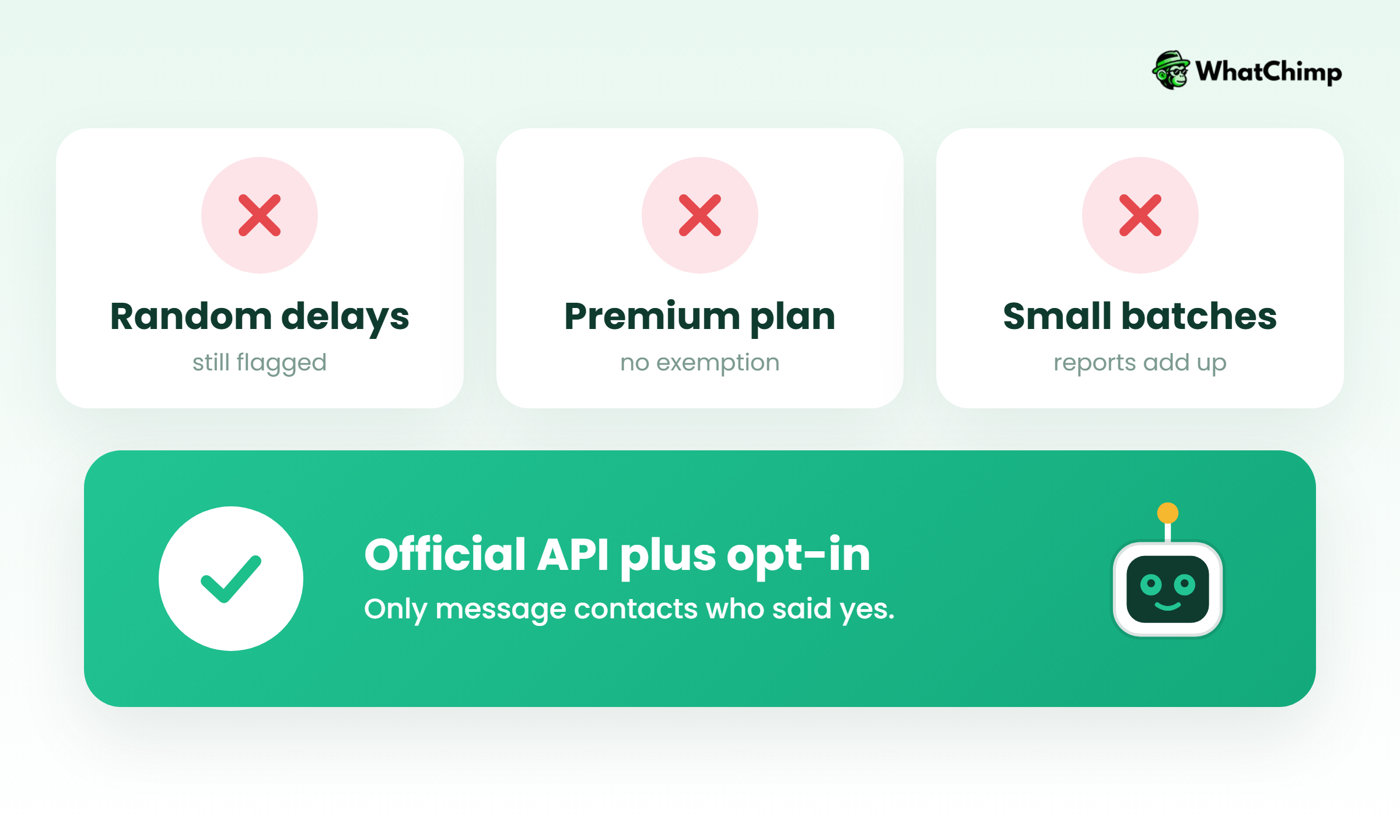
- ❌ “Random delays make it safe.” They only make the pattern harder to spot.
- ❌ “The premium version prevents bans.” Even vendors admit it doesn’t.
- ❌ “Sending in small batches is allowed.” The Terms of Service don’t mention any safe batch size.
- ✅ The only route WhatsApp permits for bulk business messaging is the official Business Platform, with opt-in and templates.
How does official-API bulk sending work?
1. Templates and opt-in keep every message compliant
Any message that starts a conversation has to be a template Meta has approved. Inside a template you add variables such as the customer’s name or order number.
Instead of: “SALE SALE SALE!!! Click here now”
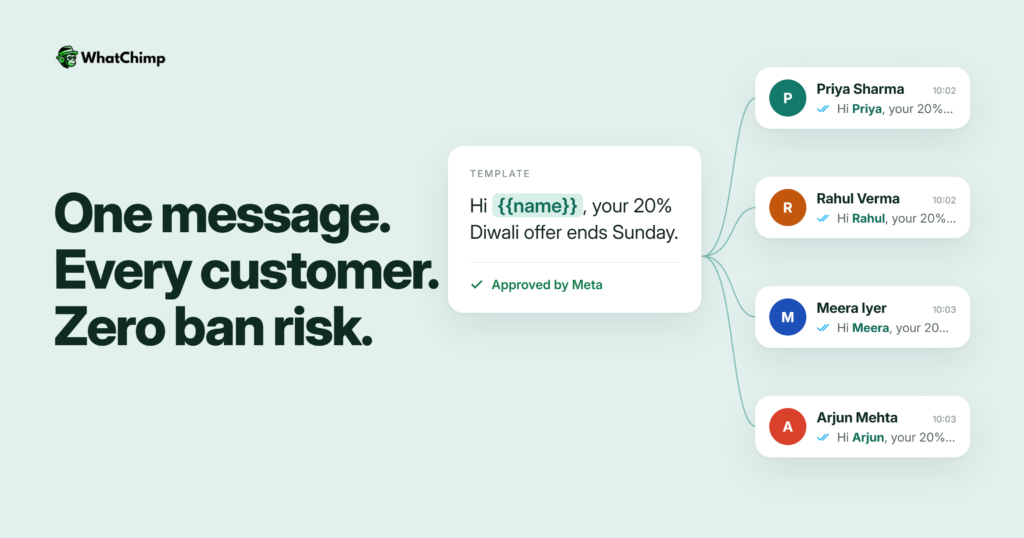
Use: “Hi {{name}}, your favourite kurta is back in stock in size M. Want me to hold one for you?”
The second one gets approved, gets read and gets replies.
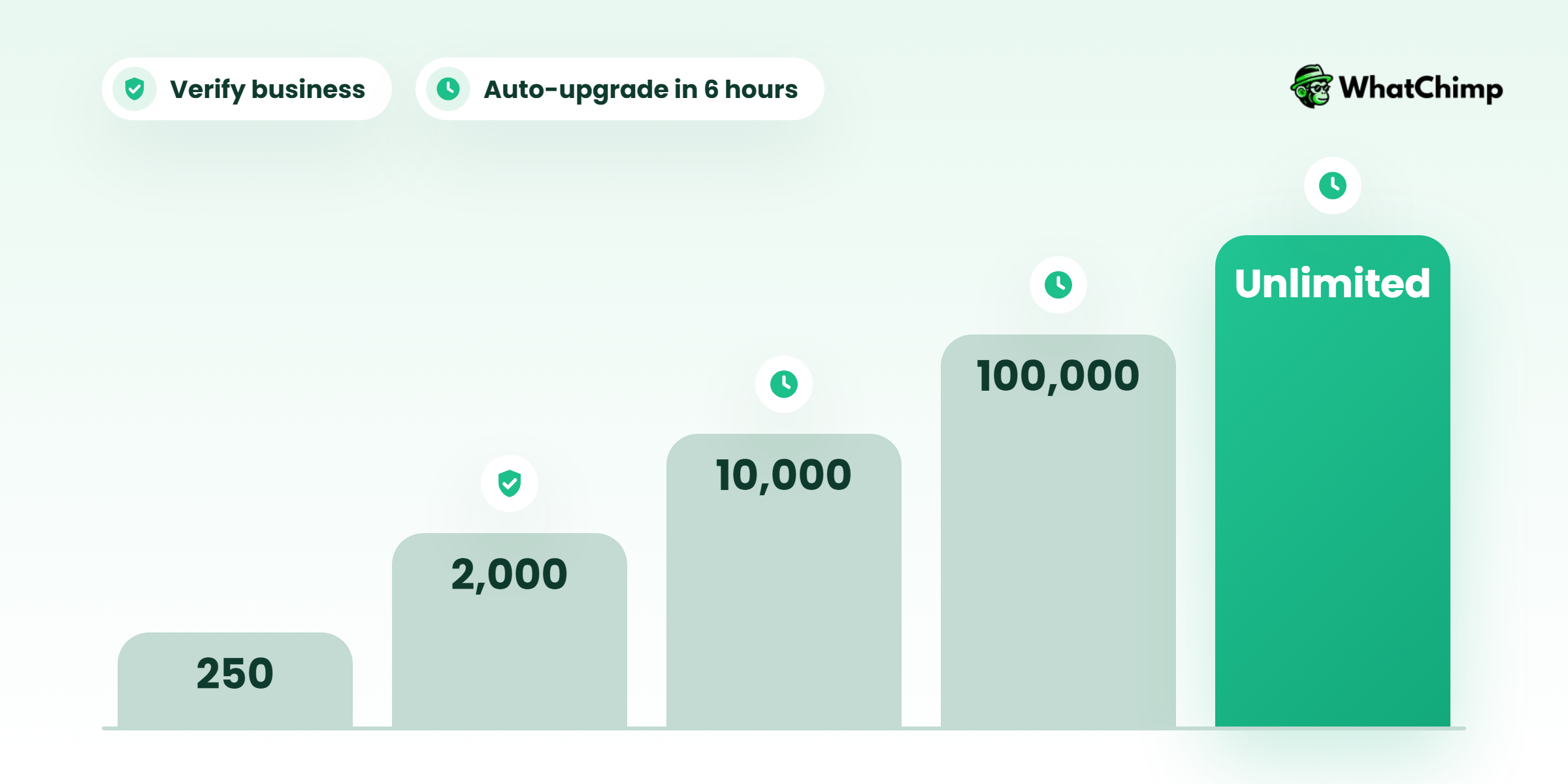
2. Limits that grow from 250 to unlimited
According to Meta’s messaging limits documentation, a messaging limit is the number of unique people you can message outside a customer service window in a rolling 24-hour period.
| Tier | Unique contacts per 24 hours | How you get there |
|---|---|---|
| Start | 250 | New business portfolio |
| Tier 1 | 2,000 | Verify your business, or send 2,000 delivered high-quality messages to unique people within 30 days |
| Tier 2 | 10,000 | Automatic scaling |
| Tier 3 | 100,000 | Automatic scaling |
| Top | Unlimited | Automatic scaling |
Automatic scaling kicks in when your messages are rated high quality and you’ve used at least half your current limit in the last 7 days. Your limit then goes up one level within 6 hours.
Two details catch people out. The limit belongs to your business portfolio, so every number in that portfolio shares it. And replies inside a customer service window don’t count against it.
3. A per-person cap, even when you’re on unlimited
Meta may limit how many marketing templates one person receives from businesses in a given period, and that cap adjusts to how much each person engages.
So “unlimited bulk sending” doesn’t really exist anywhere. Anyone who promises it is selling you something.
4. You pay only for messages that get delivered
According to Meta’s pricing docs, Meta has charged per message since July 1, 2025, and only for messages that are delivered. Templates fall into marketing, utility or authentication categories, and each category has its own rate.
From October 1, 2026, service messages (your replies inside the 24-hour window) are charged too, with the first 1,000 delivered service messages free each month for every business phone number. When someone messages you from a click-to-WhatsApp ad, every message category is free for up to 7 days.
Rates differ by country and change from time to time. Our WhatsApp Business API pricing guide explains how to read Meta’s rate card for your market.
Best WhatsApp bulk message sender software compared
Here’s how I’d group the tools that come up most, us included. Check each vendor’s own pricing page before you buy, because plans change.
| Tool | Type | How it sends | Good for | Watch out for |
|---|---|---|---|---|
| Rocket Sender | Extension | Inside WhatsApp Web, “No API Required” | Trying it out on a tiny list | Unofficial, against the Terms of Service |
| SheetWA | Extension plus an API product | Sheets to WhatsApp Web, with a separate official API option | Teams that live in Google Sheets | Says premium doesn’t prevent bans |
| WA Sender | Extension | Chrome extension with an unsubscribe list | Solo sellers | Unofficial |
| What-Sender | Extension | WhatsApp Web, free tier with a daily cap | Very small sends | Unofficial |
| WhatChimp | Official API | Business Platform, 0% markup on Meta fees | Shops, D2C brands and teams | Meta’s per-message fees come on top; Basic has 2 team members and 5,000 subscribers |
| AiSensy, Wati, Gallabox, DoubleTick | Official API | Business Platform | Businesses comparing official options | Compare seat charges and any markup on Meta fees |
| Twilio, 360dialog | Developer API | You build or connect the sending and inbox yourself | Companies with developers | Not ready-to-use for a shop owner |
Here’s the honest part about WhatChimp. As of August 2026 our Basic plan was $24/month billed annually or $40/month billed monthly, so check our pricing page for today’s price. We add 0% markup to Meta’s conversation fees, so you pay Meta’s rate plus a flat plan price. If you need more than 2 team members, you’ll be looking at Pro.
How to choose a bulk sender: an 8-point checklist
Run any tool, including ours, through this list:
- Is it built on the official WhatsApp Business API?
- Does it add a markup on top of Meta’s message fees?
- How many contacts and team seats does each plan include?
- Can you import contacts from Excel, CSV or Google Sheets?
- Can you personalise messages with variables and add buttons?
- Can you segment your list and schedule sends ahead of time?
- Where do replies go, and can your whole team answer them?
- Does it connect to Shopify or your CRM?
If a tool fails question 1, the other seven don’t matter.
How to send bulk WhatsApp messages with WhatChimp
This is the short version. Our bulk WhatsApp broadcast page covers every option in detail.
Step 1: Connect your number
Time required: 5 to 10 minutes
- Click Start free trial (7 days, no credit card required).
- Click Connect WhatsApp and finish Meta’s sign-up.
- Keep using the WhatsApp Business app on the same number if you like, since coexistence is included on every plan.
Step 2: Import your contacts
Time required: 2 to 3 minutes
- Click Contacts, then Import.
- Upload your Excel or CSV file, or connect Google Sheets.
- Tag contacts by city, interest or last order.
Step 3: Create your template
Time required: 3 to 5 minutes
- Click Templates, then New template.
- Write your message with variables like {{name}} and add a button.
- Submit it. Approval usually comes back in about 10 seconds.
Step 4: Pick your audience and schedule
Time required: 2 minutes
- Choose a segment, not your whole list.
- Send now or schedule days ahead.
Step 5: Send and handle replies
Time required: ongoing
Replies land in a shared team inbox. Your team logs in from a browser and answers from the same number.
What you get:
- ✅ A whatsapp business bulk message that goes out under Meta’s rules
- ✅ Delivered and read receipts for every send
- ✅ One place to see who replied
If you’re sitting on that Excel sheet right now, the trial is the quickest way to send your first campaign properly.
How to send bulk WhatsApp messages without getting banned
Even on the official API, Meta watches quality. This is how you stay on its good side.
1. Opt-ins collected at checkout and from ads mean fewer reports
This is the MOST important rule. Ask for permission at checkout, on forms and through click-to-WhatsApp ads, where people message you first.
People who asked to hear from you don’t tap Report.
2. Segments make every message feel personal
Example in action: Rahul runs a skincare brand. Instead of blasting his whole list, he sends only to people who bought sunscreen more than 60 days ago: “Hi Meera, your SPF 50 is probably running low. Reply YES and I’ll send 10% off your refill.” The message feels useful because it is.
3. Sending less often keeps quality ratings high
Two well-timed messages a month beat daily promos. Every ignored message is a small signal against you.
4. An easy opt-out protects your number
Instead of: “Reply to this number for more info”
Use: “Not interested? Reply STOP and we won’t message you again.”
Someone who opts out is far better for you than someone who reports you.
My number got banned using a bulk sender. What now?
First, uninstall the extension. Don’t keep sending from a backup number, because that’s how people lose two numbers.
- Open WhatsApp on the banned number and request a review through the in-app prompt.
- Explain plainly what happened. Don’t argue.
- Whatever the outcome, move bulk sending to the official API on a verified business, so it can’t happen the same way again.
Nobody can promise you’ll get the old number back. You can make sure the next one is safe.
Conclusion
You now know there are three kinds of bulk message sender, and only one of them is something WhatsApp actually permits for bulk business messaging. You also know the real limits and how Meta charges.
If your goal is to reach your customer list this month without risking your number, connect it to WhatChimp, import that Excel sheet and send one well-segmented template to your best customers first.
So, who’s on your list for that first message?
FAQs
How can I send 1,000 messages at once on WhatsApp?
You can do it on the official API once your limit is above 1,000. A new business portfolio starts at 250 unique contacts a day. Verify your business, or send 2,000 high-quality delivered messages within 30 days, to reach the 2,000 tier. From there your limit keeps rising automatically.
Can I send bulk WhatsApp messages without saving numbers?
Yes, on the official API. Recipients don’t need your number saved, but they do need to have opted in to hear from you. A broadcast list in the Business app usually reaches only people who saved your number.
Is any WhatsApp bulk message sender extension safe?
No, not in the sense of being allowed. Extensions automate WhatsApp Web, and WhatsApp’s Terms of Service forbid bulk and auto-messaging.
- ❌ Random delays don’t make it allowed
- ❌ Premium plans don’t prevent bans
- ❌ Small batches aren’t an exception
How much does it cost to send bulk WhatsApp messages?
It costs a tool’s plan fee plus Meta’s charge for each delivered message. Rates depend on the category and the recipient’s country.
| Cost | Who charges it |
|---|---|
| Plan fee | Your tool (WhatChimp Basic was $24/month billed annually as of Aug 2026) |
| Per-message fee | Meta, passed through at 0% markup by WhatChimp |
Can I import contacts from Excel or Google Sheets?
Yes. WhatChimp imports Excel and CSV files and connects to Google Sheets. Tag contacts as you import them so segmenting later is quick.
Can I personalise and schedule bulk messages?
Yes. Approved templates support variables like {{name}} or {{order}}, plus buttons. You can schedule campaigns days or weeks ahead and track delivered and read receipts.
Is bulk WhatsApp messaging legal?
Yes, when you do it through the official WhatsApp Business Platform with opt-in and approved templates. Doing it through the regular app or WhatsApp Web automation breaks WhatsApp’s Terms of Service and can get your number banned.