Optimizing Your WhatsApp Business Display Name
Your WhatsApp Business display name is the first thing customers see. A well-crafted name builds credibility, aligns with WhatsApp policies, and ensures approval. Table of Contents Key Principles for a…

Key takeaways
- A strong WhatsApp Business display name reflects your actual business name, stays clear and simple, and follows WhatsApp's rules so it gets approved.
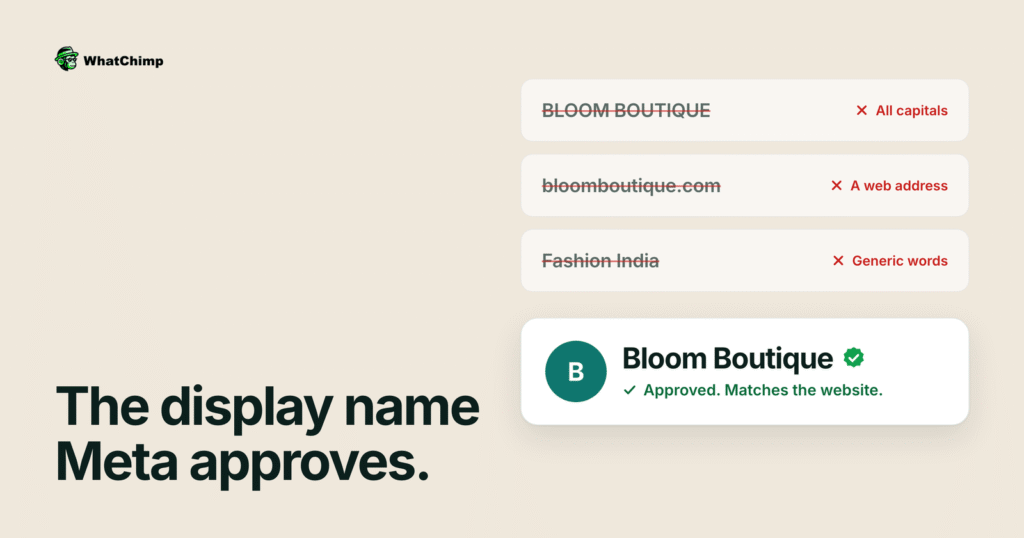
- Leave out symbols, punctuation, emojis, URLs, all-capital spelling and generic words such as Food or India.
- The name must match your website and other platforms, though you may add a country or region or a department such as Customer Support.
- Verified green tick accounts show the display name without a phone number, and they require a recognized business with strong organic media presence.
On this page
Your WhatsApp Business display name is the first thing customers see. A well-crafted name builds credibility, aligns with WhatsApp policies, and ensures approval.
Table of Contents
- Key Principles for a Strong Display Name
- Best Practices for Approval
- Business Identity
- Proper Capitalization
- Formatting Rules
- Name Length & Structure
- Brand Consistency
- Display Name Verification & Visibility
- Relationship to Business Identity
- Display Name Visibility Based on Account Type
- Requirements for Green Tick Verification
- Pro Tips for Display Name Success
- Frequently Asked Questions
Key Principles for a Strong Display Name
- Accurate Representation: Reflect your actual business name.
- Clarity & Simplicity: Avoid unnecessary symbols, abbreviations, or generic terms.
- WhatsApp Compliance: Follow platform rules to get approved.
Best Practices for Approval
1. Business Identity
- Do: Use your full business name (e.g., “Jennifer’s Cupcake Bakery”).
- Avoid: Generic words like “Food” or “India.”
- Ensure alignment with your official branding.
2. Proper Capitalization
- Correct: “Sunny Day Florist”
- Incorrect: “SUNNY DAY FLORIST”
3. Formatting Rules
- Spacing: Match your business name exactly.
- Avoid Special Characters: No symbols, punctuation, or emojis.
- Correct Format: “Green Leaf Café”
- Incorrect Format: “Green_Leaf* Cafe!”
4. Name Length & Structure
- Minimum: 3 characters
- Restrictions: No URLs
- Permitted Additions:
- Country/region
- Department (e.g., “Customer Support”)
- Test/demo indicators
5. Brand Consistency
- Must match your website and other platforms.
- Avoid abbreviations unless widely recognized.
- Clearly represent the business entity.
Display Name Verification & Visibility
Relationship to Business Identity
- Must be directly linked to your business.
- Recommended format: “Product by [Company Name]”
- Example: “Accessories by Yogi Fashion”
Display Name Visibility Based on Account Type
Standard WhatsApp Business API Account
- Display name appears above the phone number.
- Basic verification, no green tick.
Verified WhatsApp Business Account (Green Tick)
- Display name is shown without a number.
- Green tick adds authenticity and trust.
- Requires significant business presence.
Requirements for Green Tick Verification
- Strong organic media presence.
- Recognized, well-established business.
- Paid media mentions do not count.
Frequently Asked Questions
Q: Can I use my full legal business name?
A: Yes, as long as it is clear and concise.
Q: What if my business name is too long?
A: Use the most recognizable part of your name.
Q: How important is verification?
A: It significantly boosts customer trust.