Promotional WhatsApp messages: rules, real costs and 20 templates you can copy
Learn how to send promotional WhatsApp messages that get delivered: Meta's 2026 rules, the ₹ cost per message and 20 templates you can copy today.

On this page
What this guide covers
- Key takeaways
- What are promotional WhatsApp messages?
- Can you send promotional messages on WhatsApp? The 2026 rules
- Can’t I just use the WhatsApp Business app?
- How much do promotional WhatsApp messages cost?
- How to send promotional messages on WhatsApp, step by step
- What promotion formats can you use beyond plain text?
- 20 WhatsApp promotion message templates and samples
- Mistakes that get your promos ignored or your number restricted
- What promotional WhatsApp messages are NOT
- What’s changing next: the Marketing Messages API
- Conclusion
- FAQs
Key takeaways
- Promotional WhatsApp messages are allowed when the customer has opted in and you send a Meta-approved template in the Marketing category.
- In India, a delivered marketing message costs about ₹0.86 plus 18% GST, and you pay only for messages that are actually delivered.
- If you label a promo as Utility to save money, Meta approves it as Marketing anyway, so write it honestly from the start.
- Some customers won’t get your promo even when your list is perfect, because of per-user marketing limits, the “Offers and announcements” opt-out and the fact that marketing templates aren’t delivered to US numbers.
- A new account can reach 250 unique people per 24 hours outside a service window, so plan your first big sale around that limit.
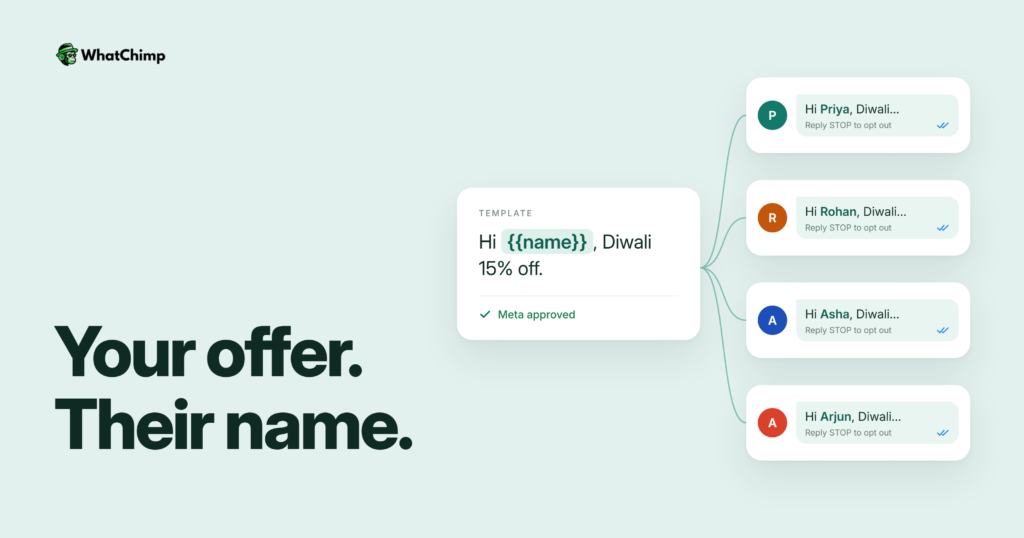
What if I told you that you could send a Diwali offer to 1,000 customers on WhatsApp for about ₹863 in Meta fees?
You’d probably think there’s a catch.
There are a few. They aren’t about the price, though. They’re about the rules.
Here’s what most shop and D2C owners do today. They type an offer on their phone, forward it to a few broadcast lists and hope for the best. Half the people never reply. Some never even receive it. Then one morning the number gets restricted and nobody can explain why.
Promotional WhatsApp messages work really well when you send them the way Meta expects. They work badly when you don’t.
In this guide I’ll show you what counts as a promotion, the rules that keep your number safe, what each message costs in rupees, how to send to thousands of people step by step, and 20 templates you can paste and adapt today.
Start with the basics.
What are promotional WhatsApp messages?
A promotional message is any message that tries to sell, announce or bring a customer back. That covers discounts, launches, festive sales, cart reminders with an offer, referral asks and win-back nudges.
Meta calls these Marketing templates. In its words, they “enable businesses to achieve a wide range of goals, from generating awareness to driving sales and retargeting customers.”
WhatsApp sorts every business message into a category, and the category decides both the rules and the price.
| Category | What it’s for | Example |
|---|---|---|
| Marketing | Offers, launches, retargeting, loyalty | “Flat 20% off kurtas this weekend” |
| Utility | An update on something the customer did | “Your order #4521 has shipped” |
| Service | Replies when the customer messages you first | “Yes, we have it in size 8” |
| Authentication | One-time passcodes | “Your login code is 482913” |
Why you can’t hide a promo inside a utility message
This is the trick everyone tries. Marketing costs more than utility, so why not slip the coupon into the shipping update?
Because Meta closed that door.
According to Meta’s template categorization rules, templates “with mixed content (for example, both utility and marketing, such as an order update with a promo or a feedback survey with promotional content)” count as marketing. Since April 9, 2025, if you pick Utility and WhatsApp decides the template is promotional, “the template is approved as MARKETING.”
Retargeting messages such as “Renew today to save {{discount}}” are marketing “even if requested by users.”
Instead of: “Hi Rohan, your order has shipped! Use NEXT10 for 10% off your next order.”
Use: “Hi Rohan, your order #4521 has shipped and should reach you by Friday.” Then send the offer later as its own Marketing template.
Two clean messages beat one that gets recategorised.
Can you send promotional messages on WhatsApp? The 2026 rules
Yes. Meta built a whole category for them. There are four rules you have to follow, though, and the first one is the MOST important.

1. Opt-in first, so every person on your list actually wants to hear from you
Meta’s opt-in guidance says businesses “are required to obtain opt-in permission, which can be general and not specifically for WhatsApp.” The person has to know they’re opting in, and they have to see your business name.
You can collect it on your website, by SMS, through a phone IVR flow, or in person and on paper.
Example in action: Priya runs a bakery in Pune. On her checkout page she adds a ticked line: “Yes, send me offers from Priya’s Bakes on WhatsApp.” At the counter she keeps a sign-up sheet that says the same thing. Six months later she has a list of people who said yes to her by name.
❌ Numbers bought from a list seller
❌ Numbers copied out of WhatsApp groups
✅ Customers who gave you their number and agreed to hear from your business
2. Use an approved template to start every conversation
The WhatsApp Business Messaging Policy is blunt about it: “You may only initiate conversations using an approved Message Template.”
Once a customer replies, a 24-hour customer service window opens and you can chat freely inside it. Outside that window, a promo has to be an approved Marketing template.
3. Respect every opt-out, wherever it comes from
The policy says you “must respect all requests (either on or off WhatsApp)… to block, discontinue, or otherwise opt out.”
If someone replies STOP, tells your store manager to stop, or emails you, take them off the list.
Customers can also switch off marketing from you inside WhatsApp itself, using a setting called “Offers and announcements.” When they do, Meta’s docs say “the API will process the request but not send the message.”
4. Expect some people not to receive it, and understand why
This is the part nobody explains, and it’s why your broadcast never reaches the whole list.
Meta’s per-user limits documentation says WhatsApp may cap how many marketing templates one person receives from all businesses combined. The cap depends on that person’s “recent marketing message read rate” and how much is already sitting in their inbox. Meta publishes no number.
Here’s what blocks delivery:
- ❌ Per-user limit reached (error 131049). Meta’s advice is to “wait at least 24 hours before resending.”
- ❌ Customer paused your offers (error 131050): “This recipient has chosen to stop receiving marketing messages on WhatsApp from your business.”
- ❌ US +1 number. “WhatsApp does not currently deliver marketing template messages to WhatsApp users with United States phone numbers.”
- ❌ Spam flags (error 131048), when “too many previous messages were blocked or flagged as spam.”
The good news: templates sent inside an open 24-hour service window don’t count toward the per-user limit.
Can’t I just use the WhatsApp Business app?
Technically, yes. Practically, no, once you pass a few hundred customers.
The free app lets you make broadcast lists, and vendors such as Wati and Sinch put the cap at 256 contacts per list. The app also offers paid “business broadcasts,” where WhatsApp’s help centre says you pay only for marketing messages delivered within 5 days and get credited for anyone not reached.
That’s fine for a tiny shop. It falls apart when you have 5,000 customers and three people answering replies.
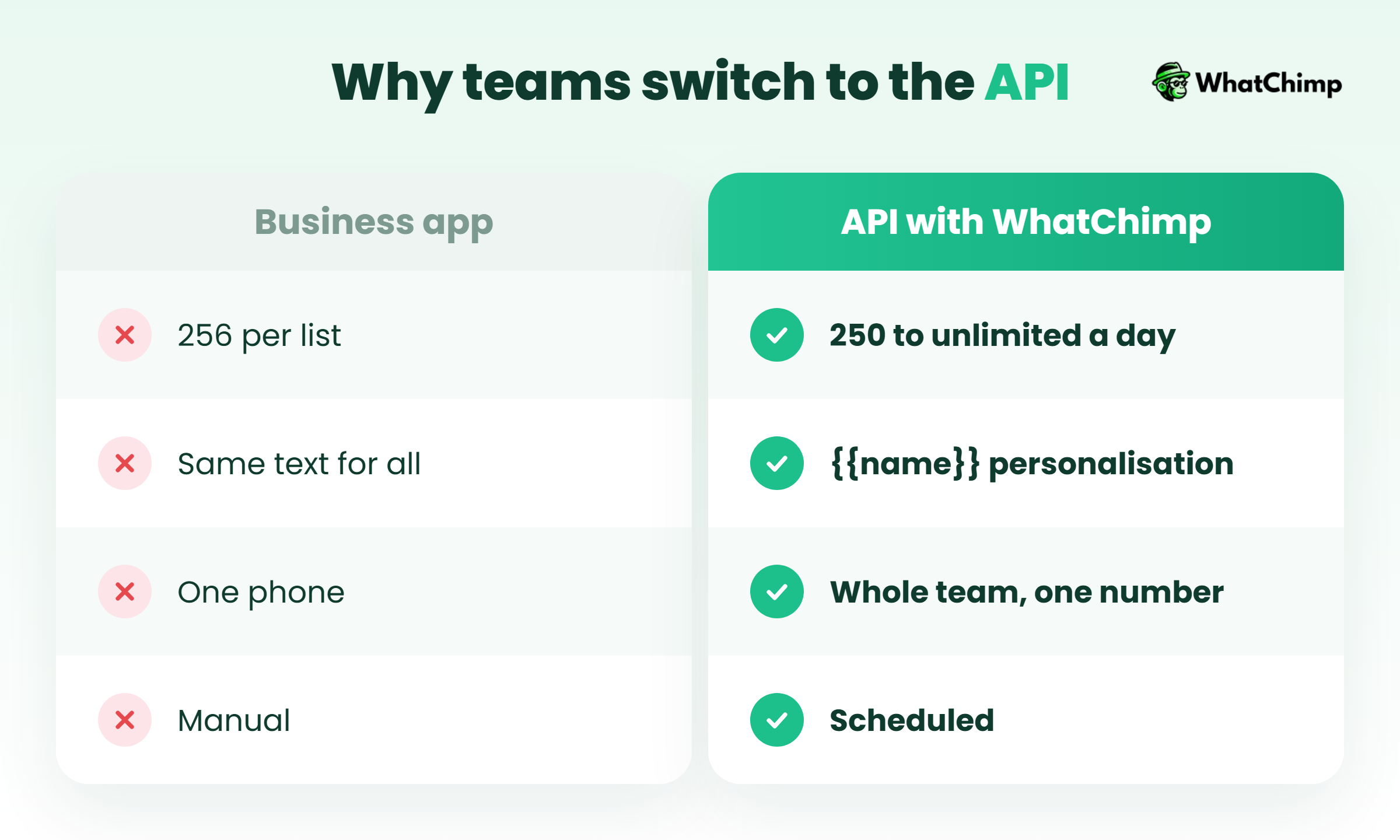
| What you need | WhatsApp Business app | WhatsApp Business API (with WhatChimp) |
|---|---|---|
| Audience size | Broadcast lists of 256 contacts | Messaging limits from 250 up to unlimited per day |
| Personalisation | Same text for everyone | {{name}}, {{order}} and {{store}} variables |
| Buttons | Limited | Link, call and booking buttons |
| Team replies | One phone | The team logs in from a browser and answers from the same number |
| Scheduling | Manual | Days or weeks ahead |
| Delivery and read tracking | Basic insights | Per-campaign delivery and read receipts |
How the API messaging limits grow
Meta’s messaging limits count unique people you can message per moving 24 hours outside a service window. The limit is shared by every number in your business portfolio.
| Level | Unique users per 24 hours | How you get there |
|---|---|---|
| Start | 250 | Every new business portfolio |
| Level 2 | 2,000 | Deliver 2,000 messages to unique users outside service windows within 30 days, using high-quality templates |
| Level 3 | 10,000 | Automatic: use at least half your limit over 7 days and it rises within 6 hours |
| Level 4 | 100,000 | Same automatic scaling |
| Level 5 | Unlimited | Same automatic scaling |
So when a tool promises “unlimited messages,” ask what it means. WhatChimp never caps how many messages you send, but Meta’s messaging limits and per-user limits still apply to everyone.
How much do promotional WhatsApp messages cost?
Since July 1, 2025, Meta charges per message, and according to its pricing documentation, “businesses are only charged when a message is delivered.”
The India rate, GST and when prices change
For India, ChatMaxima lists the marketing rate at ₹0.8631 per delivered message plus 18% GST, effective October 1, 2026, citing Meta’s official INR rate card. India’s marketing rate last went up on January 1, 2026.
Here’s what that looks like in Meta fees for a promo:
| Delivered messages | Meta fee | With 18% GST | WhatChimp markup |
|---|---|---|---|
| 500 | ₹431.55 | ₹509.23 | ₹0 |
| 1,000 | ₹863.10 | ₹1,018.46 | ₹0 |
| 5,000 | ₹4,315.50 | ₹5,092.29 | ₹0 |
Three things to remember:
- Meta changes prices only on January 1, April 1, July 1 and October 1. Check the rate card each quarter.
- Volume tiers “only apply to utility and authentication messages.” Marketing gets no bulk discount.
- Rates depend on the recipient’s country, not yours.
For the full breakdown by category, see our WhatsApp Business API pricing guide.
What changed on October 1, 2026
Meta started charging again for service messages after the first 1,000 a month per number, and for utility messages sent inside an open service window. Marketing rates also rose in 7 markets (Kuwait, Mexico, Morocco, Rest of APAC, Rest of Middle East, Saudi Arabia and the UAE). India wasn’t one of them.
Promotions you don’t pay for: the Click-to-WhatsApp ad window
This one is underused.
When someone taps a Click-to-WhatsApp ad on Facebook or Instagram and messages you, Meta opens a free entry point window. Inside it, Meta doesn’t charge for marketing, utility, authentication or service messages. Meta’s developer docs say the window “may remain open for up to 7 days,” while its business pricing page says 72 hours, so plan on the shorter one to be safe.
Example in action: Arjun sells organic ghee. His Instagram ad says “Message us for the festive combo price.” Asha taps it and asks about delivery. For the next few days, Arjun can follow up with offers and recipes without paying Meta per message.
WhatChimp lets you build these ads and publish them to Facebook and Instagram together, with A/B testing and chatbot follow-up, on Pro and above.
How to send promotional messages on WhatsApp, step by step
Here’s the exact flow I’d set up for a new store.
Step 1: Connect your number to the WhatsApp Business API
Time required: 10 to 15 minutes (Meta’s business verification can take longer)
- Sign up at WhatChimp. No credit card is required to start.
- Click Connect WhatsApp and follow Meta’s sign-up flow.
- Pick the number your customers already know.
What you get:
- ✅ A number on the official WhatsApp Business API, connected through a Meta Business Partner
- ✅ A browser inbox your whole team can answer from
Step 2: Add your opted-in contacts and segment them
Time required: 15 to 20 minutes
- Add only contacts who opted in.
- Segment by city, interest and last order.
- Keep a “do not message” segment for opt-outs.
A Mumbai-only monsoon offer sent to Chennai customers is wasted money. Segments fix that.
Step 3: Create a Marketing template
Time required: 5 to 10 minutes
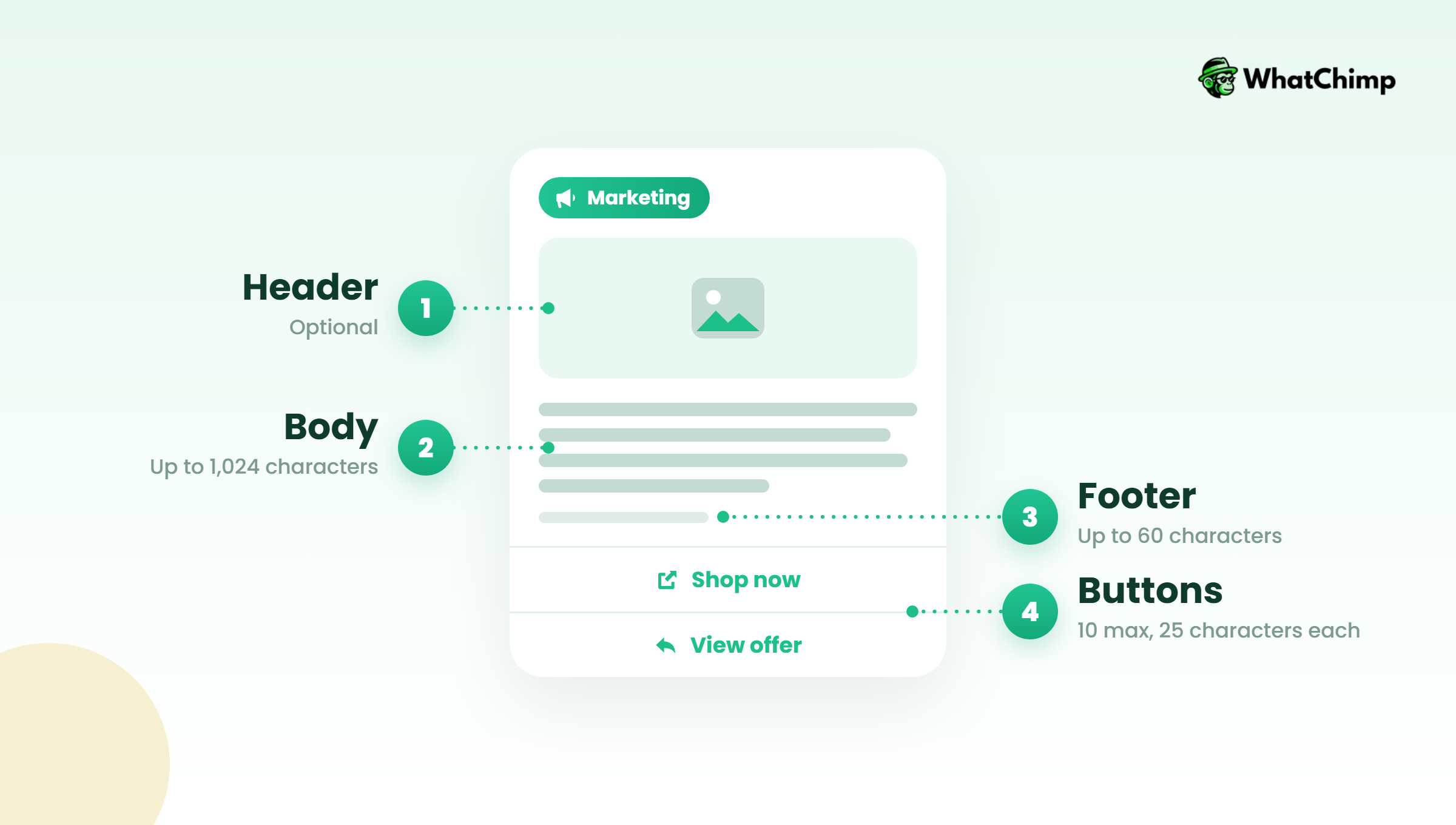
Meta’s custom marketing template docs allow these parts:
| Part | Required? | Limit |
|---|---|---|
| Header (text, image or video) | Optional | 1 per template |
| Body | Required | 1,024 characters |
| Footer | Optional | 60 characters |
| Buttons | Optional | Up to 10, labels up to 25 characters |
- Click Create template and choose the Marketing category.
- Write the body with variables like {{name}}.
- Put “Reply STOP to opt out” in the footer.
- Submit it. In WhatChimp, template approvals come back in about 10 seconds.
Step 4: Schedule the broadcast and track it
Time required: 2 to 3 minutes
- Open bulk WhatsApp broadcasts and pick your template.
- Choose a segment and fill in the variables.
- Add buttons to open a link, start a call or book an appointment.
- Schedule it for later, or send now.
- Watch delivery and read receipts once it goes out.
Pro tip: If your list is bigger than your current messaging limit, split the send over two or three days instead of letting half of it fail.
If you’d like to test this on one small segment first, WhatChimp’s 7-day free trial is enough to run a full campaign from template to read receipts.
What promotion formats can you use beyond plain text?
Meta’s marketing template docs list several special formats worth knowing:
- Coupon code: a copy-code button, so nobody mistypes DIWALI15.
- Limited-time offer: shows “expiration dates and running countdown timers.”
- Media card carousel: up to 10 swipeable cards.
- Product card carousel: up to 10 products.
- Multi-product: “up to 30 products… in up to 10 sections.”
- Catalog and single-product messages: pulled from your WhatsApp catalog.
Pick the format by what the customer needs to do next. A single offer only needs a coupon button. A new collection reads better as a carousel.
20 WhatsApp promotion message templates and samples
Every WhatsApp promotion message template below is written for the Marketing category, uses a real deadline and carries an opt-out footer. Swap in your brand, numbers and dates.
One honest note: when someone replies STOP, make sure a person on your team removes them that day.
Welcome and first-order offers
1. First-order discount
“Hi {{name}}, welcome to {{store}}! Here’s 10% off your first order with code HELLO10, valid till {{date}}. Tap below to shop. Reply STOP to opt out.”
2. Newsletter-to-WhatsApp welcome
“Thanks for joining us on WhatsApp, {{name}}. You’ll hear from us about twice a month: new drops and member-only prices. First one’s below. Reply STOP to opt out.”
New product launch
3. Launch announcement
“{{name}}, our new {{product}} is live today. You asked for a lighter version, so we made one. See it here. Reply STOP to opt out.”
4. Early access
“You bought {{last_product}} from us, so you get first look: {{new_product}} opens to you 24 hours before everyone else, from {{date}}. Reply STOP to opt out.”
Flash sales and limited-time offers
5. Weekend sale
“Hi {{name}}, our weekend sale is on: 20% off all {{category}} until Sunday 11 pm. Tap to shop. Reply STOP to opt out.”
6. Copy-code offer
“Flat ₹200 off orders above ₹999, {{name}}. Tap the button to copy your code. Valid till {{date}}. Reply STOP to opt out.”
7. Last day reminder
“Quick heads-up, {{name}}: the {{sale_name}} ends tonight at midnight. Your cart prices go back up tomorrow. Reply STOP to opt out.”
Festive and seasonal
8. Diwali offer
“Happy Diwali from all of us at {{store}}, {{name}}! Gift hampers are 15% off till {{date}}, with delivery across {{city}}. Reply STOP to opt out.”
9. Holi sale
“Holi colours, washed out clothes? Our Holi sale has 25% off whites and basics till {{date}}. Reply STOP to opt out.”
10. End-of-season sale
“{{name}}, our end-of-season sale starts today: up to 40% off summer stock while sizes last. Tap to see what’s left in your size. Reply STOP to opt out.”
Abandoned cart and browse reminders
11. Cart reminder with offer
“Hi {{name}}, you left {{product}} in your cart. It’s still there, and here’s free shipping if you order by {{date}}. Reply STOP to opt out.”
12. Back in stock
“Good news, {{name}}: {{product}} in {{size}} is back in stock. Tap to grab it. Reply STOP to opt out.”
Running a Shopify store? The Shopify integration sends cart reminders like these automatically.
Upsell and cross-sell
13. Pairs well with
“Loving your {{last_product}}, {{name}}? Customers who bought it often add {{related_product}}. It’s 10% off for you this week. Reply STOP to opt out.”
14. Refill reminder
“Your {{product}} usually runs out around now, {{name}}. Reorder in one tap and get 5% off. Reply STOP to opt out.”
Win-back and re-engagement
15. We miss you
“It’s been a while, {{name}}. Here’s 15% off your next order with code BACK15, valid till {{date}}. Reply STOP to opt out.”
16. Preference check
“Hi {{name}}, want fewer messages from us, or only sale alerts? Tap a button below and we’ll stick to it. Reply STOP to opt out.”
Loyalty, VIP and referrals
17. VIP early sale
“You’re one of our top customers, {{name}}, so the sale opens for you today, a day before everyone else. Reply STOP to opt out.”
18. Referral
“Share code {{code}} with a friend: they get ₹150 off their first order and you get ₹150 credit when they buy. Reply STOP to opt out.”
Events, webinars and appointments
19. Coaching webinar
“Hi {{name}}, our free IELTS speaking class is on Saturday at 6 pm. Seats are limited to 50. Tap to reserve yours. Reply STOP to opt out.”
20. Clinic or real estate visit
“Hi {{name}}, our free dental check-up camp runs on {{date}} at our {{branch}} clinic. Tap Book slot to pick a time. Reply STOP to opt out.”
Every whatsapp marketing sample above follows one pattern: name, one offer, a real deadline, one button and an exit.
Mistakes that get your promos ignored or your number restricted
1. Send fewer promotions and your read rate keeps your reach
Per-user limits are based on read rate. If people stop reading your promos, WhatsApp delivers fewer of them. Two good promos a month beat ten forgettable ones.
2. Give each message one job and one button
Instead of: “Check our new arrivals, sale, blog, referral scheme and Instagram!”
Use: “Our monsoon collection is live, {{name}}. Tap to see it.”
3. Use real urgency, never fake countdowns
The policy warns against messages that mislead or surprise people. If the sale ends Sunday, say Sunday. If it doesn’t end, don’t pretend.
4. Never trade discounts for reviews
“Leave 5 stars and get 20% off” is the kind of message that gets reported. Ask for honest feedback instead, and send it as its own message.
5. Split big sends across days
If your limit is 2,000 and your list is 6,000, schedule three days. WhatsApp automations can run drip sequences so you don’t have to babysit it.
✅ Opt-in on record for every contact
✅ Marketing category chosen honestly
✅ Opt-out line in every footer
✅ Segments, not “send to all”
What promotional WhatsApp messages are NOT
A lot of advice online gets this wrong. Here’s what to ignore.
- ❌ Not unlimited. Messaging limits start at 250 unique users a day, and per-user limits apply on top.
- ❌ Not a way to message strangers. No opt-in, no message.
- ❌ Not cheaper with a Utility label. Meta recategorises mixed templates as Marketing.
- ❌ Not guaranteed a “98% open rate.” That figure gets repeated everywhere, but none of the pages using it trace it to an original study. Measure your own read rate instead.
What’s changing next: the Marketing Messages API
Meta has a newer route for promos called the Marketing Messages API. According to Meta’s documentation, it “optimizes delivery to reach more of the people most likely to find your messages relevant,” and it became generally available on November 19, 2025.
Here’s the date to note: “Cloud API will stop supporting marketing messages on October 13, 2027.”
From 2026, businesses on the Marketing Messages API can also set a maximum price they’ll pay per delivered marketing message.
If you send through a Meta Business Partner like WhatChimp, the move is handled on the provider side. Still, ask whoever you use about their plan before October 2027.
Conclusion
You now know what counts as a promotion, why labelling one as Utility doesn’t work, and why some people on your list will never receive a send.
You also know the real cost: about ₹0.86 per delivered message in India, plus GST.
Today, pick one segment of opted-in customers, take one template from the list above and send it through WhatChimp’s plans, which start with a 7-day free trial and add 0% markup on Meta’s fees.
Which offer are you going to send first?
FAQs
Can I send promotional messages on WhatsApp for free?
Partly, yes. The free Business app lets you use broadcast lists, which vendors put at 256 contacts each, but you can’t personalise at scale or run a team on it. On the API, marketing messages are free only inside the free entry point window after a customer messages you from a Click-to-WhatsApp ad. Every other delivered marketing message is charged by Meta.
How much does a WhatsApp marketing message cost in India?
It costs about ₹0.86 per delivered message plus 18% GST, based on ChatMaxima’s listing of Meta’s INR rate card effective October 1, 2026. You’re charged only when the message is delivered. Meta can change rates only on January 1, April 1, July 1 and October 1.
| Messages | Cost with GST |
|---|---|
| 1,000 | about ₹1,018 |
| 5,000 | about ₹5,092 |
How many promotional messages can I send per day?
It depends on your messaging limit, which starts at 250 unique users per 24 hours for a new business portfolio. It rises to 2,000, then 10,000, 100,000 and unlimited as you send good-quality messages. Per-user marketing limits can still stop individual customers from receiving a promo on a given day.
Why didn’t some customers receive my promotion?
Usually it’s one of four reasons Meta documents:
- ❌ They hit their per-user marketing limit (error 131049)
- ❌ They turned off “Offers and announcements” for your business (error 131050)
- ❌ They have a US +1 number
- ❌ Your number has too many spam flags (error 131048)
Do I need my customers’ permission to send promotions?
Yes, you need opt-in. Meta says it can be general and doesn’t have to mention WhatsApp specifically, but the customer must know they’re opting in and see your business name. You can collect it on your website, by SMS, by phone or on paper.
How do customers stop promotional messages from a business?
They can reply STOP, ask you directly, or switch off “Offers and announcements” for your business inside WhatsApp. The policy says you must respect opt-out requests made on or off WhatsApp. Put an opt-out line in every footer so it’s always easy.
Can I send WhatsApp promotions to US numbers?
No, not as marketing templates right now. Meta’s docs state that WhatsApp doesn’t currently deliver marketing template messages to US phone numbers. You can still reply to US customers who message you first, within the service window.