WhatsApp number banned? How to read the ban screen, appeal it and stop it happening again
WhatsApp number banned? Learn which ban screen you have, how to request a review, what 72 hours really means and how to send bulk messages safely.

On this page
What this guide covers
- Key takeaways
- Which WhatsApp ban do you have?
- Why WhatsApp banned my number
- WhatsApp banned my number for 72 hours: what now?
- How can I activate my banned WhatsApp number?
- How to appeal a WhatsApp Business API restriction
- WhatsApp permanent ban: what are your options really?
- Banned WhatsApp number myths that waste your time
- How to send bulk messages without getting your WhatsApp number banned again
- Conclusion
- FAQs
Key takeaways
- Got your WhatsApp number banned? Read your ban screen before you do anything else: “Temporarily banned” points to an unofficial app or scraping, a “Request a review” option means you can appeal, and no review option means the ban is final.
- Send one appeal from inside the official WhatsApp app, because WhatsApp says extra emails or appeals won’t speed up the review or change the decision.
- Your chats aren’t gone for good, since WhatsApp lets you restore your backup once the number is unbanned.
- Most appeals fail, so fix whatever caused the ban instead of counting on the appeal.
- If you message a customer list, move to the official WhatsApp Business API with opt-in and approved templates, because unofficial bulk tools are what get business numbers banned.
What if I told you WhatsApp banned 72,14,702 Indian accounts in a single month?
You’d probably think I’m exaggerating.
I’m not. That’s the May 2026 figure from WhatsApp’s India compliance report, as reported by MediaNama. 13,79,438 of those accounts were blocked before a single user complained.
So if you’ve just opened the app and found your WhatsApp number banned, you’re in very large company.
Here’s what usually happens next. You panic. You uninstall and reinstall. You move the SIM into another phone and send five emails to support. None of that works, and some of it makes things worse.
If you run a shop, there’s a good chance you were sending offers through GB WhatsApp or a Chrome “bulk sender” extension when it happened.
In this guide I’ll show you how to work out which ban you have in about 30 seconds. Then how to appeal through WhatsApp’s own process, how long it really takes, and how to keep messaging your customers without losing the number again.
Start with the screen in front of you.
Which WhatsApp ban do you have?
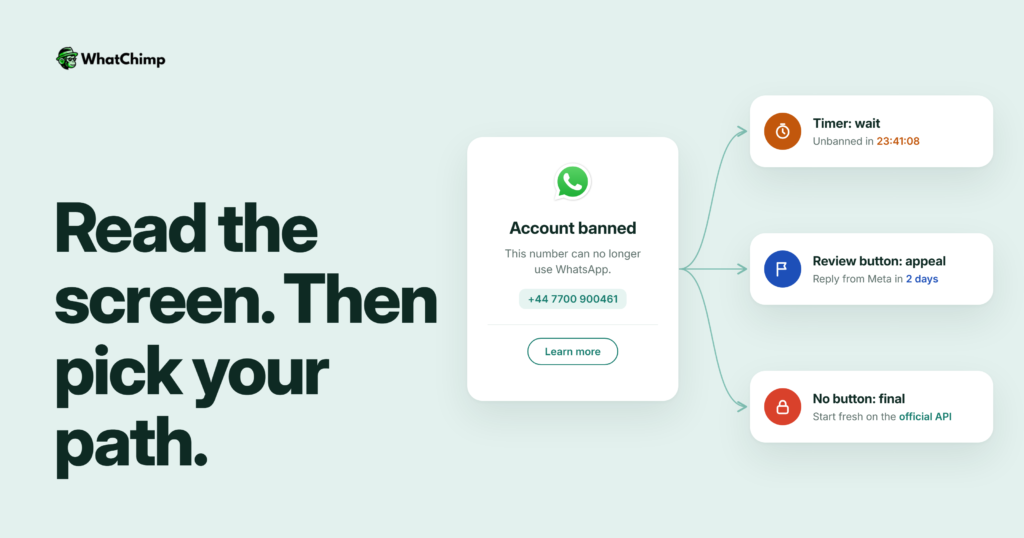
WhatsApp has three different ban screens, and each one means something different. Don’t guess from the countdown timer. Read the words.
| What you see | What it means | What to do |
|---|---|---|
| “Temporarily banned” with a timer | You’re using an unofficial app or scraping | Switch to the official app and wait |
| “This phone number can’t use WhatsApp” with Request a review | Banned, but you can appeal | Request a review, once |
| The same screen with no review option | The ban is final | Don’t appeal, plan around it |

“Temporarily banned” with a timer
WhatsApp says this message “could mean you’re using an unofficial version of WhatsApp or harvesting information, known as scraping”.
Scraping, in WhatsApp’s words, is “the automated extraction of information, both targeted and at scale, for any unpermitted purposes.” That covers a lot of the bulk sender extensions that pull numbers out of your contacts and groups.
Here’s the warning: if you don’t switch to the official app or stop scraping, WhatsApp says “your account might be permanently banned.”
This is the MOST important screen to take seriously. It’s the only one that gives you a second chance without an appeal.
“This phone number can’t use WhatsApp” with a review option
This is a full ban. The official WhatsApp help page gives the exact wording: “This phone number can’t use WhatsApp: [phone number]. You can request a review of this number. Most reviews are completed within 24 hours.”
WhatsApp bans accounts when it believes the activity “violates our Terms of Service, for example if it involves spam, scams or if it puts WhatsApp users’ safety at risk.”
The good news? You can still appeal.
The same screen with no review option
Straight from WhatsApp: “If you don’t see an option to request a review, it means the ban is final and can’t be appealed.”
Harsh. But at least you know where you stand.
A new SIM that arrived already banned
A WhatsApp banned number on a fresh SIM is more common than you’d think. WhatsApp explains that “it’s possible that the previous owner of your new phone number violated our Terms of Service.”
Phone numbers get recycled, and their history comes with them. Request a review and explain that the number is new to you.
Why WhatsApp banned my number
Short version: someone, or something, decided your account looked like spam.
WhatsApp says it catches and removes most spam and scam accounts before anyone even reports them. Here’s what usually triggers it.
1. People blocked or reported you, and that counts most
Blocks and reports are the signal WhatsApp listens to. Its Business Policy says it plainly: “Users can block or report businesses. Our systems may limit the amount of messages a business can send… based on this user feedback.”
Think about it.
Every “Who is this?” followed by a block counts against your number.
2. You used GB WhatsApp, which WhatsApp names by name
WhatsApp lists the culprits in its own help centre: “GB WhatsApp, FM WhatsApp, TeleMessage, TM WhatsApp, and others”. Using them can get an account “temporarily or permanently banned.”
The extra themes and hidden ticks aren’t worth losing your number.
3. A bulk sender tool did the sending, which policy calls unauthorized
This is the big one for shop owners. You load your whole customer list into a browser extension, hit send, and it fires message after message from your personal number.
WhatsApp’s policy covers exactly this: “If you use or operate a service which utilizes WhatsApp in violation of our terms or policies, such as messaging people at scale in an unauthorized manner, we have the right to limit or remove your access.”
Example in action: Ramesh runs a kurta shop in Jaipur (he’s an example, not a real customer). Before Diwali he pastes every saved contact into a bulk sender and sends “Mega sale!!! Click now before stock ends”. Most of those people never asked to hear from him. A few dozen tap Block. The next morning his phone shows “This phone number can’t use WhatsApp.”
4. You messaged people who never opted in
Meta is blunt about this: “Businesses are required to obtain opt-in before messaging people on WhatsApp.”
A number you copied from your bill book two years ago is not opt-in.
WhatsApp banned my number for 72 hours: what now?
First, the honest part. WhatsApp doesn’t publish ban lengths for the regular app or the Business app. Any blog that quotes a fixed consumer ban length is guessing.
So where does “72 hours” come from?
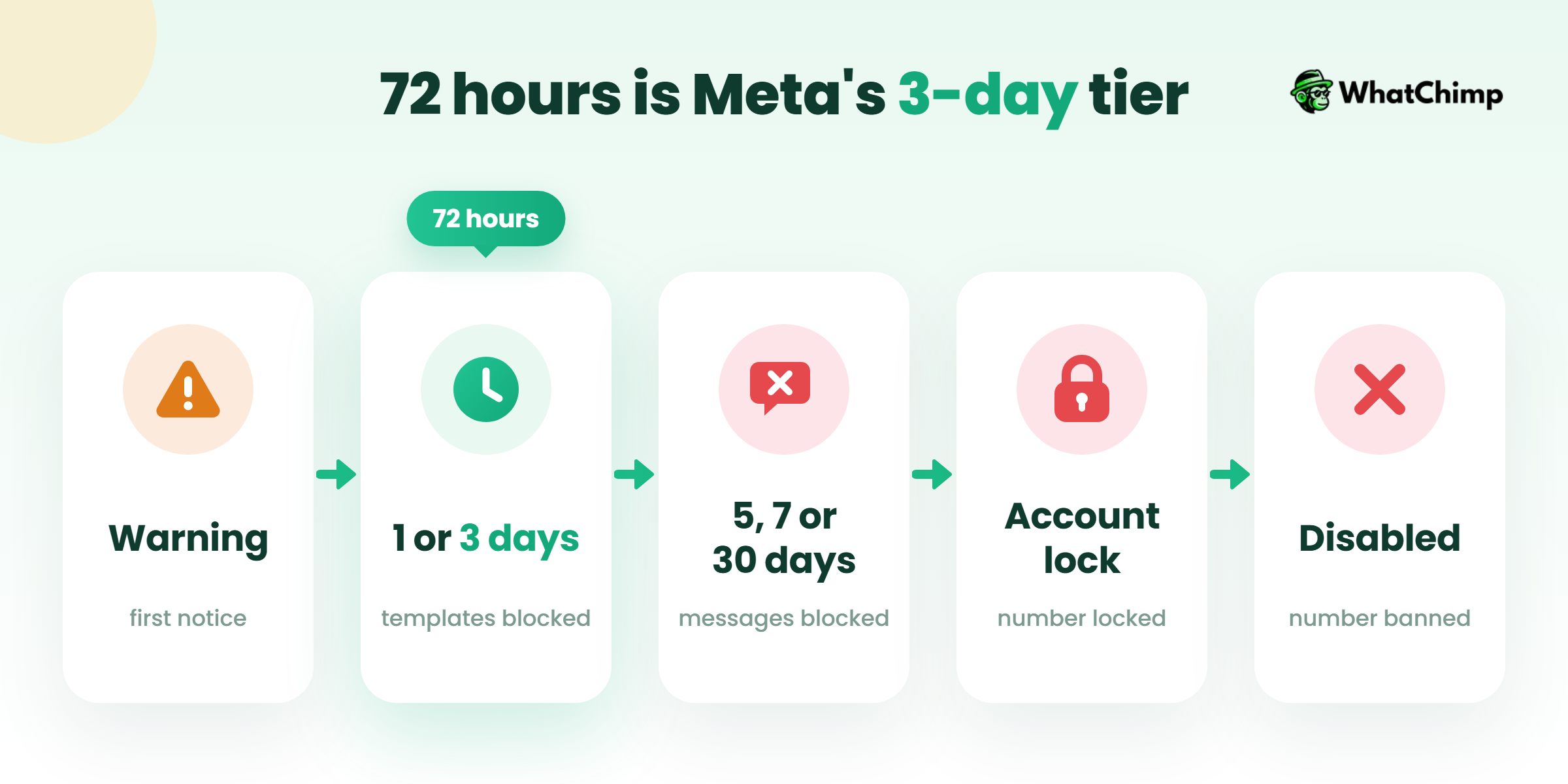
Meta does publish an enforcement ladder for businesses on the WhatsApp Business API. Here’s what its policy enforcement docs set out:
| Stage | What happens |
|---|---|
| 1 | A warning |
| 2 | A 1 or 3 day block on sending marketing, utility and authentication template messages |
| 3 | A 5, 7 or 30 day block on sending any messages |
| 4 | An account lock that “can only be removed via an appeal” |
| 5 | The account is “permanently disabled” |
That 3 day block is the real “72 hours”. Severe violations, such as “child exploitation, scams, terrorism, or the sale of illegal drugs”, skip the ladder entirely and lead to immediate offboarding.
If you’re on the regular app and staring at a timer, do this:
- Uninstall GB WhatsApp, FM WhatsApp or any other modded app.
- Install the official WhatsApp from the Play Store or App Store.
- Remove every bulk sender extension from your browser.
- Wait for the timer to run out. Don’t try to beat it.
- When you’re back, message only people who expect to hear from you.
If you do it again, the next screen may not have a timer.
How can I activate my banned WhatsApp number?
If your screen has a review option, this is the whole process.
Step 1: Stop the cause
Time required: 5 minutes
- Uninstall any unofficial WhatsApp app.
- Turn off any bulk sender or auto-reply tool connected to your number.
- Note down what you were doing just before the ban. You’ll need it for the appeal.
Step 2: Request a review in the app
Time required: 2 to 3 minutes
- Open the official WhatsApp app and verify your number.
- On the ban screen, tap Request a review.
- Add your explanation and submit.
WhatsApp says “We only review one phone number per appeal”, and that contacting it outside the review process “won’t expedite the review process or impact the decision.”
One appeal. That’s it.
Step 3: Write a short, honest appeal
Angry appeals don’t help. Clear ones might.
Instead of: “Why did you ban me?? I did nothing wrong, unban my number right now!!!”
Use: “Hi WhatsApp team, I use this number for my small clothing shop to reply to customers. I recently used a third party bulk messaging tool, which I’ve now removed. I understand this went against your terms. From now on I’ll use only the official app and message only customers who’ve asked to hear from us. Please review my number.”
If the SIM is new to you:
Use: “Hi WhatsApp team, I got this SIM on [date] and the number was already banned before I ever used WhatsApp on it. I think the previous owner may have broken your terms. Please review it.”
Step 4: Wait, then restore your chats
WhatsApp’s help page says most reviews are done within 24 hours.
Your chats haven’t been deleted. In WhatsApp’s words: “You can’t access your chat history or backups while your account is banned. You can only access a WhatsApp account backup after the phone number tied to the backup is unbanned.”
What you get after an unban:
- ✅ Your number works on WhatsApp again
- ✅ You can restore your backup the normal way when you verify
One catch for Business app users: a banned account “automatically loses its Meta Verified subscription”, and you don’t get a refund.
How to appeal a WhatsApp Business API restriction
If you use the API, the appeal goes somewhere else, but the idea is the same.
- Open Business Support Home.
- Select the restricted account and click Request Review.
- Explain what happened and what you’ve changed.
Meta says the review “typically takes 24 to 48 hours”, and the result comes back as “Unchanged” or “Reversed”. It also says “Not all spam violations might be appealed”, so sometimes you simply wait out the restriction.
Have this ready before you appeal:
- ✅ Proof of opt-in: the form, checkbox or keyword reply where each contact said yes
- ✅ The approved templates you were sending
- ✅ What you’ve changed, such as a cleaned list, smaller sends or a clear opt-out
One more thing. Your WhatsApp provider can’t fix a ban for you. WhatsApp says “Third party services can’t ban your WhatsApp Business account or remove your account ban. Only WhatsApp can ban or unban a WhatsApp Business account.”
That includes us.
WhatsApp permanent ban: what are your options really?
Here’s a number most guides leave out.
In May 2026, WhatsApp received 10,590 ban appeals from India and took action on 151 of them, according to the same MediaNama report I quoted at the top. That’s roughly 1 in 70.
So be realistic. If your appeal fails, or there was never a review button, that number is finished on WhatsApp.
Can you just start a new account?
Technically, yes. Practically, be careful. WhatsApp’s Business Policy says that if an account is terminated, it “may prohibit you and your organization from all future use of WhatsApp products and services.” If you open a new number and run the same playbook, you’ll probably lose that one too.
What I’d do instead:
- Tell customers about your new number through SMS, email and your Instagram bio, and put it up at your shop counter.
- Rebuild your list from people who actually say yes.
- Send campaigns only through the official API this time.
Banned WhatsApp number myths that waste your time
There’s no secret WhatsApp banned solution or hack. The only real WhatsApp account banned solution is the official review, plus fixing the cause.
- ❌ “Reinstalling WhatsApp lifts the ban.” It doesn’t. The ban is tied to your number.
- ❌ “Move the SIM to another phone.” It’s the same number with the same ban, and it can look like you’re trying to dodge enforcement.
- ❌ “Five appeals beat one.” WhatsApp reviews one number per appeal and says extra contact won’t change the decision.
- ❌ “My WhatsApp provider can unban me.” Only WhatsApp can.
- ❌ “API numbers never get banned.” Meta’s own ladder ends at “permanently disabled”.
- ❌ “My chats are gone forever.” Backups come back once the number is unbanned.
How to send bulk messages without getting your WhatsApp number banned again
This is the part that matters if you sell to a list.
Can’t I just go back to regular WhatsApp and be more careful?
Technically, yes. Practically, no. Here’s why: the regular and Business apps aren’t built for sending at scale, and any tool that forces them to is exactly what WhatsApp bans for.
The official WhatsApp Business API works differently. Meta’s messaging limits start a new business portfolio at 250 unique users in a moving 24 hours. As quality holds up, that grows to 2,000, 10,000, 100,000 and then unlimited.
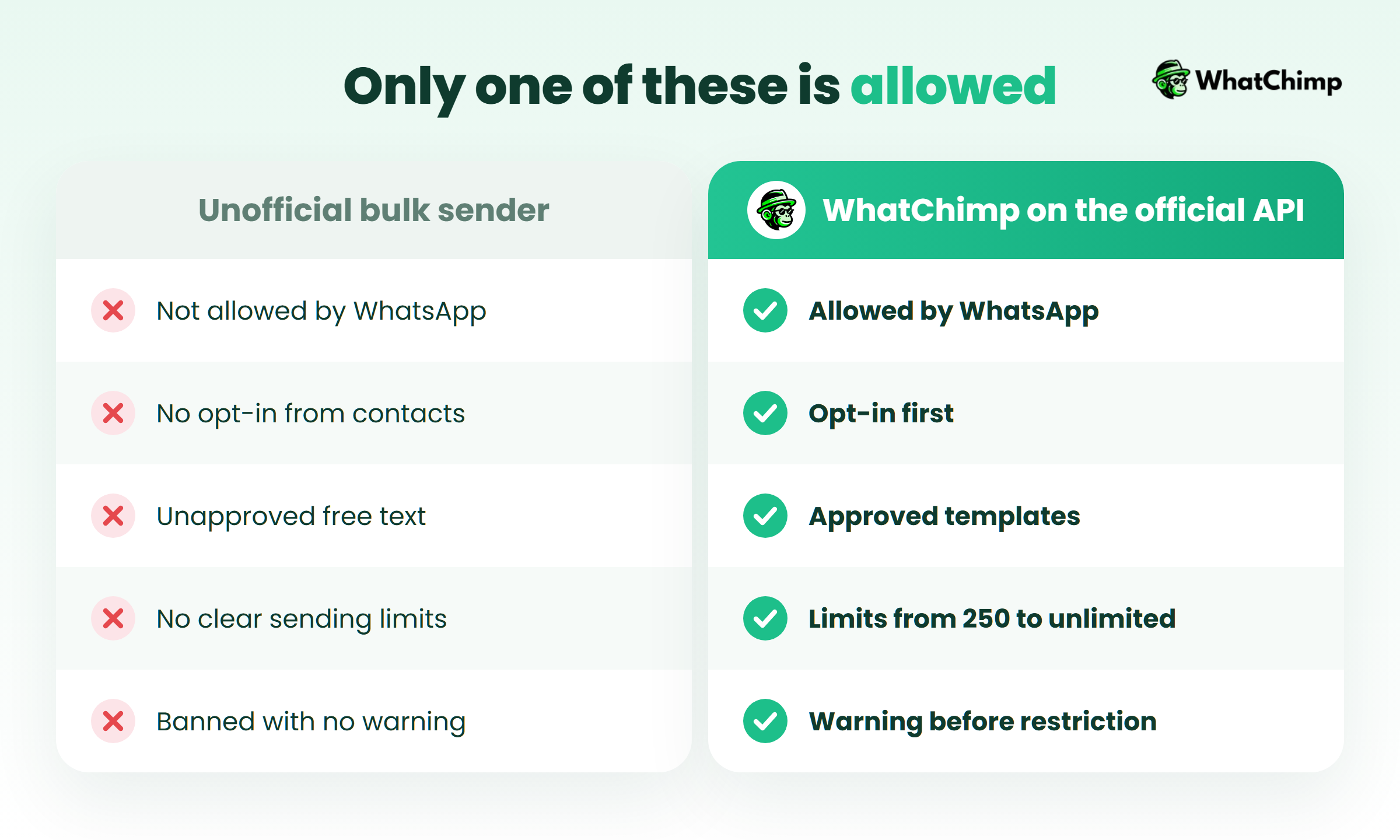
| What matters | Unofficial bulk sender | Official WhatsApp Business API |
|---|---|---|
| Allowed by WhatsApp | No | Yes |
| How a chat starts | Any text, any time | Approved template only |
| Opt-in | Ignored | Required |
| Sending limit | None, until you’re banned | 250 to unlimited, based on quality |
| When something goes wrong | Sudden ban | Warning first, then stepped restrictions |
1. Opt-in first, so nobody hits Block
Collect a clear yes at checkout, on your website form or through a click-to-WhatsApp ad. Keep a record of it. If you ever need to appeal, that record is your proof.
2. Approved templates, so every first message follows the rules
The policy says: “You may only initiate conversations using an approved Message Template.” Outside the 24-hour customer service window, you can only send templates. Inside it, you can reply freely.
Instead of: “Hiii!!! Huge sale, click the link fast”
Use: “Hi Neha, the blue kurta you asked about is back in size M. Want me to keep one aside for you? Reply ‘stop’ if you’d rather not get these updates.”
Example in action: Neha replies “Yes please, Saturday”. That opens the 24-hour window, so the shop can answer her normally without another template.
3. Quality over volume, so your limits grow on their own
If your quality is high and you’ve used at least half your limit in the last 7 days, Meta says your limit “increases by one level within 6 hours.” It works the other way too: “Our systems will rate limit businesses if the business’s quality is low for a sustained period of time.”
Send to fewer people who want the message and you’ll end up able to reach more.
4. A pre-campaign check, so you catch problems before you send
- ✅ Every contact on the list opted in
- ✅ The template is approved
- ✅ The message uses the customer’s name
- ✅ It has a clear way to opt out
- ✅ The list is segmented, so each customer gets the offer that fits them
- ✅ Someone is ready to answer replies within 24 hours
Running compliant broadcasts with WhatChimp
This is where we come in. WhatChimp is built on the official WhatsApp Business API, and we’re a Meta Business Partner.
You send personalised bulk WhatsApp broadcasts with scheduling, segments, and delivered and read reports. Template approvals come back in about 10 seconds. Replies land in a shared team inbox, so your team logs in from a browser and answers from the same number.
To be honest with you, no tool can promise you’ll never be restricted. The official API removes the reasons unofficial tools get numbers banned. Opt-in and message quality decide the rest.
You can start with a 7-day free trial and no credit card. Meta’s conversation fees pass through at 0% markup, and our WhatsApp Business API pricing guide explains how those fees work. Current plans are on the pricing page, so check there on the day.
Conclusion
You now know which ban screen you’re looking at and how to appeal it once, properly.
You also know why unofficial bulk tools keep getting numbers banned, and what the official route looks like.
If you want to keep messaging your list, set up your next campaign on the official API with WhatChimp and send it only to people who’ve said yes.
So, which screen are you looking at right now?
FAQs
Why did WhatsApp ban my number?
Usually because WhatsApp decided your activity broke its Terms of Service, most often through spam. The common triggers are unofficial apps like GB WhatsApp, bulk sender tools, scraping, and lots of people blocking or reporting you. If the SIM is new to you, the previous owner may have caused the ban.
How long does a WhatsApp ban last?
It depends on the ban. WhatsApp doesn’t publish durations for the regular or Business app, and a “Temporarily banned” screen shows its own timer. For the WhatsApp Business API, Meta’s published ladder goes from a 1 or 3 day template block to a 5, 7 or 30 day block on all messages.
| Ban type | Published length |
|---|---|
| Regular or Business app | Not published |
| API template block | 1 or 3 days |
| API full messaging block | 5, 7 or 30 days |
WhatsApp banned my account. Will I lose my chats?
No, not permanently. You can’t open your chats or backups while the ban is active. Once the number is unbanned, you can restore your backup when you verify it again.
How do I get my WhatsApp number unbanned?
You request a review from the ban screen in the official app, if that option is there. Send one clear appeal that explains what happened and what you’ve changed. WhatsApp says most reviews finish within 24 hours, and if there’s no review option, the ban is final.
Can a WhatsApp Business Solution Provider unban my number?
No. WhatsApp says only WhatsApp can ban or unban an account, and third party services can’t remove a ban. A provider can help you prepare evidence for an API appeal, but the decision belongs to WhatsApp.
Can I send bulk messages without getting my WhatsApp number banned?
Yes, if you use the official WhatsApp Business API and follow its rules. That means opt-in, approved templates and good message quality.
- ❌ GB WhatsApp or other modded apps
- ❌ Browser bulk sender extensions
- ❌ Messaging contacts who never said yes
Is a WhatsApp permanent ban really permanent?
Yes, if there’s no review option or your appeal is turned down. In May 2026, WhatsApp acted on 151 of 10,590 ban appeals from India. If you open a new account and repeat what caused the ban, WhatsApp’s policy allows it to block you and your business from its products for good.