
WhatsApp CRM: what it is, what it costs in India and how to set one up
Learn what a WhatsApp CRM is, how the app, extensions and the API compare, what Meta's per-message fees cost in India, and how to set one up today.


On this page
What this guide covers
- Key takeaways
- What is a WhatsApp CRM?
- Three ways to run WhatsApp as a CRM (and the risks of each)
- What it is NOT
- The Meta rules you have to follow on the API
- What does it really cost in India? (November 2026)
- Must-have features in a CRM for WhatsApp
- Can I connect WhatsApp to the CRM I already use?
- How to set up WhatsApp as your CRM in 5 steps
- Use cases for Indian businesses
- Best WhatsApp CRM software in India: quick comparison
- How WhatChimp fits in
- Conclusion
- FAQs
Key takeaways
- A WhatsApp CRM puts every chat, contact detail and follow-up in one place your whole team can see, so no lead vanishes into one person’s phone.
- The free Business app works for one or two people. Chrome extensions add features but run outside Meta’s official business tools. The official API through a Meta partner is the route that scales.
- Since October 1, 2026, Meta gives each business number 1,000 free service messages a month. After that, you pay for every single one. So budget for message fees, not just the software.
- A customer writes to you? You’ve got 24 hours to reply however you like. After that, you need an approved template and their opt-in.
- Already on Zoho, HubSpot or Salesforce? Don’t switch. Hook WhatsApp up to it through Zapier, Make, Pabbly, n8n or an API.
What if I told you that, since October 1, 2026, just replying to your own customers on WhatsApp can cost you money?
You’d probably say I’m exaggerating.
I’m not. Meta now gives every business phone number 1,000 free service messages a month. Message number 1,001? You pay for it. That’s straight from Meta’s own WhatsApp pricing documentation.
Meanwhile, most shop owners and D2C founders I talk to still sell the old way. One phone on the counter. Three people taking turns on it. Hot leads buried under hundreds of unread chats. Someone promised a customer a callback on Tuesday. Nobody remembers who it was.
That’s the problem a WhatsApp CRM solves.
In this guide I’ll show you what one is, the three ways to get one, and what can go wrong with each. Then come the Meta rules you can’t skip, what it really costs in India every month, and how to set it up or plug it into Zoho or HubSpot.
First, the basics.
What is a WhatsApp CRM?
A CRM (customer relationship management tool) sounds fancy. It’s really just where you write down who your customers are, what they asked for and what happens next.
A CRM for WhatsApp does that same job, just inside the chat. Every conversation sits on a contact profile: tags, notes, who owns it, the full history. And your whole team sees the same thing.
Simple, right?
Think about it. Your customers already message you on WhatsApp. The CRM part is there so nobody’s question gets missed. And when the one person holding the phone goes on leave? Your leads don’t go cold.
WhatsApp-first platform or a CRM with WhatsApp integration: which should you pick?
You’ve got two ways to get there. Pick the wrong one and you’ll lose months.
| WhatsApp-first platform | CRM with WhatsApp integration | |
|---|---|---|
| Where your team works | A shared WhatsApp inbox | Inside Zoho, HubSpot or Salesforce |
| Best for | Teams that sell and support mostly on WhatsApp | Teams that already run a sales pipeline in a CRM |
| Broadcasts and chatbots | Built in | Depends on the connector |
| Setup effort | Usually the same day | Longer, because fields have to be mapped |
Here’s my rule of thumb:
- Just two of you in the shop? The free Business app will do for now. When the chats start piling up, though, move to a WhatsApp-first platform.
- Have 10 agents across sales or support? Then you need a WhatsApp-first platform with a shared inbox. At that size, you’re really shopping for WhatsApp customer service software.
- Already living in Zoho or HubSpot? Keep it. You just need a crm whatsapp integration, so every chat sits right next to its deal.
Isn’t the WhatsApp Business app already a CRM?
So why can’t you just stick with the free app?
Technically, yes. Practically? No. Here’s why:
The Business app gives you labels, quick replies, a small catalog and a few linked devices. That’s about it. Meta pitches it at small businesses that personally handle their own chats. For businesses messaging customers at scale, Meta points to its Business Platform (the API).
What the app can’t do:
- ❌ Assign a chat to a specific person and track who replied
- ❌ Give managers and agents different permissions
- ❌ Run API chatbots, approved templates at scale or automated follow-ups
- ❌ Sync contacts and chats into your CRM
So the app works as a WhatsApp business crm for a solo owner. Once a team gets involved, it stops working.
Three ways to run WhatsApp as a CRM (and the risks of each)
1. The free Business app: fine for one or two people
It’s free, and you can have it running in minutes. Labels like “New lead” and “Paid” work as a basic pipeline.
The trouble starts when two people reply to the same customer with different prices.
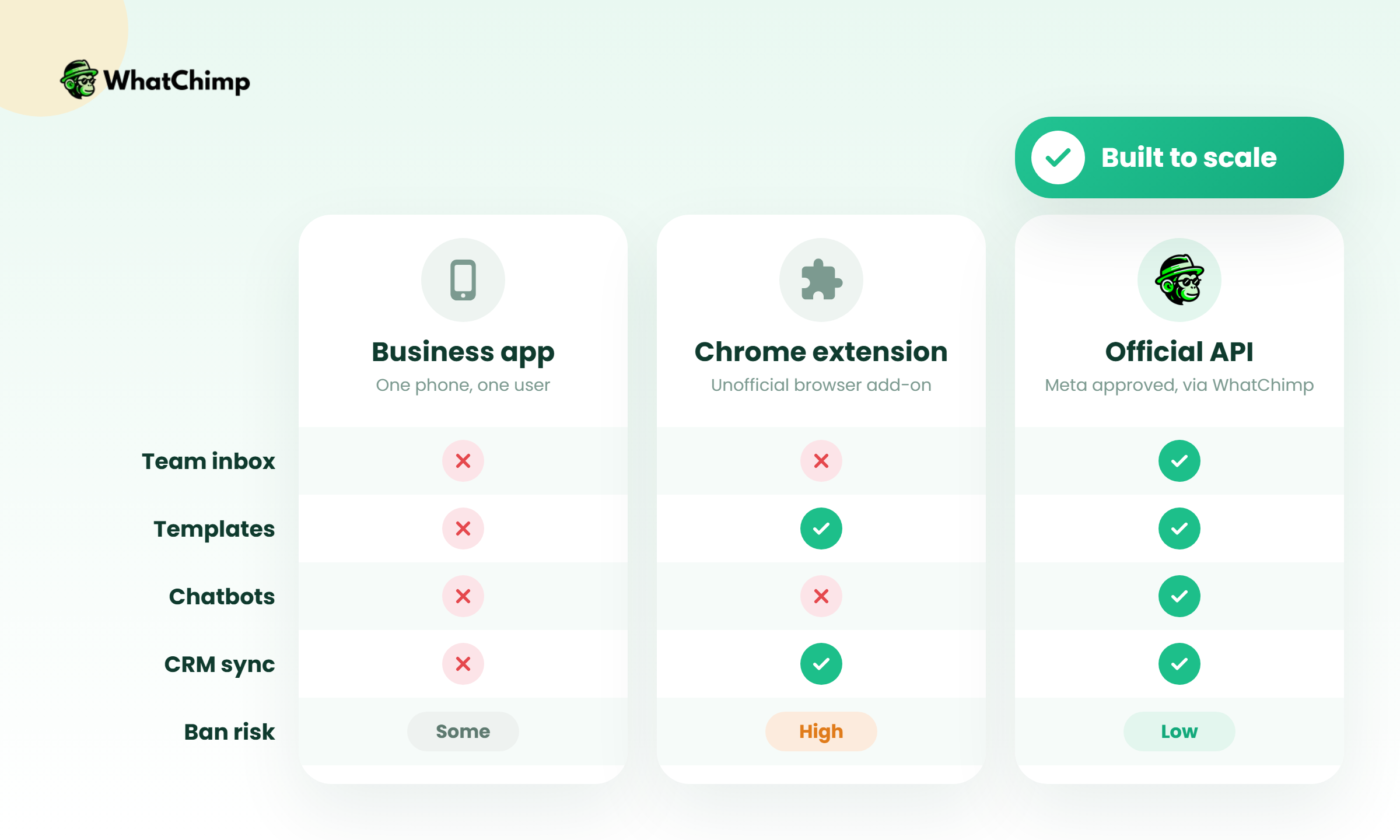
2. Chrome extensions on WhatsApp Web: cheap, but outside the official rules
Several tools that rank for this topic are browser extensions. They add pipelines, reminders and bulk sending on top of WhatsApp Web.
Here’s what their homepages leave out. They automate the consumer web client, which isn’t an official business interface. If you send bulk messages through one, your number can get banned. They also can’t send Meta-approved templates or run chatbots on the API, because they never touch the API.
Pro tip: if a tool asks you to scan a QR code on WhatsApp Web to “turn on bulk sending”, treat that as a red flag. It doesn’t matter how good the feature list looks.
3. The official Business API through a Meta partner: the route that scales
This is how serious teams do it. You connect your number to the WhatsApp Business Platform through a partner. The partner gives you a dashboard in your browser, with a shared inbox, broadcasts, chatbots and integrations in one spot.
Your team logs in and answers from the same business number.
| Business app | Chrome extension | Official API via partner | |
|---|---|---|---|
| Team members | Owner plus a few linked devices | Usually one browser session | Many agents with roles |
| Broadcast scale | Small lists | Risky bulk sending | Grows from 250 to unlimited per day |
| Approved templates | No | No | Yes |
| Chatbots and AI | Basic auto-replies | Limited | Full chatbot and AI agent |
| CRM sync | No | Some connectors | Zapier, Make, webhooks, API |
| Ban risk from bulk sends | Low if used normally | High | Low if you follow opt-in rules |
| Cost | Free | Free or low plans | Platform fee plus Meta message fees |
What it is NOT
A lot of myths float around this topic. Here are the ones I hear every week:
- ❌ “It’s a tool for blasting spam.” Nope. Meta caps how many people you can reach and keeps an eye on your quality rating. Spam gets your account killed fast.
- ❌ “Free extensions are just as good.” They can’t use templates and they put your number at risk.
- ❌ “I’ll have to throw away Zoho.” You don’t. Just connect WhatsApp to the CRM you’ve already got.
- ❌ “This is only for big companies.” Not true. A 2-agent clinic gets as much out of a shared inbox as a 50-agent call centre.
- ✅ It’s an organised way to sell and support on WhatsApp, with a record of every chat your team has had.
The Meta rules you have to follow on the API
Competitor guides mostly skip this part, and it’s where new users get burned.
1. The 24-hour window decides what you can send
In Meta’s words: “When a WhatsApp user messages you or calls you, a 24-hour timer called a customer service window starts… When the window closes, you can only send pre-approved template messages.” That’s from the Cloud API send-messages guide, which also says you may only message users who have opted in.
Example in action: Priya asked a Pune builder about a 2BHK on Monday and went quiet. On Thursday the agent wants to follow up.
Instead of: “Hi, still interested??”
(Send free text after the window closes and it just won’t go through.)
Use: an approved template, something like “Hi Priya, the 2BHK in Baner you asked about is still available. Want me to send the floor plan? Reply YES, or STOP to opt out.”
2. Opt-in comes first, always
This is the MOST important rule. Get permission first, on your website form, at checkout or through a click-to-WhatsApp ad. Then note in the contact’s profile where each opt-in came from.
- ✅ Checkbox at checkout saying you’ll send order updates on WhatsApp
- ✅ Customer messages you first from an ad or QR code
- ❌ Numbers bought from a list seller
- ❌ Adding every phone number from your old call logs
3. Messaging limits grow with you, from 250 to unlimited
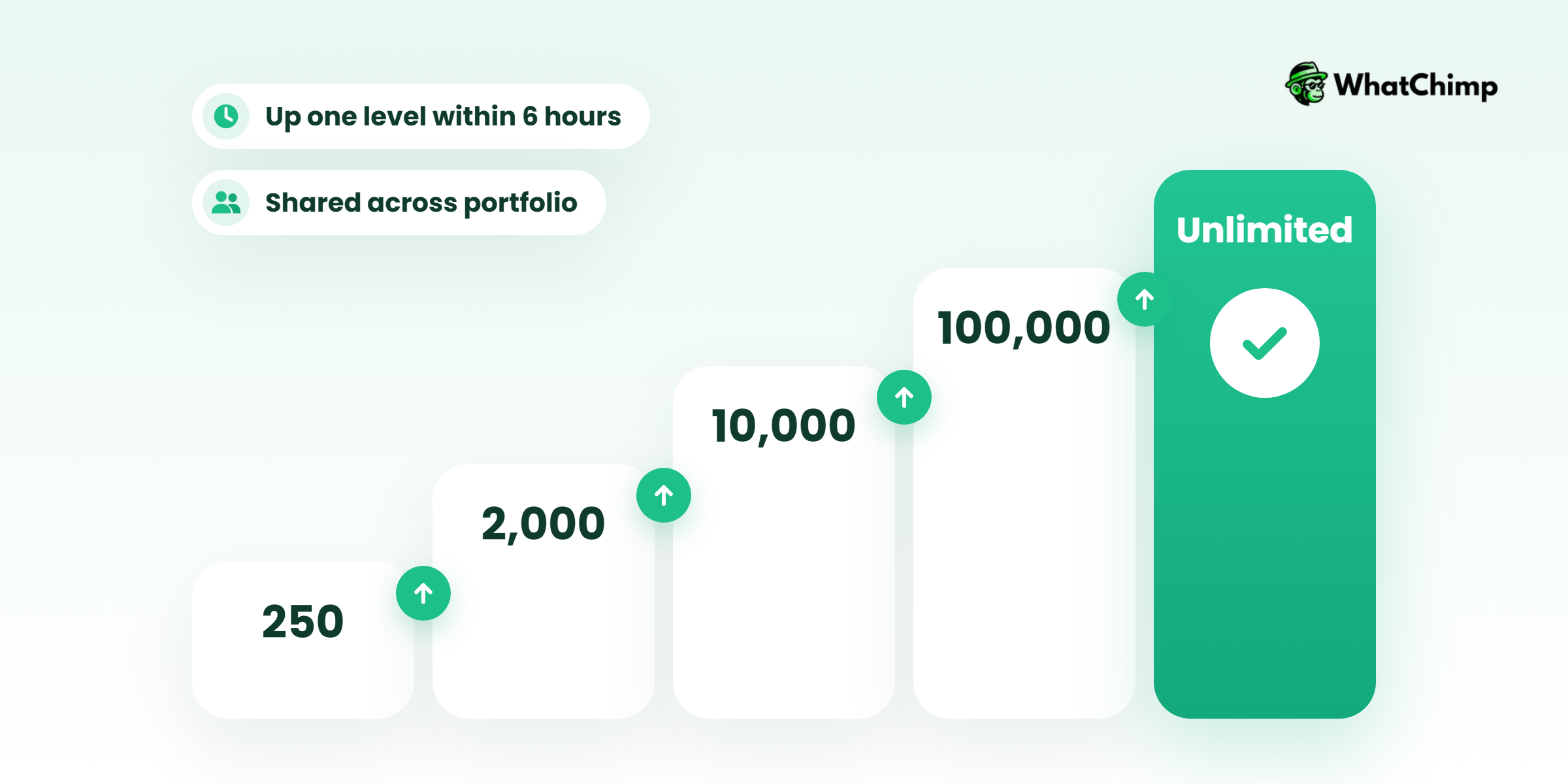
So how many people can you message? Meta’s messaging limits documentation says a new business portfolio starts at 250 unique users in a moving 24-hour period, outside a customer service window. From there it climbs to 2,000, then 10,000, then 100,000, and finally unlimited.
Two details matter:
- The limit is set at portfolio level and shared by every number in that portfolio.
- Automatic scaling moves you up one level within 6 hours. The catch? In the last 7 days you need to have used at least half your limit. And your message quality has to stay high.
So start with your warmest customers, keep complaints low, and the limit goes up by itself.
4. India’s DPDP Rules are coming into force
India’s Digital Personal Data Protection Rules were notified in November 2025, and they’re rolling out in phases. So what changes for your CRM? You need clear consent. You need a stated reason for collecting each number. And customers need an easy way to opt out and get their data wiped. My advice? Pick a tool that logs every opt-in and actually deletes a contact when someone asks.
What does it really cost in India? (November 2026)
Every Indian owner asks this, and none of the top-ranking guides give a straight answer.
There are two bills: your software plan and Meta’s per-message fees.
How Meta charges per message
Meta has charged per message since July 1, 2025. The charge depends on the message category and the recipient’s country code. There are four main categories, plus a newer Meta Business Agent category added in July 2026. All of this is on Meta’s pricing page.
| Category | What it’s for | What changed |
|---|---|---|
| Marketing | Offers, launches, win-back messages | India rate went up on January 1, 2026 |
| Utility | Order updates, payment reminders | Inside the service window these became free on July 1, 2025, and have been charged again since October 1, 2026 |
| Authentication | OTPs and logins | International auth rate for India went up on April 1, 2026 |
| Service | Your replies inside the 24-hour window | First 1,000 per number per month free from October 1, 2026; the free allowance doesn’t roll over |
Some other things from the same page are worth knowing:
- Click-to-WhatsApp ads open a free entry point window that can stay open for up to 7 days (per Meta’s developer docs), and messages inside it aren’t charged.
- Meta can change prices only on the first day of a quarter.
- India accounts must switch to INR billing by December 31, 2026. From January 1, 2027, Meta stops delivering messages for accounts not billed in INR.
Indicative India rates
Meta’s own INR rate card is a downloadable file, so check it before you budget. For a ballpark, these are the per-message charges one partner lists on its published pricing page. They vary by plan and may include that partner’s own pricing:
| Category | Per message (₹) |
|---|---|
| Marketing | 0.949 to 0.970 |
| Utility | 0.140 to 0.160 |
| Authentication | 0.127 to 0.129 |
| Service | 0.127 to 0.129 |
Questions to ask any platform about fees
- Do you add a markup on Meta’s message fees, and how much?
- Are message fees paid to you or directly to Meta?
- Do you cap how many messages I can send?
- How many team members and numbers does each plan include?
For the record, WhatChimp charges 0% markup on Meta’s conversation fees, and you pay those fees directly to Meta. I’ve written up the full breakdown in our WhatsApp Business API pricing guide.
Worked example: a 5-agent D2C brand’s monthly bill
Imagine a skincare brand with five agents on one number. In a month it sends:
| Item | Volume | Indicative cost |
|---|---|---|
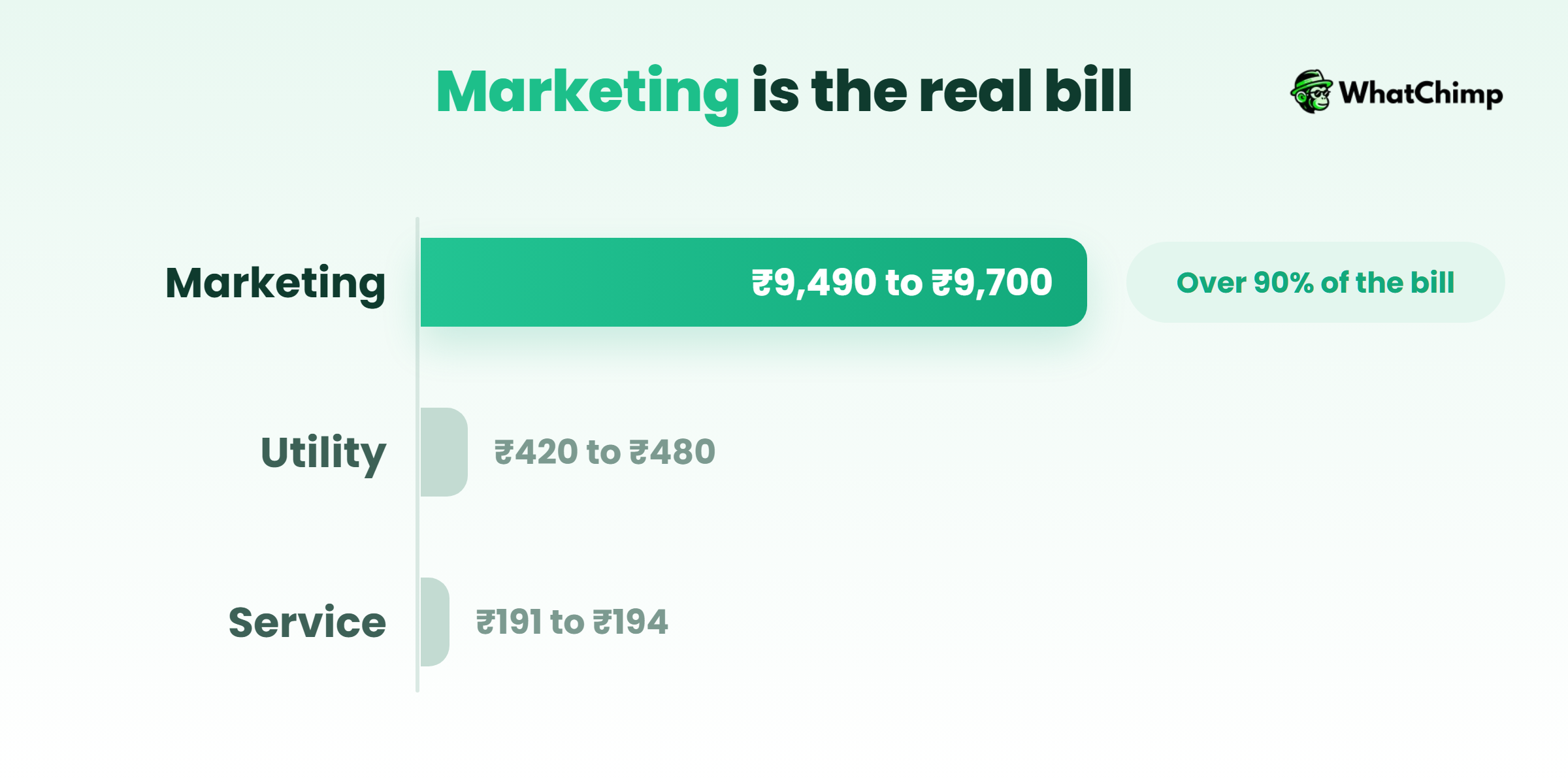
| Marketing broadcasts | 10,000 | ₹9,490 to ₹9,700 |
| Utility order updates | 3,000 | ₹420 to ₹480 |
| Service replies | 2,500 (first 1,000 free) | ₹191 to ₹194 for the other 1,500 |
| Meta total | About ₹10,100 to ₹10,374 | |
| Platform plan | WhatChimp Pro, 5 team members | $30/mo billed yearly (Nov 2026) |
Look at where the money goes.
Marketing messages make up more than 90% of the Meta bill. Better targeting saves you far more than haggling over the software price.
Must-have features in a CRM for WhatsApp
1. A shared team inbox so no customer waits on one person’s phone
Several agents, one number. Assign chats, tag them, leave each other internal notes, send saved replies. Turn on masking and agents never see the customer’s full number. That’s exactly what WhatChimp’s shared team inbox does. On Pro you also get roles, automatic routing and manager monitoring.
Example in action: Meena is the receptionist at a clinic. A new patient writes in, so she tags the chat “Dental, new patient” and assigns it to Dr Rao’s assistant. The assistant opens it and reads the whole history before typing a word. Nobody asks the patient to repeat themselves.
2. Custom fields that tell you more than a customer’s name
Store city, budget, last order or policy renewal date in fields you set up yourself. Now “Hi” becomes “Hi Rahul, your car insurance renews on the 14th.”
3. Broadcasts to the right 2,000 people instead of your whole list
Please don’t blast your whole list. I mean it. Pick one tag, say “bought in last 90 days” or “Pune leads”, and send only to those people. When people actually want your message, they don’t hit report, so your quality rating stays healthy. And your limits keep going up.
Instead of: “Big sale!!! 50% off everything, shop now”
Use: “Hi Ananya, the vitamin C serum you bought in August is back in stock, and it’s 20% off for repeat customers till Sunday. Want the link?”
4. Chatbots and AI agents that handle the 2 a.m. questions while you sleep
It’s 2 a.m. and someone wants to know when their order will arrive. A chatbot can answer that FAQ for you. It can also qualify the lead, collect their details through WhatsApp forms and pass the chat to a real person on your team. This isn’t a fringe experiment, either. Meta says more than one million businesses already use its Business Agent on WhatsApp and Messenger. And when a customer goes quiet? Don’t chase them by hand. Set up WhatsApp automations and the follow-up sends itself.
5. Catalog, payments and booking, so the sale closes right inside the chat
Customers browse your products, pay or book an appointment, all without leaving WhatsApp. And every order lands on their contact profile.
6. Integrations and an API that keep your data from getting stuck in one tool
Where does your data live? Orders, probably in Shopify or WooCommerce. Quick lists? A Google Sheet. For everything else, you’ll want Zapier, Make, Pabbly or n8n doing the connecting.
Can I connect WhatsApp to the CRM I already use?
Already on Zoho or HubSpot? Good. Stay right there.
Three ways to connect
| Method | How it works | Best for |
|---|---|---|
| Native connector | Built by the CRM or the WhatsApp platform | Simple sync, if one exists for your pair of tools |
| Zapier, Make, Pabbly, n8n | No-code “when this happens, do that” | Most SMBs |
| Webhooks and API | Your developer writes the sync | Custom pipelines, high volume |
Straight answer? WhatChimp has no native Zoho, HubSpot or Salesforce connector. You connect it through Zapier, Make, Pabbly, n8n, webhooks or the WhatChimp API. Honestly, for most teams, that’s all a whatsapp crm integration needs.
Setting up the Zoho CRM WhatsApp integration, step by step
Zoho already has some WhatsApp features built into Zoho CRM, so look at those first. They might be enough. Still want an inbox built around WhatsApp, plus broadcasts, while Zoho holds your records? Fine. Here’s the setup, no code needed.
Time required: about 20 to 30 minutes
- In WhatChimp, set up custom fields that mirror your Zoho ones (lead source, city, budget).
- Open Zapier, Make or Pabbly and pick WhatChimp as your trigger app. I’d start with a new contact coming in, or a bot that’s just finished collecting someone’s details.
- Choose Zoho CRM as the action app, then click Create or update lead.
- Map phone, name and your custom fields to the matching Zoho fields.
- Now build a second flow going the other way. When a Zoho lead hits a stage, a WhatsApp template goes out.
- Send a test to your own number first. Looks right? Switch it on.
What you get:
- ✅ Every WhatsApp lead appears in Zoho without anyone typing it in
- ✅ Sales reps send WhatsApp follow-ups straight from the pipeline they already use
HubSpot and Salesforce
Same idea here. Someone new messages you on WhatsApp, or you change a tag, and HubSpot or Salesforce creates or updates the record. Nobody has to touch it. Moved a deal to the next stage? The customer gets a template back. Here’s a tip I learned the hard way. Save every phone number in one format, with the country code. Skip that and you’ll be cleaning up duplicates.
Google Sheets as a free starter CRM
Looking for a free crm with whatsapp integration? Honestly, the cheapest one that works is a Google Sheet. Every lead you capture gets pushed into the sheet automatically. You sort and filter it yourself. Basic? Sure. But it’s free, and it beats scrolling back through old chats by a mile.
What syncs and what doesn’t
| Usually syncs | Usually doesn’t |
|---|---|
| Name, phone, tags, custom fields | Full chat transcripts (unless you build it) |
| Lead source and opt-in status | Media files like images and voice notes |
| Trigger events, like a new lead or a stage change | Live typing indicators and read receipts |
Before you switch anything on, decide which tool owns each field. Every field gets one home. No arguments later.
How to set up WhatsApp as your CRM in 5 steps
Step 1: Get your Meta Business portfolio ready
Time required: about 10 to 15 minutes
- Log in to your Meta Business portfolio. Don’t have one yet? Create it.
- Add your legal business name and your website.
- Start business verification if Meta asks for it.
Step 2: Pick the number
Time required: 2 to 3 minutes
- Pick a number your customers already know, or get a fresh one for the API.
- Make sure it can receive an SMS or call for the verification code.
Step 3: Connect through a Meta partner
Time required: 5 to 10 minutes
- Sign up on WhatChimp (no credit card required, 7-day free trial).
- Click Connect WhatsApp and log in with Facebook.
- Select your portfolio and number, then set your display name.
What you get:
- ✅ Your number on the official WhatsApp Business API, connected through a Meta Business Partner
- ✅ A browser dashboard your whole team can log in to
Step 4: Create your first templates
Time required: 5 minutes
- Write a utility template (order update) and a marketing template (offer).
- Submit them. On WhatChimp, approvals usually come back in about 10 seconds.
Step 5: Add your team, automations and CRM sync
Time required: 30 minutes
- Invite agents and set who handles which tags.
- Turn on a welcome bot and an automated follow-up.
- Import your opted-in contacts and connect Zoho, HubSpot or Sheets.
If you’d like to try this on your own customers, a free WhatChimp account gets you through all five steps before you pay anything.
Use cases for Indian businesses
| Business | What they track | Example message |
|---|---|---|
| Real estate | Budget, locality, site visit date | “Your site visit at Baner is confirmed for Saturday at 11. Reply 1 to reschedule.” |
| D2C and Shopify | Orders, abandoned carts, repeat buyers | “Hi Kavya, your order has shipped. Track it here.” |
| Coaching and education | Course interest, demo attended | “Your free demo class starts at 6 pm today. Here’s the link.” |
| Clinics | Appointments, follow-ups | “Reminder: your check-up with Dr Mehta is tomorrow at 10.” |
| Insurance | Renewal dates, policy type | “Your health policy renews on the 20th. Want a quote for the same cover?” |
Best WhatsApp CRM software in India: quick comparison
Quick note before the table. Everything here is as of November 2026. Prices change a lot and depend on the plan you pick, so check each vendor’s own pricing page before you decide. I’ve only put a price on WhatChimp, because that’s the one I checked myself.
| Tool | Type | Route | Fits best |
|---|---|---|---|
| WhatChimp (my company) | WhatsApp-first platform | Official API | SMBs and D2C teams wanting an inbox, broadcasts and bots, with 0% markup on Meta fees. Basic $12/mo billed yearly, Pro $30/mo billed yearly |
| Wati | WhatsApp-first platform | Official API | Support and sales teams |
| AiSensy | WhatsApp-first platform | Official API | Marketing broadcasts |
| Interakt | WhatsApp-first platform | Official API | Small Indian D2C brands |
| Zoho CRM | Full CRM with WhatsApp features | CRM plugin | Teams already on Zoho |
| WAPlus | Chrome extension | WhatsApp Web | Solo users who accept the extension risks |
How WhatChimp fits in
I built WhatChimp for teams who live in WhatsApp. It’s browser-based, built on the official WhatsApp Business API, and we’re a Meta Business Partner. Businesses in 90+ countries use it.
In one place you get a shared inbox, custom fields, broadcasts, AI chatbots, automations, a catalog, appointment booking, click-to-WhatsApp ads and a Shopify integration. And the price? When I checked the pricing page in November 2026, Basic was $12/mo billed yearly ($144) and Pro was $30/mo billed yearly ($360). Meta’s fees go straight to Meta at 0% markup.
Conclusion
You now know what this kind of CRM is, why the free app and Chrome extensions stop working once a team is involved, and what Meta’s rules and fees look like in India.
Your one action today: take the leads sitting in your phone, put them on a proper WhatsApp CRM, and assign every open chat to a named person.
Which lead are you going to follow up first?
FAQs
Is WhatsApp Business a CRM?
Not really, no. The Business app gives you labels and quick replies, and if you run the shop alone, that’s honestly enough. What it can’t do is assign chats, set permissions, run API chatbots or sync with a CRM. Got a team? Then you need the API through a partner.
Is there a free CRM with WhatsApp integration?
Yes, a few basic ones. Your free options are:
- ❌ The Business app: free, but built for one person
- ❌ Chrome extensions on free plans: free, but they carry ban risk and can’t send templates
- ✅ Google Sheets plus an automation: free and safe, but very basic
How much does it cost per month in India?
It costs your platform fee plus Meta’s per-message fees. Marketing messages cost the most: roughly ₹0.95 to ₹0.97 each on one partner’s published rates. Service messages are kinder, since the first 1,000 per number each month are free. So if you send 10,000 marketing messages a month, budget about ₹10,000 for Meta, plus the software.
Can my whole team use one WhatsApp number?
Yes, on the API. You use a shared inbox. Each agent logs in from their own browser and replies from the same business number. You assign chats, leave notes and see exactly who answered. You can even hide customer numbers from your agents.
Can I message a customer after 24 hours?
Yes, as long as they’ve opted in and you use an approved template. Here’s how I explain it to shop owners. Picture a timer. A customer messages you and a 24-hour window opens. While it’s running, type whatever you like. Once it runs out, you’re back to templates, like a reminder or an update.
Will a Chrome extension get my number banned?
It can. Extensions automate WhatsApp Web, and WhatsApp Web isn’t an official business interface. Bulk sending through one? Honestly, there’s no riskier move. If WhatsApp is your main sales channel, stay on the official API.
Can a WhatsApp CRM app work alongside Zoho or HubSpot?
Yes. And most teams I talk to don’t choose. The pipeline stays in the CRM. The chats run on a WhatsApp platform. Zapier, Make, Pabbly, n8n or an API ties the two together. Where people trip up is phone numbers. Map them with the country code, or your records won’t match.