WhatsApp without saving number: 6 ways on Android, iPhone and Web
Learn how to WhatsApp without saving number on Android, iPhone, Web and Desktop, with wa.me link formats, privacy tips and the safe way for businesses.

On this page
What this guide covers
- Key takeaways
- The quick answer: how to send WhatsApp message without saving number
- Method 1: search the number in WhatsApp’s new chat screen
- Method 2: open a wa.me click-to-chat link (works on any device)
- How to WhatsApp without saving number on Android
- How to send message on WhatsApp without saving number on iPhone
- On WhatsApp Web and the desktop app
- Which method should you use?
- What messaging an unsaved number is NOT
- Messaging many customers without saving numbers (the business way)
- Common mistakes and the “invalid number” fix
- Conclusion
- FAQs
Key takeaways
- The quickest way to WhatsApp without saving number: tap New chat, then type the full number with country code into the search bar.
- A wa.me link opens a chat on any phone, browser or computer. Just use wa.me/ plus the number in international format, with no +, spaces, dashes or leading zero.
- Add ?text= and a ready-written message to the link, and the chat opens with your words already typed.
- These tricks are about convenience, not privacy. The person you message still sees your number, so you’re not anonymous.
- If you’re a business messaging many customers, use the official WhatsApp Business API with opt-in instead of bulk-sending from a personal phone, because that is what gets numbers restricted.
What if I told you six characters are all you need to message anyone on WhatsApp?
wa.me/
You’d probably think I’m exaggerating.
I’m not.
Right now you’re probably doing what most of us do. The delivery guy calls, the plumber texts, a seller on OLX shares a number, and you save “Ramesh Plumber 2” into your contacts just to send one message. Six months later your phone book is a graveyard of people you’ll never talk to again.
And if you run a shop, it’s worse. Every new customer means another saved number on somebody’s personal phone.
In this guide I’ll show you how to send WhatsApp message without saving number on Android, iPhone, WhatsApp Web and the desktop app. I’ll show you the exact link format WhatsApp itself recommends, how to fix the annoying “invalid number” error, and what to do when you need to message hundreds of customers, not one.
Start with the fastest one.
The quick answer: how to send WhatsApp message without saving number
Open WhatsApp and tap the New chat icon. Type the full number, country code included, into the search bar. If they’re on WhatsApp, their chat pops up and you can message them right away.
No app. No saving.
If that doesn’t work on your version, or you’re on a laptop, use a link instead:
- Open any browser.
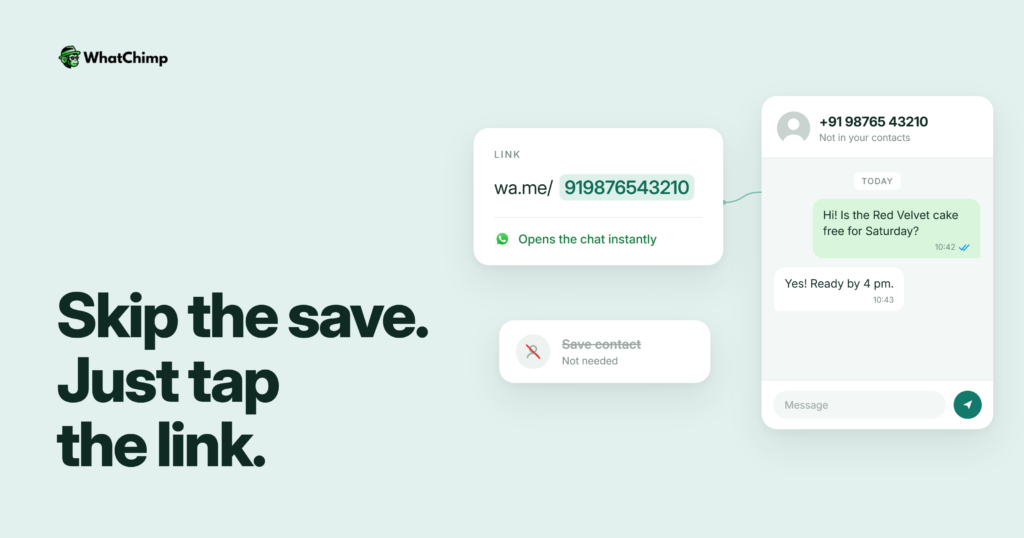
- Type wa.me/ followed by the number in international format, for example wa.me/919876543210 for an Indian number.
- Tap Continue to chat, and WhatsApp opens with that person’s chat ready.
WhatsApp’s own Help Center says click to chat “allows you to begin a chat with someone without having their phone number saved in your phone’s address book” and that it “works on both your phone and WhatsApp Web” (WhatsApp Help Center).
That’s the whole trick. Everything below is the detail that makes it work every time.
Method 1: search the number in WhatsApp’s new chat screen
This is the method most guides skip, which is odd, because it’s the simplest.
WhatsApp lets you type an unknown number into the new chat search, and if the number is on WhatsApp you can open the chat directly. It works on both Android and iPhone and has been a regular feature (not a beta) since 2023.
Step 1: Open the new chat screen
Time required: under a minute
- Open WhatsApp.
- Tap the New chat icon. On Android it’s the speech bubble with a plus; on iPhone it’s the pencil.
- Tap the search bar up top.
Step 2: Type in the number, then open the chat
- Type the full number with its country code, like +91 98765 43210.
- Give WhatsApp a second to check the number.
- Tap the result. The chat opens and you can type your message.
What you get:
- ✅ A normal WhatsApp chat, with photos, voice notes and files
- ✅ Nothing added to your phone’s contacts
What if it says the number isn’t on WhatsApp?
Check the country code first. Nine times out of ten that’s the problem.
Code’s right and still nothing? Then the person just isn’t using WhatsApp on that number. Send them an SMS or give them a call instead.
Method 2: open a wa.me click-to-chat link (works on any device)
I use this method the most. Why? It works on every phone, every browser and every computer.
The exact link format
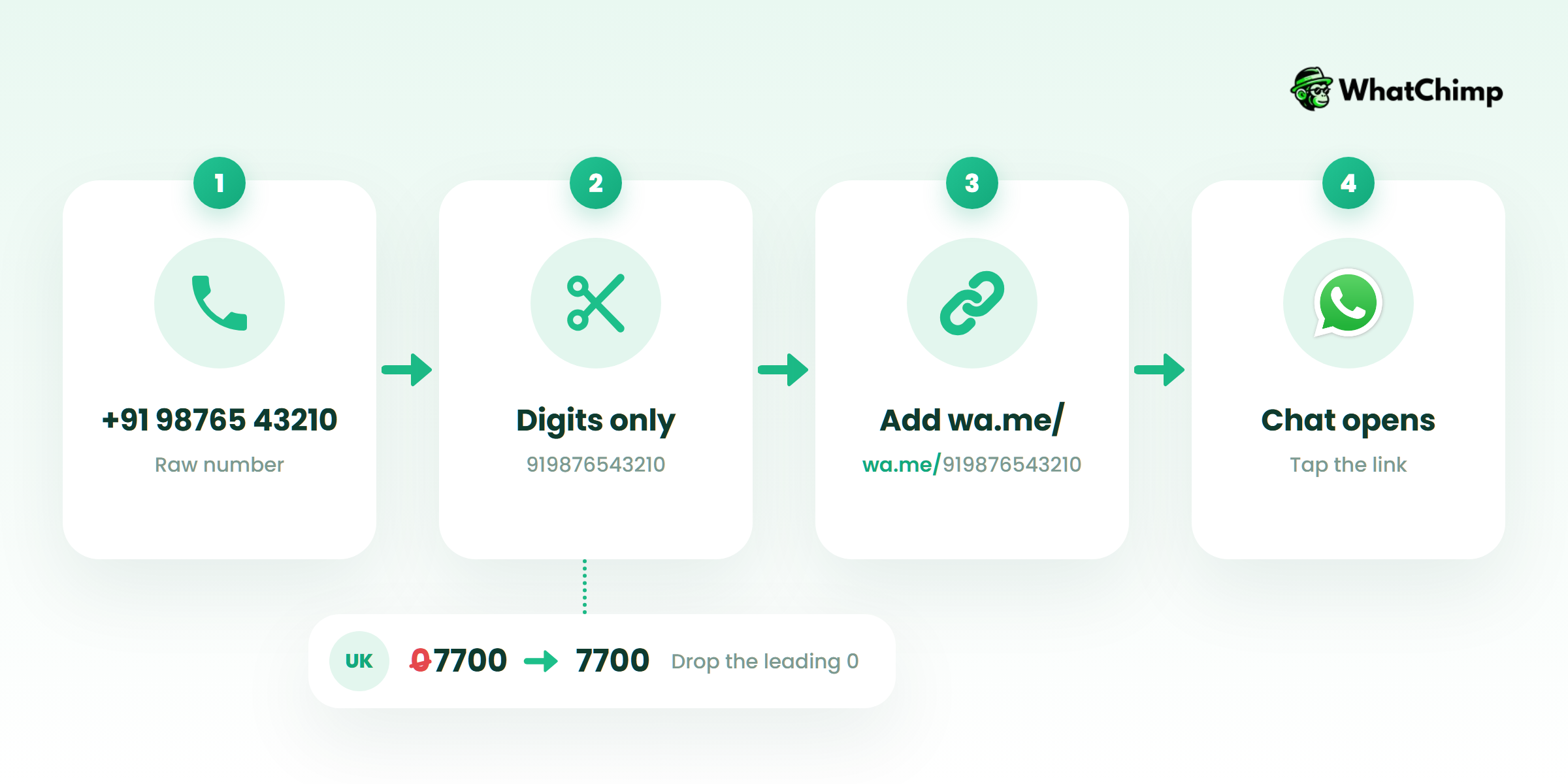
WhatsApp’s rule is simple: use https://wa.me/ followed by “a full phone number in international format. Omit any zeroes, brackets, or dashes” (WhatsApp Help Center).
So: country code, then the number. No plus sign, no spaces, no leading zero.
| Country | Number as you’d write it | Correct wa.me link |
|---|---|---|
| India (+91) | 98765 43210 | wa.me/919876543210 |
| US (+1) | (415) 555-0123 | wa.me/14155550123 |
| UK (+44) | 07700 900123 | wa.me/447700900123 |
| UAE (+971) | 050 123 4567 | wa.me/971501234567 |
See the UK and UAE rows? The leading 0 disappears once the country code goes in front.
This is the MOST common reason a wa.me link fails.
Add a prefilled message with ?text=
Want the chat to open with your message already typed? Easy. Add ?text= to the end of the link, then your message. Write each space as %20.
For example: wa.me/919876543210?text=Hi%2C%20is%20the%20cycle%20still%20available%3F
That opens the chat with “Hi, is the cycle still available?” waiting in the box. You just hit send.
There’s a second version too. A link with only a message and no number, wa.me/?text=yourmessage, shows “a list of contacts you can send your message to” (WhatsApp Help Center). That’s how you send a WhatsApp message without number in the link at all, handy for sharing one message with whoever you pick.
Example in action: Ravi is flat hunting and finds a 2BHK listing with only a phone number on it.
Instead of: “Hi”
Use: “Hi, I’m Ravi. Is the 2BHK in Indiranagar still available? I can visit this Saturday.”
The owner knows exactly who you are and why you’re writing. Strangers ignore a lonely “Hi”. They answer a clear question.
Turn the link into a QR code
Shop owners, this one’s for you.
Paste your wa.me link into any QR code generator. Print it on your counter, your bill or your delivery bag. A customer scans it, WhatsApp opens your shop’s chat, and they message you first. You never had to save their number.
How to WhatsApp without saving number on Android
Android gives you a few extra shortcuts on top of the two methods above.
Tap a number inside any chat
Got a number inside a WhatsApp chat? You don’t need to copy it anywhere.
- Just tap the number in the message.
- Choose Chat with +91 XXXXX XXXXX.
- The chat opens. Done.
A lot of Android phones have another shortcut. Long-press a number in an SMS or on a web page, and WhatsApp shows up in the text-selection menu.
From a WhatsApp group
Someone in your society group or class group posted something and you want to reply privately?
- Open the group and tap their message or name.
- Tap Message +91 XXXXX XXXXX.
- A private chat opens, unsaved.
The Message Yourself trick
Got a number from somewhere else, like an email or a sticky note?
- Open your own chat (it’s at the top of New chat, labelled “Message yourself”).
- Paste or type the number, with country code, and send it to yourself.
- Tap that number in the message, then choose Chat with.
It sounds silly. It works brilliantly.
What about Google Assistant?
Sure, you can ask Assistant to send a WhatsApp message. In my experience, though, it’s built around saved contacts. For an unsaved number, the wa.me link or new chat search is quicker and more reliable.
How to send message on WhatsApp without saving number on iPhone
Good news: wa.me works on iPhone exactly the same way.
Safari plus wa.me
- Open Safari.
- Type wa.me/ and the number in international format.
- Tap Open when Safari asks to open WhatsApp.
The new chat search from Method 1 works on iPhone too, and so do the group and Message Yourself tricks.
Shortcuts app (build your own)
You can build a Shortcut in Apple’s Shortcuts app that asks for a number and opens the wa.me link for you.
Pro tip: Build it yourself rather than downloading a shared shortcut from some random website. A shortcut can do a lot on your phone, and you can’t easily tell what a stranger’s one really does.
On WhatsApp Web and the desktop app
Working from a laptop all day? You don’t need your phone in hand.
WhatsApp Web direct link
Type this into your browser while you’re logged in to WhatsApp Web:
web.whatsapp.com/send?phone=919876543210
It opens the chat right inside WhatsApp Web. The format rules don’t change: country code, no plus, no spaces. Test it once with your own number before you rely on it. WhatsApp doesn’t document this URL on its help page the way it does wa.me.
Desktop app on Windows or Mac
Paste a wa.me link into any browser on your computer. It offers to open the chat in the WhatsApp desktop app if you have it installed, or in WhatsApp Web if you don’t.
Which method should you use?
Here’s how I’d choose, depending on what you’re doing.
| Method | Android | iPhone | Web | Desktop | Prefilled message | Best for |
|---|---|---|---|---|---|---|
| New chat search | ✅ | ✅ | No | No | No | One quick message from your phone |
| wa.me link | ✅ | ✅ | ✅ | ✅ | ✅ | Any device, sharing, QR codes |
| Tap number in chat | ✅ | ✅ | No | No | No | Numbers someone sent you |
| Group message option | ✅ | ✅ | No | No | No | Replying privately to a group member |
| Message Yourself | ✅ | ✅ | No | No | No | Numbers from email or paper |
| web.whatsapp.com/send | No | No | ✅ | ✅ | No | Working on a laptop |
One-off message on the phone? Use new chat search.
Recurring, on a laptop, or you want to share a link? Use wa.me.
Messaging dozens of customers every day? Keep reading, because none of these tricks are built for that.
What messaging an unsaved number is NOT
You’ll hear a few myths about this. Let me clear them up.
- ❌ It doesn’t hide your number. They’ll see it, plus your profile photo and name, depending on your privacy settings.
- ❌ It does not need a paid app or a “WhatsApp Mod” APK. Every method above uses WhatsApp itself.
- ❌ It does not make bulk messaging allowed. Sending to 500 people who never asked to hear from you is still spam, whether you saved them or not.
- ✅ It is free, apart from your normal internet data.
- ✅ It works with attachments. Once the chat is open, it’s a normal chat.
About third-party apps: some are fine, and the honest ones say so plainly. But apps that ask for your contacts, your SMS or accessibility permissions just to open a chat are asking for far more than they need. Since WhatsApp’s own methods now cover this, I’d skip them.
And please, never install a modified WhatsApp. That’s a quick way to get your account banned.

Messaging many customers without saving numbers (the business way)
Now the part no other guide on this topic tells you.
Running a store, a clinic or a D2C brand? You might be thinking: “Can’t I just use wa.me links for all my customers?”
Technically, yes. Practically? No. Here’s why:

1. Bulk messages from a personal number break WhatsApp’s rules
WhatsApp’s Business Messaging Policy says you may only contact people if “(a) they have given you their mobile phone number or username; and (b) you have received opt-in permission from the recipient confirming that they wish to receive subsequent messages or calls from you” (WhatsApp Business Messaging Policy).
Copy-pasting the same offer to 300 numbers from your phone, with no opt-in, is exactly what gets numbers reported and restricted.
2. The official API starts you at 250 people a day and grows with good behaviour
There’s a cap on the official WhatsApp Business API. A new business portfolio can message 250 unique people per 24 hours outside a customer conversation. Keep your quality high and that limit climbs: 2,000, then 10,000, then 100,000, then unlimited (Meta messaging limits). Want 2,000 from day one? Verifying your business is one way to get there.
So you start small, prove people want your messages, and scale.
3. You pay per delivered message, and replies inside 24 hours are cheaper or free
Since July 1, 2025, Meta charges per message, only when it’s delivered, and messages customers send you aren’t charged (Meta pricing). Business-started messages must use approved templates (Marketing, Utility or Authentication). Inside the 24-hour window after a customer writes to you, you can reply freely, and Meta’s pricing page lists a free tier of 1,000 service messages a month per business number.
Better still, when someone taps a click-to-WhatsApp ad, that conversation can stay free for up to 7 days, per the same Meta page. Many blogs still say 72 hours. That’s out of date.
4. Nobody on your team saves a single customer number
This is where it clicks for most shop owners.
With WhatChimp, which is built on the official WhatsApp Business API, your customers’ numbers live in your dashboard, not on a staff member’s phone. When Neha from your team leaves, the customer chats don’t leave with her.
Example in action: Priya runs a home bakery. She gets 40 new orders a week from Instagram, and she used to save every single number on her phone. Not anymore. Now customers tap her wa.me link or QR code, an AI chatbot answers “What are today’s flavours?”, and her two helpers reply from the same number through the shared team inbox in their browsers.
When Diwali comes around, she sends an approved template to customers who opted in, using bulk WhatsApp broadcasts.
Instead of: forwarding “DIWALI OFFER!!! 20% OFF” to every number in her phone.
Use: “Hi Ankit, your favourite chocolate walnut cake is back for Diwali. Want me to keep one aside for the 30th?”
The second one gets replies. The first one gets reported.
A few things worth knowing about WhatChimp:
| What | Detail |
|---|---|
| Built on | The official WhatsApp Business API, as a Meta Business Partner |
| Meta fees | Passed on at cost with 0% markup |
| Template approvals | About 10 seconds |
| Getting started | 7-day free trial, no credit card required |
| Used by | Businesses in 90+ countries |
If you’re messaging new customers every day, try it on the free trial with one real campaign. Plans and current prices are on the pricing page.
Common mistakes and the “invalid number” fix
Seeing “phone number shared via URL is invalid”? It means one of two things: the number is formatted wrong, or it isn’t on WhatsApp.
Run through this list:
- ❌ Leaving the plus sign in: wa.me/+919876543210
- ❌ Not dropping the leading zero: wa.me/4407700900123
- ❌ Leaving in spaces, brackets or dashes: wa.me/91 98765-43210
- ❌ Skipping the country code: wa.me/9876543210
- ✅ Correct: wa.me/919876543210
Format’s perfect and it still won’t open? Then that person isn’t on WhatsApp with that number.
One more mistake: sending a blank “Hi” to a stranger. They don’t have your name saved either. Say who you are in the first line.
Conclusion
You now know six ways to message someone without saving them: new chat search, wa.me links, tapping a number in a chat, groups, Message Yourself and the WhatsApp Web link.
You know the format rule that fixes most errors: country code first, no plus, no zero, no spaces.
And you know where the line is. One message to a plumber is fine. Hundreds of unsolicited messages from your phone is not.
If you’re a business that messages new customers every day, the step to take today is to put your wa.me link or QR code where customers can see it, and let them come to you on the official API through WhatChimp, so nobody on your team ever has to save a number again.
So, how many “Customer 47” contacts are sitting in your phone right now?
FAQs
Can I send WhatsApp without saving number for free?
Yes, it’s completely free. WhatsApp’s new chat search, wa.me links and the WhatsApp Web link cost nothing beyond your normal internet data. You don’t need any paid app.
Will the person see my number when I message them?
Yes, they do. They’ll see your number, and your name and profile photo depending on your privacy settings. These methods save you from adding contacts, they don’t make you anonymous.
Does the wa.me link work on iPhone?
Yes, same as Android. Open Safari, type wa.me/ and then the number in international format, and tap Open when it asks. Or skip Safari and use the new chat search inside WhatsApp.
Can I send photos or files to an unsaved number?
Yes. Once the chat’s open, it’s just a normal WhatsApp chat. Send photos, documents, voice notes and your location, same as you would with any saved contact.
Can I message someone from a group without saving their number?
Yes. Open the group and tap the person’s message or name. Choose Message followed by their number. That’s it: a private chat opens, and nothing gets added to your contacts.
Can I send bulk or promotional WhatsApp messages without saving numbers?
Yes, but only the right way. WhatsApp requires opt-in before a business messages someone, and business-started messages must use approved templates. Here’s the difference:
- ❌ Pasting one offer into hundreds of chats from your personal WhatsApp
- ✅ Sending approved templates to opted-in customers through the official WhatsApp Business API
Why does my wa.me link say the number is invalid?
It’s almost always the format. Strip out the plus sign, spaces, dashes, brackets and any leading zero. Then check the country code sits at the start, like wa.me/919876543210. Still failing? That number isn’t on WhatsApp.