
Skip to content
WhatChimp
    • Basic plansFor small businesses starting on the official WhatsApp API
    • Enterprise plansFor large teams: higher limits and premium support
    0%
    markup on Meta ratesYou pay Meta's price for every message. Nothing on top.See plans
    Compare all plansTalk to sales
  • Messaging

    • Bulk WhatsApp BroadcastReach your whole list in one send
    • Click to WhatsApp AdsAds that open a WhatsApp conversation
    • Omnichannel InboxWhatsApp, Instagram and Facebook in one inbox
    • Shared InboxOne inbox for the whole team

    Automation

    • WhatsApp ChatbotAutomate replies around the clock
    • AI AgentAn AI agent that knows your business
    • Appointment BookingLet customers book on WhatsApp

    Commerce

    • WhatsApp CatalogShow your products inside WhatsApp
    • WhatsApp PaymentsTake payments inside the chat
    • WhatsApp FormsCollect answers with forms in the chat
    See WhatChimp in actionA short walkthrough of the whole platform.Watch demo
    Talk to sales
  • Teams

    • WhatChimp for MarketingLaunch campaigns and reach your audience
    • WhatChimp for SalesTrack and close more WhatsApp leads
    • WhatChimp for SupportAnswer customers and solve questions quickly

    Industries

    • Marketing agenciesRun WhatsApp for every client
    • EducationAdmissions, reminders and updates
    • HealthcareBookings and patient follow-ups
    • E-commerceRecover carts and confirm orders
    • Agency partner programPartner pricing, features and support for agencies
    • Become an affiliateEarn commission on every sale you refer
    • ZapierConnect thousands of apps
    • MakeBuild visual workflows
    • n8nWorkflows you host yourself
    • ShopifyAutomate your store's messages
    • WooCommerceOrder updates and cart recovery
    • WhatsApp CommerceSell inside the conversation
    • Google SheetsSync contacts with a sheet
    • PabblyAutomate data between apps
    • APIConnect your own applications
    View all integrations
    • OnboardingSet up WhatChimp step by step
    • Help docsSetup guides and best practices
    • Tutorial videosStep-by-step video guides
    • WhatsApp supportTalk to us on WhatsApp
    • Raise a ticketGet a technical issue resolved
    • Download invoicesInvoices for your subscription
    • FAQQuick answers to common questions
    Book your onboarding callA one-on-one setup session with our team.Go to onboarding
  • Log in
Watch demoSign up
Log inWatch demoSign up

Overview

3
  • WhatChimp Overview
  • Pricing Explained
  • WhatChimp Pricing Benefits (No Markup on WhatsApp API)

Setup & Configuration

6
  • How to Migrate from WhatsApp App to WhatChimp Business Account (WhatsApp Business API)
  • How to Connect Your Phone Number with WhatChimp (Embedded Signup)
  • How to Migrate from WhatsApp App to WhatChimp Business Account (WhatsApp Business API)
  • How to Add Payment Method for WhatsApp API Billing
  • How to Verify Your Meta Business Manager
  • How to Change Your Display Picture, Description, Website, and More on WhatsApp Cloud API

WhatsApp Business API

7
  • What is WhatsApp Business API?
  • Business Manager, WhatsApp Accounts, and Phone Numbers Explained
  • WhatsApp Messaging Limits
  • How to Apply for the WhatsApp Green Tick?
  • Handy Links for WhatsApp Business API Settings
  • How to Delete Your Phone Number on Meta
  • My WhatsApp Business Verification Request Was Rejected

Live Chat

2
  • Customer Chat Handover via Join Chat & Signature Message
  • How to Handle WhatsApp Conversations with the Live Chat Dashboard 

Subscriber Manager

4
  • How to Import Subscribers Manually inside WhatChimp
  • How to Integrate Google Sheets and Import Contacts into Whatchimp
  • How to Import Subscribers Using CSV
  • How to Manage Custom Fields and Labels

Message Template

14
  • Understanding WhatsApp Quality Rating with Whatchimp
  • Understanding WhatsApp Messaging Tiers in Whatchimp
  •  How to Upgrade WhatsApp Messaging Tiers with Whatchimp
  • Understanding WhatsApp Quality Rating in Whatchimp
  • Guidelines for Utility and Marketing Templates in Whatchimp
  • Understanding Conversations and Their Types in Whatchimp
  • Type of Messages
  • Character Limits for Media Message Templates
  • Top Reasons Why Templates Get Rejected
  • Understanding Template Rejections & How to Fix Them
  • Templates to Restart Conversations After Non-Working Hours
  • Creating a WhatsApp Message Template in WhatChimp 
  • How to Create Message Template in WhatsApp Manager and Sync to WhatChimp
  • How to Create and Use Carousel Media Templates in WhatChimp

Broadcasting

5
  • Understanding WhatsApp Broadcast Limits with Whatchimp
  • WhatsApp Broadcasting Rules with Whatchimp
  • WhatsApp’s 24-Hour Rule: What You Need to Know
  • WhatsApp Broadcasting with Personalized Variable Data
  • Broadcasting – How to Send Bulk Messages on WhatsApp without Getting Banned

Bot Manager

11
  • How to Build Automatic Follow-Up Chatbots on WhatsApp
  • How to Collect User Details Without Forms on WhatsApp
  • How to Add Clickable CTA Buttons in WhatChimp
  • How to Integrate a Website Chatbot Into Your WordPress Website
  • How to Create a Keyword-Based WhatsApp Chatbot in WhatChimp
  • How to set up sales sequence chatbot?
  • How to Automate Complex Conversations with User Input Flow in Webchat
  • External HTTP API Integration in Bot Flow
  • How to Use Dynamic Lists in WhatChimp
  • WhatsApp Flow Forms in Whatchimp
  • WhatsApp No Match Reply & Frequency Setup

Webhook Workflow

1
  • Send Shopify Order Notifications to WhatsApp via Webhook Workflow

E-Commerce Catalog

1
  • Selling Products on WhatsApp with WhatChimp’s Catalog Integration

AI Integration

1
  • Train AI Assistant for Chatbot With FAQ, URL & File

APIs and Webhooks

1
  • How to Create WordPress Users via HTTP API in Whatchimp

Integrations

3
  • How to Send Automated WhatsApp Messages on WP Form Submission
  • Using Google Sheet Data in WhatsApp and Other Chatbot Replies with WhatChimp
  • How to Connect Zapier with WhatChimp to Send Collected Data in WhatsApp

Account Settings

1
  • How to Create a Facebook Business Manager Account for Whatchimp

FAQs and Troubleshooting

8
  • Understanding Template Rejections & How to Fix Them
  • Top Reasons Why Templates Get Rejected
  • What if the Facebook “Start Verification” Button is Greyed Out or Not Visible?
  • Understanding Meta’s Frequency Capping for WhatsApp Marketing
  • Blocking Spam Messages in Whatchimp
  • Troubleshooting the Facebook “Start Verification” Button in Whatchimp
  • Common Error Codes and solutions
  • Why Your Messages Aren’t Sending & How to Fix It
View Categories
  • Home
  • Docs
  • WhatsApp Business API
  • Business Manager, WhatsApp Accounts, and Phone Numbers Explained

Business Manager, WhatsApp Accounts, and Phone Numbers Explained

Anant Gupta
Updated on 16 September 2024

5 min read

For businesses using the WhatsApp Business API, it’s essential to understand the structure of Meta Business Manager, WhatsApp Business Accounts (WABA), and Phone Numbers. Each of these elements plays a key role in managing your business’s communication with customers through WhatsApp.

When setting up your WhatsApp Business API, it’s helpful to understand how the system is structured:

1. Meta Business Manager: This is the central hub where all your business assets are managed, including WhatsApp Business Accounts, phone numbers, and user roles. It allows you to control who has access to what in your business.

2. WhatsApp Business Accounts (WABA): This account links your business to the WhatsApp API. You can have multiple WhatsApp Business Accounts under your Meta Business Manager, each connected to different phone numbers and messaging templates.

3. Phone Numbers: Each WhatsApp Business Account can register up to 25 phone numbers (for verified businesses). These numbers are used for customer communication, and each phone number is dedicated to either the WhatsApp API or WhatsApp Business App, but not both.

Let’s break down the structure to help you understand how they work together:

Business Manager #

Meta Business Manager acts as the central platform where all your business’s digital assets are managed. This includes Facebook Pages, Instagram accounts, ad accounts, and most importantly for this guide, WhatsApp Business Accounts. Here, you manage permissions, assign roles, and connect various business tools.
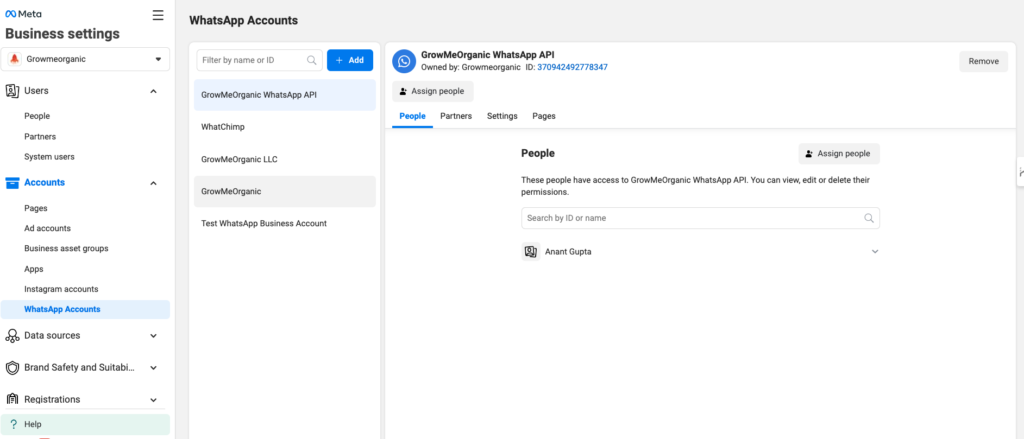
Key Points #

• Business Verification: Before fully utilizing the WhatsApp Business API, your business must be verified within Business Manager.

• Multiple Assets Management: You can manage various assets like Facebook and Instagram accounts, WhatsApp Business accounts, and phone numbers all in one place.

• Assigning Roles and Permissions: You can assign roles (such as admin, editor, or viewer) to team members to control access to different parts of your business assets.

WhatsApp Business Accounts (WABA) #

A WhatsApp Business Account (WABA) is where your business’s communication via WhatsApp takes place. Each WhatsApp Business Account can manage multiple phone numbers, allowing you to run different departments, services, or locations through separate numbers.
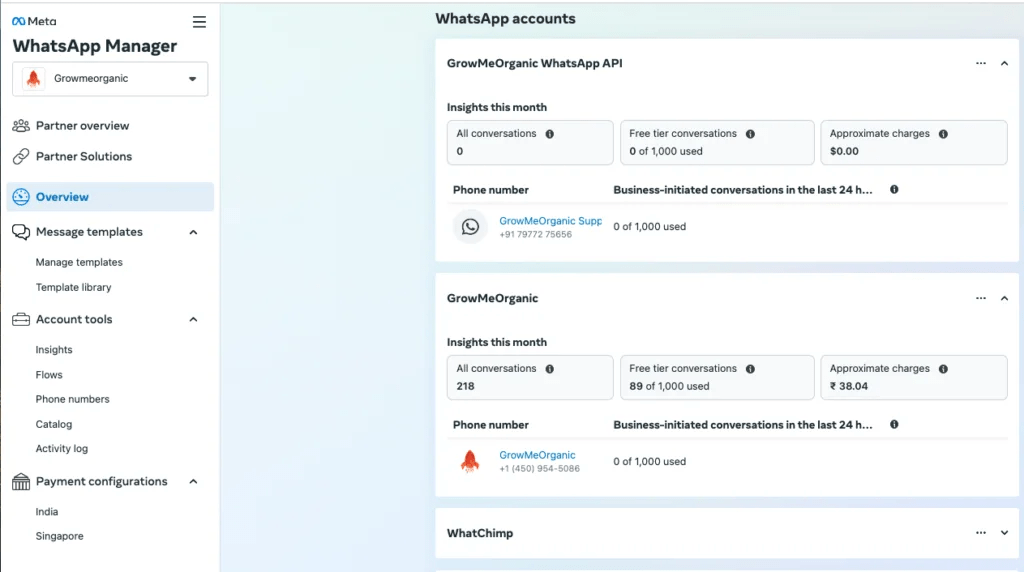
Key Points #

• Types of WhatsApp Business Accounts:

  • Business Account: This is the default account type when you register with WhatsApp Business API. It shows your phone number in most views unless the customer saves your contact.
  • Official Business Account (OBA): If your business qualifies, you can apply for this status. OBAs show your business name in all WhatsApp views and include a green verification badge, boosting trust and credibility.

• Phone Numbers Limit: A verified WhatsApp Business Account can have up to 25 phone numbers. However, if your business is not verified, you are limited to using just one phone number.

• Message Templates: WhatsApp Business Accounts can store up to 250 message templates, which are essential for sending automated or pre-approved messages like notifications, reminders, and alerts.

Phone Numbers #

Phone numbers are an essential part of your WhatsApp Business Account. These numbers are used to send and receive messages through the WhatsApp Business API. Managing phone numbers effectively is crucial for running WhatsApp-based customer service or marketing operations.
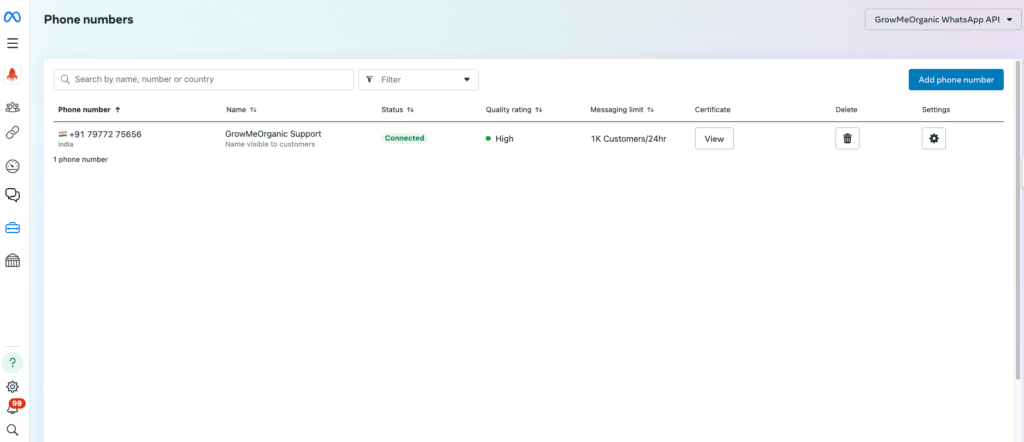
Key Points #

• Single Use Only: A phone number can either be used for the WhatsApp Business API or the WhatsApp Business App, but not both. Once you link a number to the API, you cannot use it for the standard WhatsApp Business App.

• Verified Phone Numbers: All phone numbers must be verified through Meta Business Manager before they can be used to send or receive messages through the WhatsApp Business API.

• Managing Multiple Numbers: Once your account is verified, you can connect up to 25 phone numbers under one WhatsApp Business Account. This is useful for managing different departments, services, or even multiple businesses within the same account.

Official Business Account vs. Business Account #

Let’s differentiate between the two main types of WhatsApp Business Accounts:

Business Account #

• Every business that signs up for the WhatsApp Business API starts with this type of account.

• In most views, users will see your phone number instead of your business name, unless they have saved your contact.

• You can still fill out your business profile with key details like your business name, description, website, and hours of operation.

Official Business Account (OBA) #

• This account type is reserved for notable and verified businesses that have met WhatsApp’s criteria, including being widely recognized.

• OBAs display the business name in all views, even if the user hasn’t saved the contact, and include a green verification badge.

• Achieving OBA status requires business verification through Meta Business Manager and applying for the green tick verification.

How to Increase Phone Numbers in WhatsApp Business Account #

While by default, each WhatsApp Business Account can have up to 25 phone numbers, businesses can request to increase this limit by contacting Meta’s support if they have specific needs.

Key Limitations to Keep in Mind #

• Unverified Accounts: If your business account is unverified, you are limited to using only one phone number with the WhatsApp Business API.

• Unique Phone Number Use: A phone number linked to the WhatsApp Business API cannot be used on the WhatsApp Business App or WhatsApp Messenger at the same time.

• No Multi-Business Managers: A WhatsApp Business Account can only belong to one Business Manager. You cannot share the same account across multiple Business Managers.

• Cannot Migrate Accounts: You cannot migrate a WhatsApp Business Account from one business to another.

Conclusion #

In summary, the structure of Meta Business Manager, WhatsApp Business Accounts, and Phone Numbers is key to successfully managing customer communication on WhatsApp. By understanding how these elements work together, small businesses can better manage their WhatsApp messaging efforts.

For businesses looking to expand, verifying your Meta Business Account is crucial, as it allows for more flexibility, including the ability to connect multiple phone numbers and improve customer communication at scale.

What is WhatsApp Business API?WhatsApp Messaging Limits

Leave a Reply Cancel reply

Your email address will not be published. Required fields are marked *

Table of Contents
  • Business Manager
    • Key Points
  • WhatsApp Business Accounts (WABA)
    • Key Points
  • Phone Numbers
    • Key Points
  • Official Business Account vs. Business Account
    • Business Account
    • Official Business Account (OBA)
  • How to Increase Phone Numbers in WhatsApp Business Account
    • Key Limitations to Keep in Mind
  • Conclusion

Share This Article :

  • Facebook
  • X
  • LinkedIn
  • Pinterest

Was it helpful ?

  • Happy
  • Normal
  • Sad
WhatChimp

#1 Official WhatsApp Marketing Platform (Meta Business Partner)

Meta Business Partner
4.8 on Trustpilot, 242 reviews
sales@whatchimp.com+1 (555) 750-6003

Features

  • AI Agents
  • Omnichannel: FB & Insta
  • Bulk Broadcasting
  • Shared Inbox
  • Smart Chatbots
  • Catalog
  • Appointment Booking
  • Native Forms
  • Payments
  • CTWA Ads
  • Coexistence
  • Multi WhatsApp Numbers
  • All features

Integrations

  • API
  • Google Sheets
  • Zapier
  • Pabbly
  • Make
  • n8n
  • WhatsApp Commerce
  • WooCommerce
  • Shopify
  • View all integrations

Platform

  • WhatsApp Business API
  • WhatsApp marketing software

Solutions

  • For Marketing
  • For Sales
  • For Support

Partner

  • Agency Partnership
  • Become an Affiliate

Help and resources

  • Login
  • Watch Demo
  • Documentation
  • Blog
  • Onboarding
  • Tutorial Videos
  • Support
  • Invoices

Company

  • About us
  • Pricing
  • Meta Partner Directory
  • FAQ
  • Contact us

Compare

  • Wati alternative
  • AiSensy alternative
  • Interakt alternative
  • Gallabox alternative
  • DoubleTick alternative
  • Zoko alternative
  • Gupshup alternative
  • WANotifier alternative
  • QuickReply alternative
WhatChimp

© 2019-2026 GrowMeOrganic LLC. All rights reserved.

  • Refund & Cancellation
  • Terms & Conditions
  • Privacy Policy
  • Cookie settings

Free masterclass

How to send 1000s of WhatsApp messages without getting banned

A free masterclass from WhatChimp, for anyone who sells or supports on WhatsApp.

  • Leverage Meta's official WhatsApp API
  • Automate your sales
  • Save 30% on messaging costs

Meta Business PartnerOn the official WhatsApp API

Sign up for the masterclass

Your first name and email are all we need.

Masterclass

Free. No payment details.

Rated 4.8 on Trustpilot from 242 reviews